Description
- Hide multi-day events once they start
- buy me a coffee
#1. Install Code
#1.1. Business Plan/higher
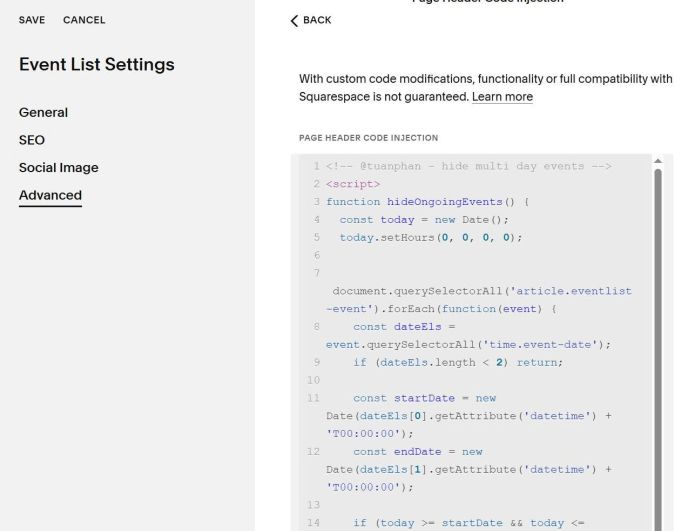
Click Gear icon on Event Page

Next, click Advanced > Page Header Code Injection

Paste this code
<!-- @tuanphan - hide multi day events -->
<script>
function hideOngoingEvents() {
  const today = new Date();
  today.setHours(0, 0, 0, 0);

  document.querySelectorAll('article.eventlist-event').forEach(function(event) {
    const dateEls = event.querySelectorAll('time.event-date');
    if (dateEls.length < 2) return;

    const startDate = new Date(dateEls[0].getAttribute('datetime') + 'T00:00:00');
    const endDate = new Date(dateEls[1].getAttribute('datetime') + 'T00:00:00');

    if (today >= startDate && today <= endDate) {
      event.style.display = 'none';
    }
  });
}

document.addEventListener('DOMContentLoaded', hideOngoingEvents);
window.addEventListener('mercury:load', hideOngoingEvents);
</script>
#1.2. Personal/Basic Plan
First, edit Event Page

Add a blank section

Add a Block
Choose Markdown Block

Paste this code
<script src="https://code.beaverhero.com/event/hidemultiday.js"></script>

#2. Customize
#2.1. If you use Markdown and you want to hide section with Markdown, use this code to Custom CSS
body[class*="type-event"] section:has(.markdown-block) {
    display: none;
}

#2.2. If you want to apply this on Summary Block – Event
#2.2.1. Business/Higher Plan
Use this code to Page Header Injection (page where you use Summary Block)
<!-- @tuanphan - Hide event -->
<script>
function hideOngoingEvents() {
  const today = new Date();
  today.setHours(0, 0, 0, 0);

  document.querySelectorAll('article.eventlist-event').forEach(function(event) {
    const dateEls = event.querySelectorAll('time.event-date');
    if (dateEls.length < 2) return;

    const startDate = new Date(dateEls[0].getAttribute('datetime') + 'T00:00:00');
    const endDate = new Date(dateEls[1].getAttribute('datetime') + 'T00:00:00');

    if (today >= startDate && today <= endDate) {
      event.style.display = 'none';
    }
  });

  document.querySelectorAll('.summary-item').forEach(function(item) {
    const timeEl = item.querySelector('time.summary-metadata-item--date');
    if (!timeEl) return;

    const dateText = timeEl.textContent.trim();
    if (!dateText.includes('–')) return;

    const parts = dateText.split('–').map(s => s.trim());
    if (parts.length < 2) return;

    const startDate = new Date(parts[0]);
    const endDate = new Date(parts[1]);

    if (isNaN(startDate) || isNaN(endDate)) return;

    startDate.setHours(0, 0, 0, 0);
    endDate.setHours(0, 0, 0, 0);

    if (today >= startDate && today <= endDate) {
      item.style.display = 'none';
    }
  });
}

document.addEventListener('DOMContentLoaded', hideOngoingEvents);
window.addEventListener('mercury:load', hideOngoingEvents);
</script>

#2.2.2. Personal/Basic Plan
Add this code to Markdown Block (under Summary Block) if you use Personal/Basic Plan
<script src="https://code.beaverhero.com/event/hidemultiday.js"></script>

Note: It won’t work properly with Summary Wall or Carousel layout