I released new version with more better option. You can check it here.
Description
- loading screen with text or image
- view demo (with text) – pass: abc
- view demo 2 (with logo) – pass: abc
- buy me a coffee
#1. Install Code
#1.1. One Page
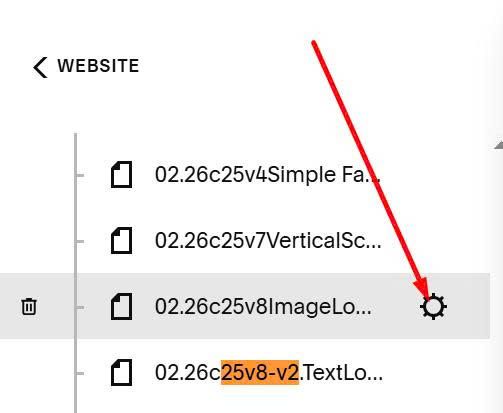
Hover on Page where you want to apply effect > Click Gear icon
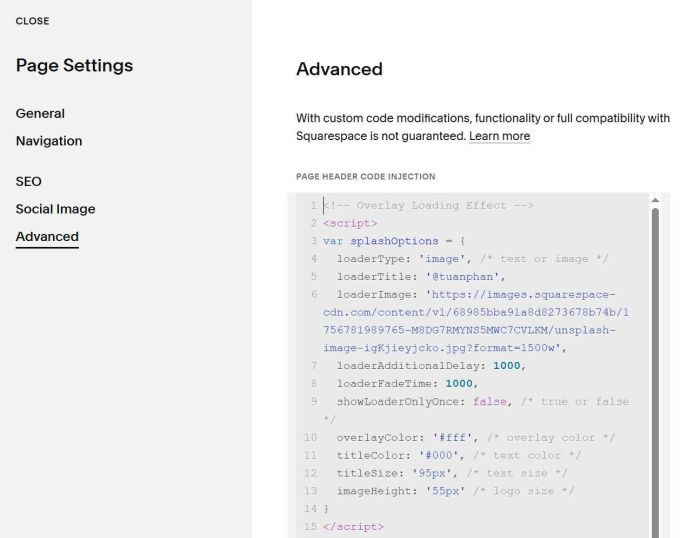
Click Advanced > Paste this code
<!-- Overlay Loading Effect -->
<script>
var splashOptions = {
  loaderType: 'image', /* text or image */
  loaderTitle: '@tuanphan',
  loaderImage: 'https://images.squarespace-cdn.com/content/v1/68985bba91a8d8273678b74b/1756781989765-M8DG7RMYNS5MWC7CVLKM/unsplash-image-igKjieyjcko.jpg?format=1500w',
  loaderAdditionalDelay: 1000,
  loaderFadeTime: 1000,
  showLoaderOnlyOnce: false, /* true or false */
  overlayColor: '#fff', /* overlay color */
  titleColor: '#000', /* text color */
  titleSize: '95px', /* text size */
  imageHeight: '55px' /* logo size */
}
</script>
<style>
#splash-page,body{overflow:hidden}#splash-page{position:fixed;top:0;left:0;width:100%;height:100%;display:flex;justify-content:center;align-items:center;z-index:10000}#splash-page h1{text-align:center;margin:0}#splash-page img{display:block}body.splash-loaded{overflow:auto}
</style>
<script>
!function(){splashOptions.showLoaderOnlyOnce&&"yes"===localStorage.getItem("splashLoaded")?document.write(""):document.write('<div id="splash-page"><div class="splash-branding"></div></div>'),localStorage.setItem("splashLoaded","yes");var e=document.getElementById("splash-page");if(e){e.style.backgroundColor=splashOptions.overlayColor;var s=e.querySelector(".splash-branding");if("image"===splashOptions.loaderType)s.innerHTML='<img src="'+splashOptions.loaderImage+'">',s.querySelector("img").style.maxHeight=splashOptions.imageHeight;else{s.innerHTML="<h1>"+splashOptions.loaderTitle+"</h1>";var a=s.querySelector("h1");a.style.color=splashOptions.titleColor,a.style.fontSize=splashOptions.titleSize}e.style.transition="opacity "+splashOptions.loaderFadeTime+"ms ease",window.addEventListener("load",(function(){setTimeout((function(){e.style.opacity="0",setTimeout((function(){e&&e.parentNode&&(e.parentNode.removeChild(e),document.body.classList.add("splash-loaded"))}),splashOptions.loaderFadeTime)}),splashOptions.loaderAdditionalDelay)}))}}();
</script>
#1.2. All Pages
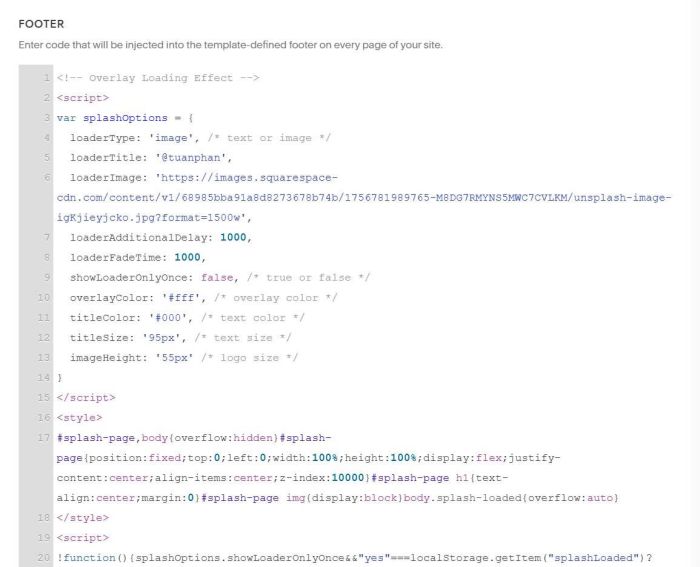
You can add code to Code Injection > Footer
<!-- Overlay Loading Effect -->
<script>
var splashOptions = {
  loaderType: 'image', /* text or image */
  loaderTitle: '@tuanphan',
  loaderImage: 'https://images.squarespace-cdn.com/content/v1/68985bba91a8d8273678b74b/1756781989765-M8DG7RMYNS5MWC7CVLKM/unsplash-image-igKjieyjcko.jpg?format=1500w',
  loaderAdditionalDelay: 1000,
  loaderFadeTime: 1000,
  showLoaderOnlyOnce: false, /* true or false */
  overlayColor: '#fff', /* overlay color */
  titleColor: '#000', /* text color */
  titleSize: '95px', /* text size */
  imageHeight: '55px' /* logo size */
}
</script>
<style>
#splash-page,body{overflow:hidden}#splash-page{position:fixed;top:0;left:0;width:100%;height:100%;display:flex;justify-content:center;align-items:center;z-index:10000}#splash-page h1{text-align:center;margin:0}#splash-page img{display:block}body.splash-loaded{overflow:auto}
</style>
<script>
!function(){splashOptions.showLoaderOnlyOnce&&"yes"===localStorage.getItem("splashLoaded")?document.write(""):document.write('<div id="splash-page"><div class="splash-branding"></div></div>'),localStorage.setItem("splashLoaded","yes");var e=document.getElementById("splash-page");if(e){e.style.backgroundColor=splashOptions.overlayColor;var s=e.querySelector(".splash-branding");if("image"===splashOptions.loaderType)s.innerHTML='<img src="'+splashOptions.loaderImage+'">',s.querySelector("img").style.maxHeight=splashOptions.imageHeight;else{s.innerHTML="<h1>"+splashOptions.loaderTitle+"</h1>";var a=s.querySelector("h1");a.style.color=splashOptions.titleColor,a.style.fontSize=splashOptions.titleSize}e.style.transition="opacity "+splashOptions.loaderFadeTime+"ms ease",window.addEventListener("load",(function(){setTimeout((function(){e.style.opacity="0",setTimeout((function(){e&&e.parentNode&&(e.parentNode.removeChild(e),document.body.classList.add("splash-loaded"))}),splashOptions.loaderFadeTime)}),splashOptions.loaderAdditionalDelay)}))}}();
</script>
#2. Customize
#2.1. If you want to change Logo to Site Title text only, use this new code
<!-- Overlay Loading Effect -->
<script>
var splashOptions = {
  loaderType: 'text', /* text or image */
  loaderTitle: '@tuanphan',
  loaderImage: 'https://images.squarespace-cdn.com/content/v1/68985bba91a8d8273678b74b/1756781989765-M8DG7RMYNS5MWC7CVLKM/unsplash-image-igKjieyjcko.jpg?format=1500w',
  loaderAdditionalDelay: 1000,
  loaderFadeTime: 1000,
  showLoaderOnlyOnce: false, /* true or false */
  overlayColor: '#fff', /* overlay color */
  titleColor: '#000', /* text color */
  titleSize: '95px', /* text size */
  imageHeight: '55px' /* logo size */
}
</script>
<style>
#splash-page,body{overflow:hidden}#splash-page{position:fixed;top:0;left:0;width:100%;height:100%;display:flex;justify-content:center;align-items:center;z-index:10000}#splash-page h1{text-align:center;margin:0}#splash-page img{display:block}body.splash-loaded{overflow:auto}
</style>
<script>
!function(){splashOptions.showLoaderOnlyOnce&&"yes"===localStorage.getItem("splashLoaded")?document.write(""):document.write('<div id="splash-page"><div class="splash-branding"></div></div>'),localStorage.setItem("splashLoaded","yes");var e=document.getElementById("splash-page");if(e){e.style.backgroundColor=splashOptions.overlayColor;var s=e.querySelector(".splash-branding");if("image"===splashOptions.loaderType)s.innerHTML='<img src="'+splashOptions.loaderImage+'">',s.querySelector("img").style.maxHeight=splashOptions.imageHeight;else{s.innerHTML="<h1>"+splashOptions.loaderTitle+"</h1>";var a=s.querySelector("h1");a.style.color=splashOptions.titleColor,a.style.fontSize=splashOptions.titleSize}e.style.transition="opacity "+splashOptions.loaderFadeTime+"ms ease",window.addEventListener("load",(function(){setTimeout((function(){e.style.opacity="0",setTimeout((function(){e&&e.parentNode&&(e.parentNode.removeChild(e),document.body.classList.add("splash-loaded"))}),splashOptions.loaderFadeTime)}),splashOptions.loaderAdditionalDelay)}))}}();
</script>
then change this line
loaderTitle: '@tuanphan',
#2.2. To change Overlay Color, change this line
overlayColor: '#fff', /* overlay color */
#2.3. To change text color/size, change this line
titleColor: '#000', /* text color */
titleSize: '95px', /* text size */
#2.4. To change logo size, change this line
imageHeight: '55px' /* logo size */
#2.5. To show loading once, and disappear forever, change this line
showLoaderOnlyOnce: false, /* true or false */