Description
- pause slideshow full on hover
- view demo – password: abc
- buy me a coffee
#1. Install Code
#1.1. Make sure you use Slideshow Full
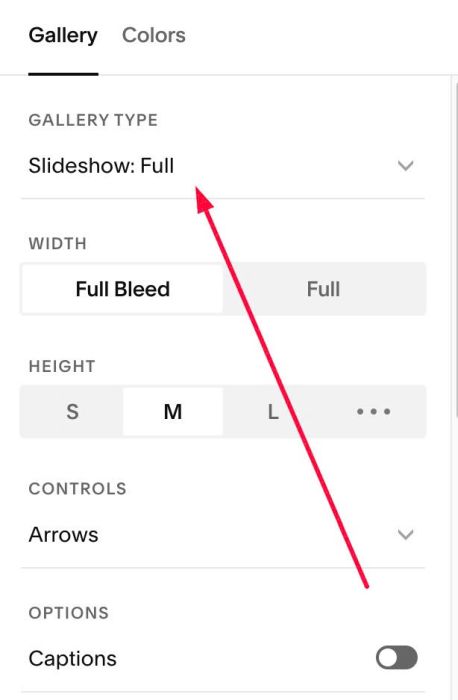
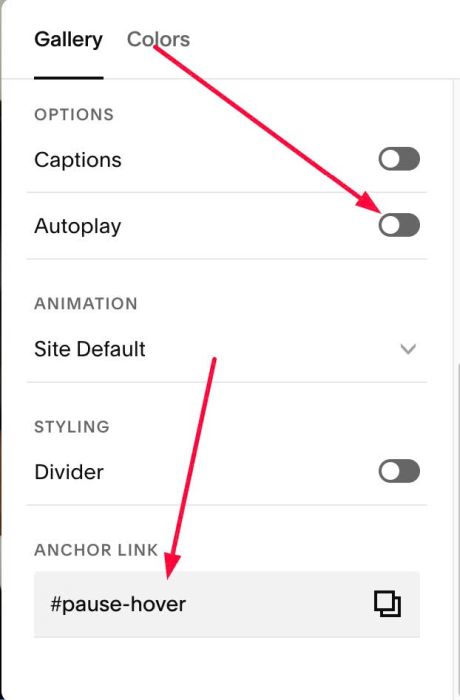
#1.2. Make sure Autoplay is Disabled (we will use code to set autoplay) + at Anchor Link, enter word: pause-hover
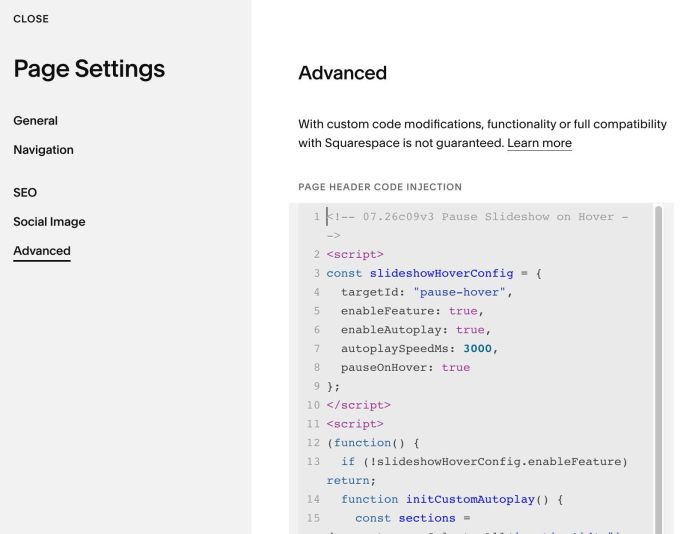
#1.3. Use this code to Page Header Injection (page where you use Slideshow Full)
- if you use Personal/Basic Plan and your plan doesn’t support Injection, see #3.1
<!-- 07.26c09v3 Pause Slideshow on Hover -->
<script>
const slideshowHoverConfig = {
  targetId: "pause-hover",
  enableFeature: true,
  enableAutoplay: true,
  autoplaySpeedMs: 3000,
  pauseOnHover: true
};
</script>
<script>
(function() {
  if (!slideshowHoverConfig.enableFeature) return;
  function initCustomAutoplay() {
    const sections = document.querySelectorAll('section[id*="' + slideshowHoverConfig.targetId + '"]');
    sections.forEach(function(section) {
      if (section.dataset.customSlideshowInit === "true") return;
      section.dataset.customSlideshowInit = "true";
      const nextBtn = section.querySelector('.gallery-fullscreen-slideshow-control-btn[data-next], .gallery-simple-slideshow-control-btn[data-next], button[data-next]');
      if (!nextBtn) return;
      let autoplayTimer;
      function startPlay() {
        if (slideshowHoverConfig.enableAutoplay) {
          clearInterval(autoplayTimer);
          autoplayTimer = setInterval(function() {
            nextBtn.click();
          }, slideshowHoverConfig.autoplaySpeedMs);
        }
      }
      function stopPlay() {
        clearInterval(autoplayTimer);
      }
      startPlay();
      if (slideshowHoverConfig.pauseOnHover) {
        section.addEventListener("mouseenter", stopPlay);
        section.addEventListener("mouseleave", startPlay);
        section.addEventListener("touchstart", stopPlay, {passive: true});
        section.addEventListener("touchend", startPlay, {passive: true});
      }
    });
  }
  document.addEventListener('DOMContentLoaded', initCustomAutoplay);
  window.addEventListener('mercury:load', initCustomAutoplay);
  setTimeout(initCustomAutoplay, 1000);
  setTimeout(initCustomAutoplay, 3000);
})();
</script>
#2. Customize
#2.1. To change autoplay speed, change Line 07
autoplaySpeedMs: 3000,
#3. Other
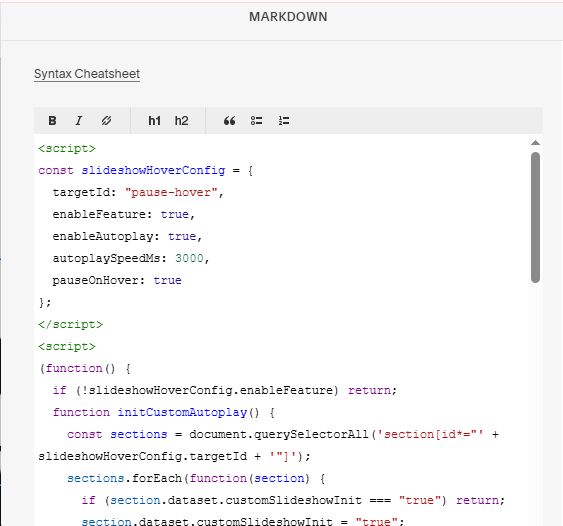
#3.1. If you use Personal/Basic Plan and your plan doesn’t support Injection, you can edit current page (page where you use Slideshow Full) > Add a Block > Choose Markdown

Then add this code into Markdown
<script>
const slideshowHoverConfig = {
  targetId: "pause-hover",
  enableFeature: true,
  enableAutoplay: true,
  autoplaySpeedMs: 3000,
  pauseOnHover: true
};
</script>
<script>
(function() {
  if (!slideshowHoverConfig.enableFeature) return;
  function initCustomAutoplay() {
    const sections = document.querySelectorAll('section[id*="' + slideshowHoverConfig.targetId + '"]');
    sections.forEach(function(section) {
      if (section.dataset.customSlideshowInit === "true") return;
      section.dataset.customSlideshowInit = "true";
      const nextBtn = section.querySelector('.gallery-fullscreen-slideshow-control-btn[data-next], .gallery-simple-slideshow-control-btn[data-next], button[data-next]');
      if (!nextBtn) return;
      let autoplayTimer;
      function startPlay() {
        if (slideshowHoverConfig.enableAutoplay) {
          clearInterval(autoplayTimer);
          autoplayTimer = setInterval(function() {
            nextBtn.click();
          }, slideshowHoverConfig.autoplaySpeedMs);
        }
      }
      function stopPlay() {
        clearInterval(autoplayTimer);
      }
      startPlay();
      if (slideshowHoverConfig.pauseOnHover) {
        section.addEventListener("mouseenter", stopPlay);
        section.addEventListener("mouseleave", startPlay);
        section.addEventListener("touchstart", stopPlay, {passive: true});
        section.addEventListener("touchend", startPlay, {passive: true});
      }
    });
  }
  document.addEventListener('DOMContentLoaded', initCustomAutoplay);
  window.addEventListener('mercury:load', initCustomAutoplay);
  setTimeout(initCustomAutoplay, 1000);
  setTimeout(initCustomAutoplay, 3000);
})();
</script>