Description
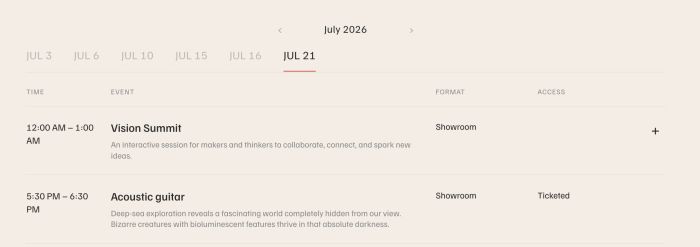
- adding custom filter for Event Calendar Block
- view demo – password: abc
- buy me a coffee
#1. Install Code
#1.1. Make sure you added Event Calendar Block and connect with an Event Page

#1.2. Click Gear icon on Event Page (or Page where you use Calendar Block)

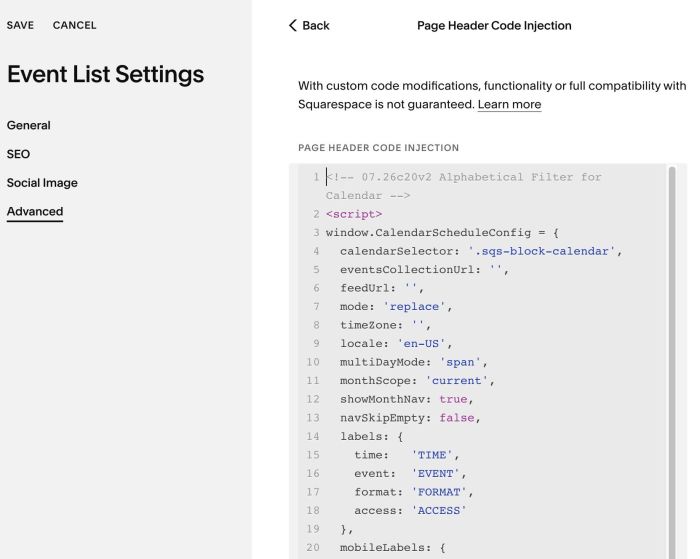
#1.3. Click Advanced > Page Header Code Injection > Paste code to right box
- If you use Personal/Basic Plan and your plan doesn’t support Injection, see #3.1.
<!-- 07.26c20v2 Alphabetical Filter for Calendar -->
<script>
window.CalendarScheduleConfig = {
  calendarSelector: '.sqs-block-calendar',
  eventsCollectionUrl: '',
  feedUrl: '',
  mode: 'replace',
  timeZone: '',
  locale: 'en-US',
  multiDayMode: 'span',
  monthScope: 'current',
  showMonthNav: true,
  navSkipEmpty: false,
  labels: {
    time:   'TIME',
    event:  'EVENT',
    format: 'FORMAT',
    access: 'ACCESS'
  },
  mobileLabels: {
    time:   'Time',
    format: 'Format',
    access: 'Access'
  },
  showExcerpt: true,
  showExpand:  true,
  emptyText:   'No events to show.',
  accentColor:      '#e07a72',
  textColor:        '#2b2b2b',
  mutedColor:       '#8a8a8a',
  lineColor:        '#e2e0da',
  tabInactiveColor: '#bdbbb5',
  maxWidth:         1100
};
</script>
<script src="https://code.beaverhero.com/event/0726c20v2alphabeticalfiltercalendar.js"></script>
#1.4. Note
- Column “Format” will get Categories
- Column “Access” will get Tags
- Expand text when click “+” icon will get Event Description
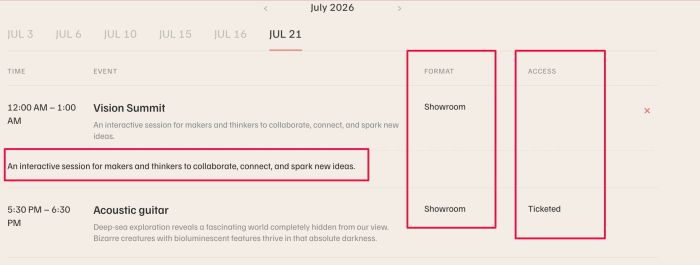
Text under Event Title = Event Excerpt

#2. Customize
#2.1. To change Column label text, change line 14 to line 24
labels: {
  time:   'TIME',
  event:  'EVENT',
  format: 'FORMAT',
  access: 'ACCESS'
},
mobileLabels: {
  time:   'Time',
  format: 'Format',
  access: 'Access'
},
#2.2. Other style (line 27 to line 33)
emptyText:   'No events to show.',
accentColor:      '#e07a72',
textColor:        '#2b2b2b',
mutedColor:       '#8a8a8a',
lineColor:        '#e2e0da',
tabInactiveColor: '#bdbbb5',
#3. Other
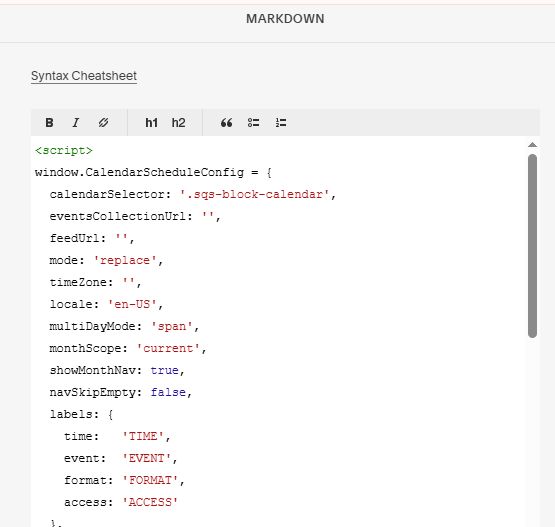
3.1. If you use Personal/Basic Plan and your plan doesn’t support Injection, you can add a Markdown Block under Calendar Block

Then add this code into Markdown
<script>
window.CalendarScheduleConfig = {
  calendarSelector: '.sqs-block-calendar',
  eventsCollectionUrl: '',
  feedUrl: '',
  mode: 'replace',
  timeZone: '',
  locale: 'en-US',
  multiDayMode: 'span',
  monthScope: 'current',
  showMonthNav: true,
  navSkipEmpty: false,
  labels: {
    time:   'TIME',
    event:  'EVENT',
    format: 'FORMAT',
    access: 'ACCESS'
  },
  mobileLabels: {
    time:   'Time',
    format: 'Format',
    access: 'Access'
  },
  showExcerpt: true,
  showExpand:  true,
  emptyText:   'No events to show.',
  accentColor:      '#e07a72',
  textColor:        '#2b2b2b',
  mutedColor:       '#8a8a8a',
  lineColor:        '#e2e0da',
  tabInactiveColor: '#bdbbb5',
  maxWidth:         1100
};
</script>
<script src="https://code.beaverhero.com/event/0726c20v2alphabeticalfiltercalendar.js"></script>