Description
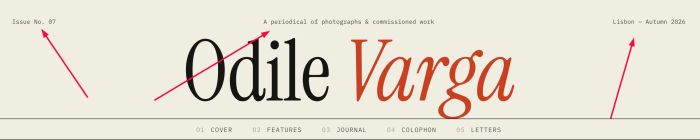
- adding text to 3 corners of header: top left – middle center – top right
- view demo – password: abc
- buy me a coffee
#1. Install Code
#1.1. Use this code to Code Injection > Footer
<!-- 10.26c19v9 Header 189 Style 01: Top Text - Middle Text - Right Text -->
<script>
window.Header189Config={
size:'12px',
color:'#4a453d',
gap:'10px',
items:[
  {text:'Issue No. 07'},
  {text:'A periodical of photographs & commissioned work'},
  {text:'Lisbon — Autumn 2026'}
]
};
</script>
<script src="https://code.beaverhero.com/header/1026c19v9header3cornerstext.js"></script>
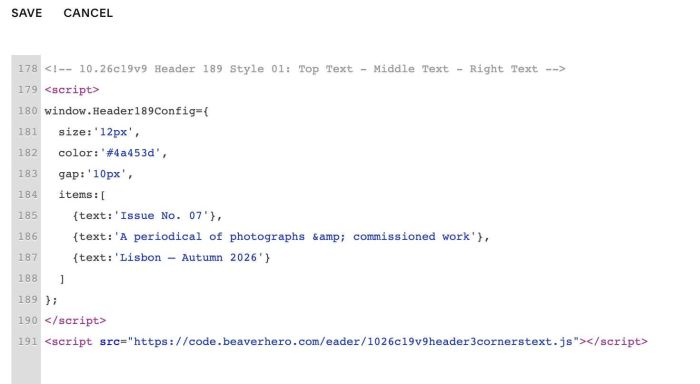
#1.2. You can update Text/style here
size:'12px',
color:'#4a453d',
gap:'10px',
items:[
{text:'Issue No. 07'},
{text:'A periodical of photographs & commissioned work'},
{text:'Lisbon — Autumn 2026'}
]
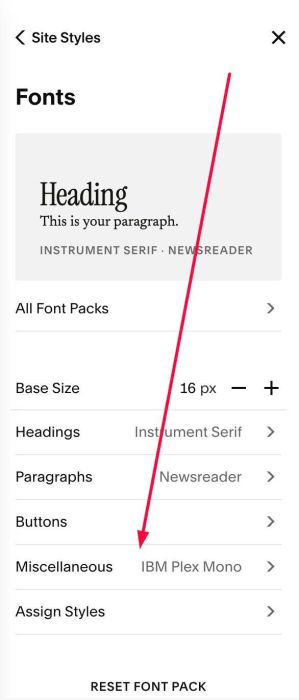
Note: text will use font family from Miscellaneous