Description
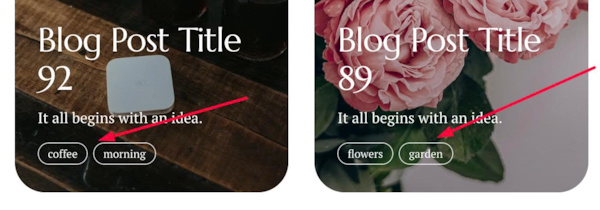
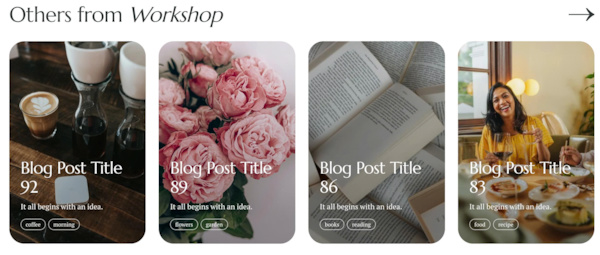
- Squarespace has no built-in related posts, so this code adds them automatically below every blog post, pulled from the same category. This version uses a 4-column grid of image cards: the thumbnail fills the whole card, with the title, excerpt and tags sitting on top of a dark gradient. The heading is dynamic too: a post in Design shows “Others from Design”, a post in Travel shows “Others from Travel”, with an arrow linking to that category page.
- buy me a coffee
#1. Install Code
#1.1. Use this code to Blog Page Header Injection
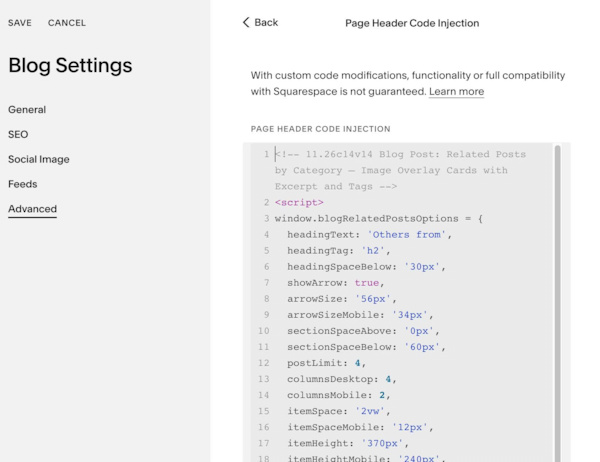
<!-- 11.26c14v14 Blog Post: Related Posts by Category – Image Overlay Cards with Excerpt and Tags -->
<script>
window.blogRelatedPostsOptions = {
  headingText: 'Others from',
  headingTag: 'h2',
  headingSpaceBelow: '30px',
  showArrow: true,
  arrowSize: '56px',
  arrowSizeMobile: '34px',
  sectionSpaceAbove: '0px',
  sectionSpaceBelow: '60px',
  postLimit: 4,
  columnsDesktop: 4,
  columnsMobile: 2,
  itemSpace: '2vw',
  itemSpaceMobile: '12px',
  itemHeight: '370px',
  itemHeightMobile: '240px',
  itemPadding: '40px 25px 30px',
  itemPaddingMobile: '20px 15px 15px',
  itemBackgroundColor: '#f4f4f7',
  imageRadius: '33px',
  imageRadiusMobile: '25px',
  overlayColor: 'rgba(0,0,0,0.35)',
  overlayStyle: 'gradient',
  textColor: '#ffffff',
  titleSpaceBelow: '10px',
  showExcerpt: true,
  excerptSpaceBelow: '15px',
  showTags: true,
  tagLimit: 3,
  tagGap: '6px',
  tagPadding: '2px 10px',
  tagBorderRadius: '100px',
  tagBorderWidth: '1px',
  tagBorderColor: 'rgba(255,255,255,0.8)',
  tagFontSize: '12px'
};
</script>
<script src="https://code.beaverhero.com/blogpost/1126c14v14relatedpostsv60.js"></script>
#1.2. Customize
To change text Others from/style, edit this
headingText: 'Others from',
headingTag: 'h2',
headingSpaceBelow: '30px',

To change arrow style, change this
showArrow: true,
arrowSize: '56px',
arrowSizeMobile: '34px',
To change number of related posts/columns, edit this
postLimit: 4,
columnsDesktop: 4,
columnsMobile: 2,
To change space between items, space inside each item, item height, edit this
itemSpace: '2vw',
  itemSpaceMobile: '12px',
  itemHeight: '370px',
  itemHeightMobile: '240px',
  itemPadding: '40px 25px 30px',
  itemPaddingMobile: '20px 15px 15px',
To change item overlay color (over image)/image border radius, change this
  imageRadius: '33px',
  imageRadiusMobile: '25px',
  overlayColor: 'rgba(0,0,0,0.35)',
To change tag style, edit this
showTags: true,
  tagLimit: 3,
  tagGap: '6px',
  tagPadding: '2px 10px',
  tagBorderRadius: '100px',
  tagBorderWidth: '1px',
  tagBorderColor: 'rgba(255,255,255,0.8)',
  tagFontSize: '12px'