Description
- adding timeline4 style with Team Section
- view demo – password: abc
- buy me a coffee if it is useful for you

#1. Install Code
#1.1. First you need to add Section
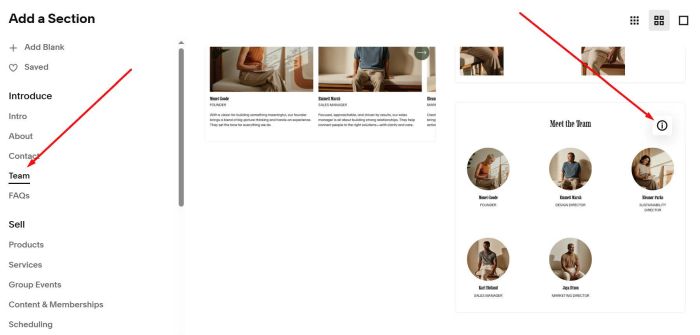
Choose Team > Choose section with (i) icon. You need to add 3 Team sections
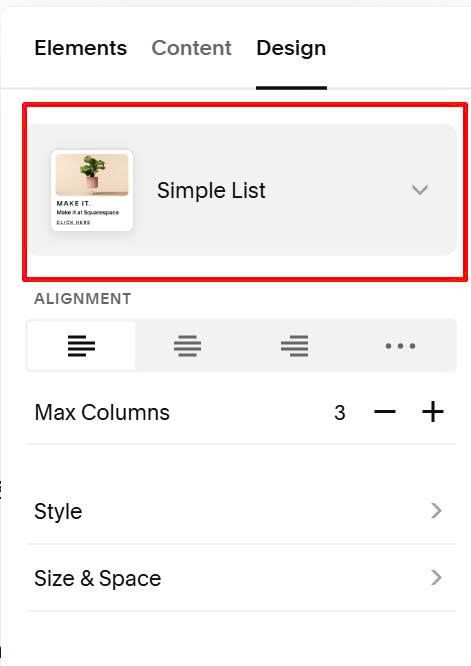
Make sure use Simple List
#1.2. Next, enable these options

add your desired text, image

#1.3. Hover on top right of section > click Edit Section

at Anchor Link, enter word: timeline4

#1.4. Hover on page where you added Team Section > Click Gear icon

Click Advanced > Paste this code
<!-- @tuanphan - Timeline4 -->
<style>
  section[id*="timeline4"] .user-items-list {
  	display: none;
  }
section[id*="timeline4"] .tp-timeline {
  background: #fff;
  color: #111;
  width: 100%;
  padding: 52px 16px 70px;
  box-sizing: border-box;
}

section[id*="timeline4"] .tp-section-title {
  text-align: center;
  margin-bottom: 50px;
  font-size: 2.5rem;
  font-weight: 700;
  color: #111;
}

section[id*="timeline4"] .tp-timeline__wrap {
  position: relative;
  max-width: 1100px;
  margin: 0 auto;
  display: flex;
  flex-direction: column;
  gap: 62px;
  padding: 6px 0;
}

section[id*="timeline4"] .tp-line {
  position: absolute;
  left: 50%;
  width: 2px;
  background: #cfcfcf;
  transform: translateX(-50%);
  z-index: 0;
  pointer-events: none;
}

section[id*="timeline4"] .tp-item {
  position: relative;
  display: grid;
  grid-template-columns: 1fr 85px 1fr;
  align-items: center;
  min-height: 110px;
}

section[id*="timeline4"] .tp-left .tp-node {
  grid-column: 1;
  justify-self: end;
}

section[id*="timeline4"] .tp-left .tp-dot {
  grid-column: 2;
  justify-self: center;
}

section[id*="timeline4"] .tp-right .tp-dot {
  grid-column: 2;
  justify-self: center;
}

section[id*="timeline4"] .tp-right .tp-node {
  grid-column: 3;
  justify-self: start;
}

section[id*="timeline4"] .tp-dot {
  width: 10px;
  height: 10px;
  border-radius: 999px;
  background: #ff6a00;
  position: relative;
  z-index: 2;
}

section[id*="timeline4"] .tp-node {
  width: 108px;
  display: flex;
  flex-direction: column;
  align-items: center;
  text-align: center;
  transform: translateY(18px);
}

section[id*="timeline4"] .tp-icon {
  width: 64px;
  height: 64px;
  border-radius: 999px;
  object-fit: cover;
  display: block;
}

section[id*="timeline4"] .tp-text {
  margin-top: 10px;
  width: 108px;
  font-size: 14px;
  line-height: 1.15;
  letter-spacing: .2px;
  font-weight: 700;
  display: -webkit-box;
  -webkit-line-clamp: 2;
  -webkit-box-orient: vertical;
  overflow: hidden;
  word-break: break-word;
}

@media (max-width: 820px) {
  section[id*="timeline4"] .tp-timeline {
    padding: 44px 14px 58px;
  }
  section[id*="timeline4"] .tp-section-title {
    font-size: 2rem;
    margin-bottom: 35px;
  }
  section[id*="timeline4"] .tp-timeline__wrap {
    gap: 54px;
    max-width: 980px;
  }
  section[id*="timeline4"] .tp-item {
    grid-template-columns: 1fr 59px 1fr;
    min-height: 104px;
  }
  section[id*="timeline4"] .tp-node {
    width: 104px;
    transform: translateY(16px);
  }
  section[id*="timeline4"] .tp-icon {
    width: 58px;
    height: 58px;
  }
  section[id*="timeline4"] .tp-text {
    width: 104px;
  }
}

@media (max-width: 640px) {
  section[id*="timeline4"] .tp-timeline__wrap {
    gap: 44px;
  }
  section[id*="timeline4"] .tp-item {
    grid-template-columns: 1fr 52px 1fr;
  }
}
</style>

<script>
(()=>{const e='section[id*="timeline4"]',t=(e,t)=>{const n=e.getBoundingClientRect(),i=t.getBoundingClientRect();return n.top-i.top+n.height/2},n=(e,n)=>{const i=e.querySelectorAll(".tp-dot");if(i.length<2)return;const o=t(i[0],e),r=t(i[i.length-1],e),c=Math.round(o),l=Math.max(2,Math.round(r-o));n.style.top=c+"px",n.style.height=l+"px"},i=()=>{const t=document.querySelector(e);if(!t)return;const i=(e=>{const t=e.querySelector("ul.user-items-list-item-container");return t?Array.from(t.querySelectorAll("li.list-item")).map((e=>{const t=e.querySelector(".list-item-content__title"),n=e.querySelector("img.list-image");return{title:(t?t.textContent:"").trim(),image:(i=n,i&&(i.getAttribute("data-src")||i.getAttribute("data-image")||i.getAttribute("src"))||"")};var i})).filter((e=>e.title||e.image)):[]})(t);i.length&&((e,t)=>{if(document.body.classList.contains("sqs-edit-mode"))return;const i=e.querySelector(".tp-timeline");i&&i.remove();const o=e.querySelector(".list-section-title"),r=o?o.textContent.trim():"",c=document.createElement("div");if(c.className="tp-timeline",r){const e=document.createElement("h2");e.className="tp-section-title",e.textContent=r,c.appendChild(e)}const l=document.createElement("div");l.className="tp-timeline__wrap";const a=document.createElement("div");a.className="tp-line",a.setAttribute("aria-hidden","true"),l.appendChild(a),t.forEach(((e,t)=>{const n=t%2==0?"tp-left":"tp-right",i=document.createElement("div");i.className=`tp-item ${n}`;const o=document.createElement("span");o.className="tp-dot";const r=document.createElement("div");r.className="tp-node";const c=document.createElement("img");c.className="tp-icon",c.src=e.image||"";const a=document.createElement("div");a.className="tp-text",a.textContent=e.title||"",r.appendChild(c),r.appendChild(a),"tp-left"===n?(i.appendChild(r),i.appendChild(o)):(i.appendChild(o),i.appendChild(r)),l.appendChild(i)})),c.appendChild(l);const d=e.querySelector(".content")||e.querySelector(".content-wrapper")||e,s=e.querySelector(".user-items-list");let m;s?s.parentNode.insertBefore(c,s):d.appendChild(c),requestAnimationFrame((()=>requestAnimationFrame((()=>n(l,a))))),window.addEventListener("resize",(()=>{clearTimeout(m),m=setTimeout((()=>n(l,a)),120)}));const u=c.querySelectorAll("img.tp-icon");let p=u.length;if(p>0){const e=()=>{p--,p<=0&&n(l,a)};u.forEach((t=>{t.complete?e():(t.addEventListener("load",e,{once:!0}),t.addEventListener("error",e,{once:!0}))}))}})(t,i)};let o=0;const r=()=>{const t=document.querySelector(e);t&&t.querySelector("li.list-item")?i():o<30&&(o++,setTimeout(r,300))};"loading"===document.readyState?document.addEventListener("DOMContentLoaded",r):r(),window.addEventListener("load",r),document.addEventListener("mercury:load",r)})();
</script>

#2. Customize
#2.1. To change image style, find these
section[id*="timeline4"] .tp-icon {
    width: 64px;
    height: 64px;
    border-radius: 999px;
    object-fit: cover;
    display: block;
}
#2.2. To change text style, find these
section[id*="timeline4"] .tp-text {
    margin-top: 10px;
    width: 108px;
    font-size: 14px;
    line-height: 1.15;
    letter-spacing: .2px;
    font-weight: 700;
    display: -webkit-box;
    -webkit-line-clamp: 2;
    -webkit-box-orient: vertical;
    overflow: hidden;
    word-break: break-word;
}
#2.3. To change dot style, find these
section[id*="timeline4"] .tp-dot {
    width: 10px;
    height: 10px;
    border-radius: 999px;
    background: #ff6a00;
    position: relative;
    z-index: 2;
}
#2.4. To change gray vertical line style, find these
section[id*="timeline4"] .tp-line {
    position: absolute;
    left: 50%;
    width: 2px;
    background: #cfcfcf;
    transform: translateX(-50%);
    z-index: 0;
    pointer-events: none;
}