Description
- Flare: A Cybersecurity Squarespace Website Template
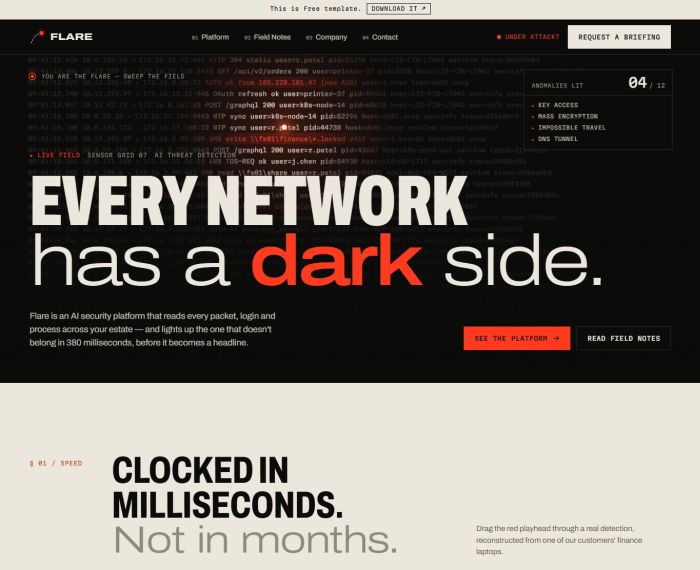
- Flare is a bold, dark and precise website template for AI-powered cybersecurity companies. Built around the idea of a signal flare cutting through darkness, it turns threat detection into something visitors can see, touch and play with. The result feels fast, confident and trustworthy — technical without ever being cold.
- view demo – password: abc
- buy me a coffee
- download template
Who it’s for
- AI-driven threat detection and response platforms
- Data protection, identity security and cloud security startups
- Managed security service providers and incident response teams
- Security research labs and threat intelligence firms
Pages included
- Home
- Interactive “dark field” hero: a live stream of network logs where the visitor’s cursor acts as a flare, revealing hidden anomalies and counting them as they are found
- Millisecond timeline: a draggable playhead that walks through a real detection, step by step
- Signal vs. noise: a slider that collapses thousands of alerts into three real incidents
- Declassified case files: redacted incident stories that reveal their details on click
- Four-verb platform overview with stretching typography on hover
- Field Notes preview with Traffic Light Protocol (TLP) labels
- “Hold to fire a flare” call to action
- Platform
- Hero with full-width looping video, scanning line and running timecode
- Four chapters (Sense, Reason, Contain, Explain) with a sticky chapter index and spec sheets
- Example plain-language analyst conversation
- Deployment comparison table: Cloud, Hybrid and Air-gapped
- Integrations grid
- Briefing call to action
- Field Notes
- TLP sharing-level legend
- Featured research article
- Filterable list of notes by topic (Threat intel, Research, Advisory)
- Advisory subscription form
- Company
- Mission statement and full-width team photo
- “Rules of engagement” principles list
- Leadership team shown as security access badges
- Open positions list
- Contact
- Emergency response line panel with 24/7 hotline
- Briefing request form with “What are you protecting?” options and an on-screen reference number after sending
- Office locations
- Shared elements
- Header with “Under attack?” shortcut and mobile menu
- Footer with live sensor status, “last detection” ticker and vulnerability disclosure block with PGP fingerprint