Description
- Triplicate: A Public Services Squarespace Website Template
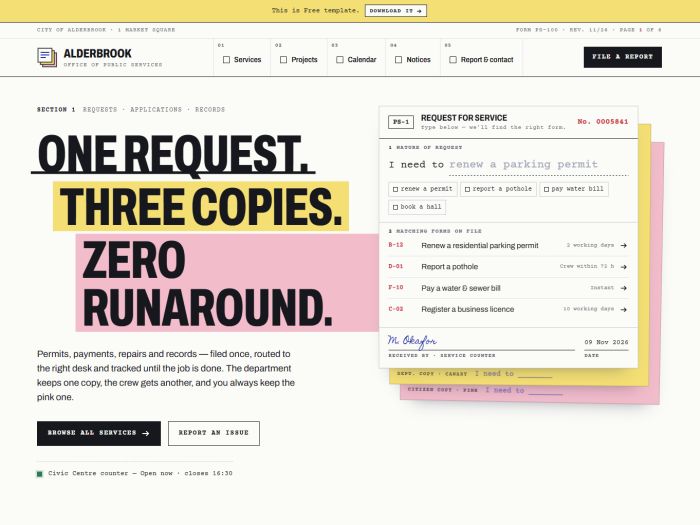
- Triplicate is a public services website template that treats every page like an official form: ruled boxes, red date stamps and white, canary and pink copies. It’s built for city offices and public agencies that publish services, projects, events and notices, and want a site that feels clear, trustworthy and a little playful. Residents always know what to do next and where their request has gone.
- view demo – password: abc
- buy me a coffee
- download template
Who it’s for
- City, town and municipal government offices
- Public works, utilities and transport departments
- Civic service centres and citizen help desks
- Public agencies running capital projects or community programmes
Pages included
- Home
- Hero request form (“I need to…”) that suggests matching services as you type, with quick-pick entries
- Live service-counter status (shows whether the counter is open or closed now)
- Counter desks showing the number now being served, the queue size and a take-a-number ticket
- Project preview as routing slips with stage, dates, initials and budget spent
- Upcoming events with date stamps, plus latest notices with “Received” stamps
- Recorded council session video with an agenda marked Adopted / Deferred / Noted
- “Report an issue” section explaining where each of the three copies goes
- Services
- Directory of services laid out as a ledger: form number, service, processing time, fee, and online / in-person / mail availability
- Filters by life event (moving house, new baby, starting a business and more), by channel, and by keyword
- Expandable rows with a description, a what-to-bring checklist and a start button
- Projects
- Totals summary: projects, under way, opened, spent and allocated
- Filters by stage and by ward
- Routing-slip cards for each project
- Project Detail
- Site photo, description and location
- Full routing slip with approval stamps
- Budget ledger: allocated, committed, spent, remaining
- Progress memos and a sign-up box for project updates
- Calendar
- Monthly calendar grid with colour-coded event types and today marked
- Day view listing each event’s time, place and details
- “Add to calendar” download for each event
- Notices
- Public notice board with “Received” date stamps and category filters
- Notices that unfold to show the full text
- Report & Contact
- Service request form with request types, location, description, contact details, preferred reply and live signature
- On submit, the form splits into three copies and leaves the pink one as a receipt with a reference number and expected reply time
- Office cards with weekly hours and open/closed status, plus a mailing address and emergency numbers