Description
- Lowercase: A Minimalist Notion Creator Squarespace Website Template
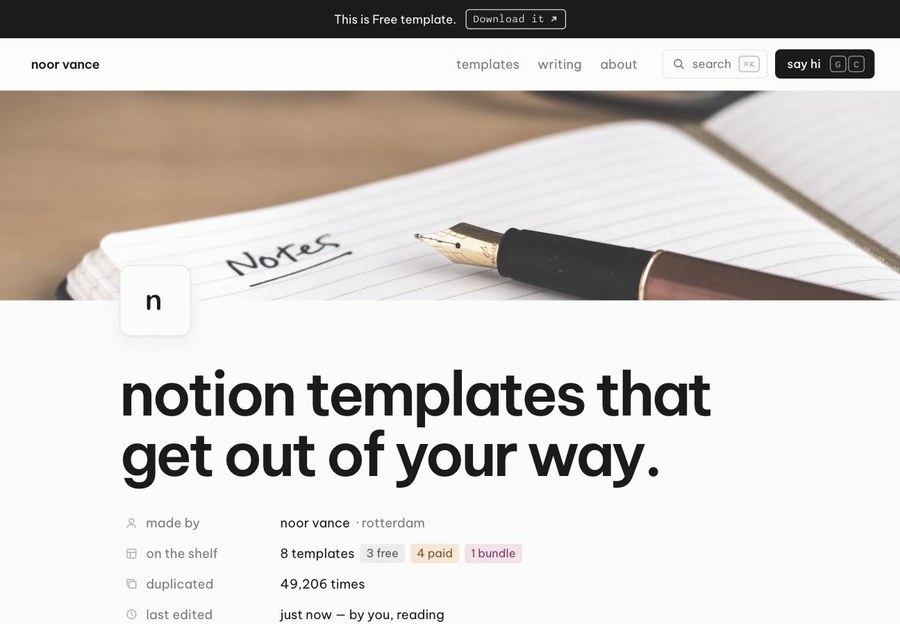
- Lowercase is a quiet, all-lowercase website for creators who sell Notion templates and write about organising a calmer life. Every page reads like a well-kept document, with property rows, toggles, tags and margin comments, so your templates feel at home before anyone opens them. The overall feeling is calm and uncluttered, and confident without being loud.
- view demo – password: abc
- buy me a coffee
- download template
Who it’s for
- Notion template creators and digital product sellers
- Productivity writers and newsletter authors
- Systems designers and consultants who build custom workspaces for clients
- Creators who teach planning, studying or personal finance
Pages included
- Home
- Page cover with a “change cover” option, page icon and a large lowercase headline
- Page properties: maker, shelf summary with tags, duplicate count, live “last edited”
- “Type / to look around” line that opens a command menu
- The shelf: one template collection with Gallery, Table and Board views plus area filters
- “From scattered to sorted”: loose notes that tidy themselves into labelled columns
- Video walkthrough with clickable chapters and chapter progress
- “Notes in the margins”: testimonials as comments attached to highlighted claims, which visitors can resolve and reopen
- “Ways in”: pricing as a clean comparison table (free shelf, single template, all-access)
- FAQ as folding toggles
- “Duplicate this page” call to action that stacks copies of a page
- Templates
- The full collection with Gallery, Table and Board views, area filters, name search and sorting
- Template detail
- Cover, icon, one-line summary and properties (status, area, pages, duplicates, last updated)
- Description, a “what’s inside” page tree that unfolds, preview images and a changelog
- “Pairs well with” suggestions, a link to the next template, and a sticky purchase panel with price and what’s included
- Writing
- Newsletter intro with an email signup
- Archive of essays with date, topic tag and reading time
- Article
- Topic, date and reading time; headline and lede
- Body with subheadings, a callout box, an image with caption, a checkable to-do list and a pull quote
- Link to the next letter
- About
- Cover, profile properties (location, working hours, current project, reply time)
- Short bio, a “things I believe” checklist with a playful agreement counter
- Image pair, “on my desk” tools table and a personal changelog
- Contact
- Enquiry form styled as a new page: title, name, email, enquiry type and budget as selectable tags, and message
- Inbox table showing recent enquiries, where new messages appear at the top
- Throughout
- Breadcrumb header with page path, search and command menu, and keyboard shortcuts shown on buttons
- Footer with backlinks for the current page, “this visit” history, newsletter signup, social links and a light/dark switch