Description
- Alder: A Personal Portfolio Website Template
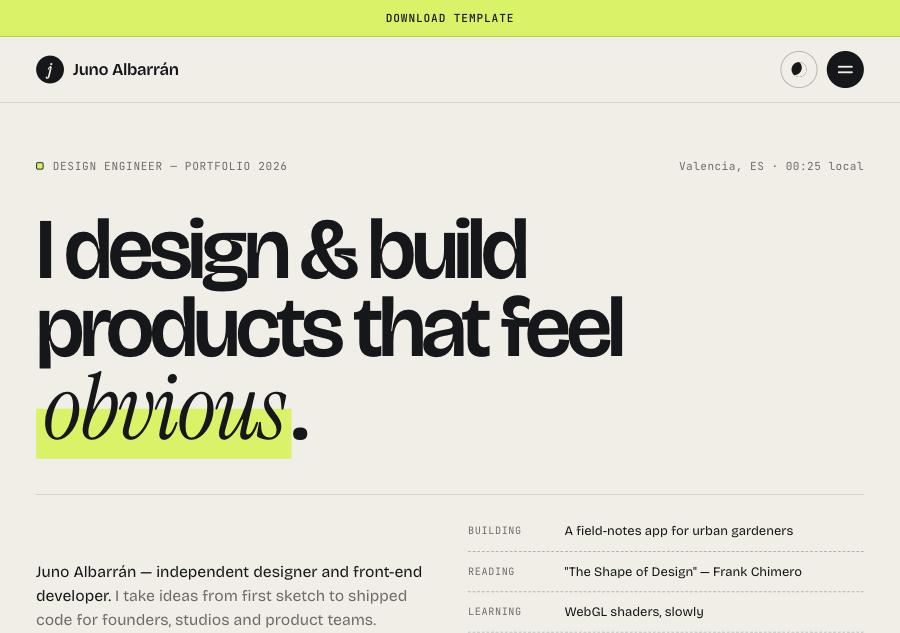
- Alder is a clean, editorial portfolio template for designers, developers and creative studios who want their work presented with clarity and personality. Oversized headlines, an elegant italic accent and a bright highlighter detail make it confident without being loud. It gives each project room to tell its story, from first sketch to measurable results.
- view demo – password: abc
- buy me a coffee
- download template
Who it’s for
- Product, UI/UX and web designers
- Front-end developers and design engineers
- Freelancers and independent creatives
- Small creative studios and agencies
Pages included
- Index (Home)
- Hero with headline, short intro, “Now” list (building, reading, learning) and calls to action
- Featured project reel
- Client name strip
- Selected work as stacked project cards that layer as you scroll
- Services accordion with deliverables for each service
- Testimonial slider
- Project call to action
- Work
- Category filters with project counts
- Project search by name, client or tool
- Grid and list view toggle
- Project cards with cover, category, year and summary
- Case Study
- Project title, summary and key facts (client, role, timeline, year)
- Large cover image
- Section navigation that follows your reading position
- Reading progress bar
- Overview, Challenge, Process (three steps), Solution and Results sections
- Before/after slider comparing early sketches with the final design
- Image gallery, results metrics and client quote
- Next project link
- About
- Portrait with a personal note, bio and animated key numbers
- Four-step working process
- Experience list
- Toolkit grid
- Recognition, speaking and writing
- CV download button
- Contact
- Click-to-copy email
- Six-month availability calendar
- Social links
- Project enquiry form with service selection, budget slider, start date, validation and a summary of the sent message
- FAQ accordion
- Shared across all pages: sticky header with availability status, light/dark mode switch, mobile menu, and a footer with large email link, local time and back-to-top button.