Description
- animated text effect
- view demo – password: abc
- buy a coffee, my friend code this effect

#1. Install Code
#1.1. First you need to add a Code Block
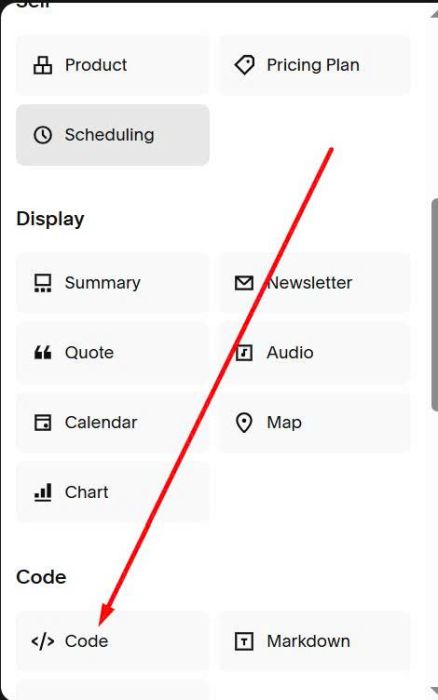
#1.2. Add this code into Code Block
<div class="tp-hcd">
<span class="tp-hcd__pre">Human-centered </span>
<span class="tp-hcd__slot" aria-live="polite"></span>
</div>
<script>
var TP_HCD_OPTIONS = {
words: [
"design",
"breakthroughs",
"leadership",
"collaborations"
],
delay: 2000, // Time between word changes (ms)
anim: 1100 // Slide + fade animation duration (ms)
};
</script>
<style>
:root{
--tp-slot-h: 1.25em;
--tp-word-top: 0.15em;
--tp-slot-nudge: 0.15em;
--neon:#d7ff00;
--text:#ffffff;
}
.tp-hcd{
display:inline-flex;
align-items:baseline;
font-size:clamp(42px, 7vw, 88px);
line-height:1.05;
letter-spacing:-0.02em;
color:var(--text);
}
.tp-hcd__pre{
color:var(--neon);
white-space:nowrap;
}
.tp-hcd__slot{
position:relative;
display:inline-block;
height:var(--tp-slot-h);
overflow:hidden;
white-space:nowrap;
transform:translateY(var(--tp-slot-nudge));
}
.tp-hcd__measure{
position:absolute;
left:-9999px;
top:-9999px;
visibility:hidden;
white-space:nowrap;
}
.tp-hcd__m{ display:inline-block; }
.tp-hcd__word{
position:absolute;
left:0;
top:var(--tp-word-top);
transform:translateY(110%);
opacity:0;
transition:
transform 1100ms cubic-bezier(.18,.9,.18,1),
opacity 1100ms ease;
}
.tp-hcd__word.is-active{
transform:translateY(0%);
opacity:1;
}
.tp-hcd__word.is-out{
transform:translateY(-110%);
opacity:0;
}
@media (prefers-reduced-motion: reduce){
.tp-hcd__word{ transition:none; }
}
</style>
<script>
(function(){
var opts = window.TP_HCD_OPTIONS;
if(!opts || !opts.words || !opts.words.length) return;
var root = document.querySelector(".tp-hcd");
if(!root) return;
var slot = root.querySelector(".tp-hcd__slot");
if(!slot) return;
var wordsList = opts.words;
var delay = opts.delay || 2000;
var anim = opts.anim || 1100;
slot.innerHTML = "";
var measure = document.createElement("span");
measure.className = "tp-hcd__measure";
measure.setAttribute("aria-hidden","true");
var wordEls = [];
var mEls = [];
wordsList.forEach(function(txt, i){
var m = document.createElement("span");
m.className = "tp-hcd__m";
m.textContent = txt;
measure.appendChild(m);
mEls.push(m);
var w = document.createElement("span");
w.className = "tp-hcd__word" + (i === 0 ? " is-active" : "");
w.textContent = txt;
slot.appendChild(w);
wordEls.push(w);
});
slot.appendChild(measure);
function setSlotWidth(){
var max = 0;
mEls.forEach(function(el){
var w = el.getBoundingClientRect().width;
if(w > max) max = w;
});
slot.style.width = Math.ceil(max) + "px";
}
setSlotWidth();
window.addEventListener("resize", function(){
clearTimeout(root.__tpHcdRz);
root.__tpHcdRz = setTimeout(setSlotWidth, 120);
});
var index = 0;
function next(){
var current = wordEls[index];
var next = wordEls[(index + 1) % wordEls.length];
current.classList.remove("is-active");
current.classList.add("is-out");
next.classList.add("is-active");
setTimeout(function(){
current.classList.remove("is-out");
}, anim + 40);
index = (index + 1) % wordEls.length;
}
setInterval(next, delay);
})();
</script>

#2. Customize
#2.1. To change text, change these lines.
<div class="tp-hcd">
<span class="tp-hcd__pre">Human-centered </span>
<span class="tp-hcd__slot" aria-live="polite"></span>
</div>
<script>
var TP_HCD_OPTIONS = {
words: [
"design",
"breakthroughs",
"leadership",
"collaborations"
],
delay: 2000, // Time between word changes (ms)
anim: 1100 // Slide + fade animation duration (ms)
};

#2.2. To change neon text color

change this line
--neon:#d7ff00;

#2.3. To change white text color, change this line
--text:#ffffff;
