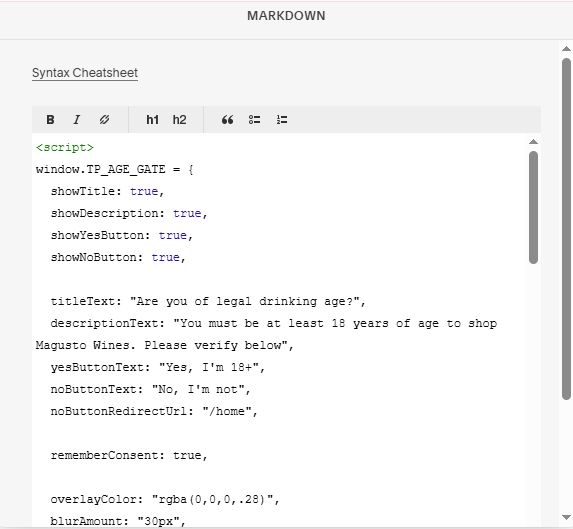
Description
- age verification popup
- view demo – password: abc
- buy a coffee
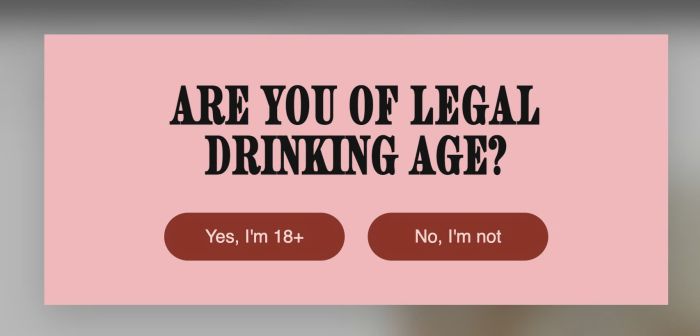
#1. Install Code
If you use Personal/Basic Plan and your plan doesn’t support Injection, you can see step #2.5.
If you don’t want to use complex code, you can also use this free tool to add Age Verification Popup.
#1.1. First, use this code to Code Injection > Footer
<!-- 03.26c30v2 - Age Verification Popuup -->
<script>
window.TP_AGE_GATE = {
  showTitle: true,
  showDescription: true,
  showYesButton: true,
  showNoButton: true,

  titleText: "Are you of legal drinking age?",
  descriptionText: "You must be at least 18 years of age to shop Magusto Wines. Please verify below",
  yesButtonText: "Yes, I'm 18+",
  noButtonText: "No, I'm not",
  noButtonRedirectUrl: "/home",

  rememberConsent: true,

  overlayColor: "rgba(0,0,0,.28)",
  blurAmount: "30px",

  ageBoxBackground: "#efb9bb",
  ageBoxTextColor: "#22161b",
  ageBoxPadding: "56px 48px 54px",
  ageBoxWidth: "min(92vw,760px)",
  ageBoxShadow: "0 18px 50px rgba(0,0,0,.18)",

  titleFontSize: "clamp(34px,5vw,64px)",
  titleLineHeight: ".95",
  titleFontWeight: "900",
  titleLetterSpacing: ".02em",
  titleTextTransform: "uppercase",

  descriptionFontSize: "clamp(15px,1.6vw,24px)",
  descriptionLineHeight: "1.35",
  descriptionFontWeight: "800",
  descriptionLetterSpacing: ".03em",
  descriptionTextTransform: "uppercase",
  descriptionSpaceAbove: "26px",

  buttonBackground: "#8b342a",
  buttonTextColor: "#f5d4d0",
  buttonFontSize: "22px",
  buttonLineHeight: "1.2",
  buttonFontWeight: "inherit",
  buttonLetterSpacing: "normal",
  buttonTextTransform: "none",
  buttonPaddingTopBottom: "16px",
  buttonPaddingLeftRight: "28px",
  buttonBorderRadius: "999px",
  buttonSpaceAbove: "40px"
};
</script>
<div id="tp-age-gate" hidden><div class="tp-age-gate__panel" role="dialog" aria-modal="true" aria-labelledby="tp-age-gate-title" aria-describedby="tp-age-gate-text"><h2 id="tp-age-gate-title" class="tp-age-gate__title"></h2><p id="tp-age-gate-text" class="tp-age-gate__text"></p><div class="tp-age-gate__actions"><button class="tp-age-gate__btn" type="button" data-age="yes"></button><button class="tp-age-gate__btn" type="button" data-age="no"></button></div></div></div>
<script>
!function(){var t=window.TP_AGE_GATE||{},e="tpAgeVerified",n=document.getElementById("tp-age-gate");if(n){var o=n.querySelector(".tp-age-gate__panel"),a=n.querySelector(".tp-age-gate__title"),i=n.querySelector(".tp-age-gate__text"),r=n.querySelector(".tp-age-gate__actions"),g=n.querySelector('[data-age="yes"]'),l=n.querySelector('[data-age="no"]'),d=document.createElement("style");d.textContent=["#tp-age-gate{position:fixed;inset:0;z-index:999999;display:flex;align-items:center;justify-content:center;padding:24px;background:"+(t.overlayColor||"rgba(0,0,0,.28)")+"}","#tp-age-gate ~ div#siteWrapper{filter:blur("+(t.blurAmount||"30px")+")}","#tp-age-gate[hidden]{display:none !important}","#tp-age-gate[hidden] ~ div#siteWrapper{filter:unset !important}","#tp-age-gate *{box-sizing:border-box}","html.tp-age-gate-lock,html.tp-age-gate-lock body{overflow:hidden !important}",".tp-age-gate__panel{text-align:center}",".tp-age-gate__title{margin:0}",".tp-age-gate__text{max-width:560px;margin-left:auto;margin-right:auto;margin-top:0}",".tp-age-gate__actions{display:flex;justify-content:center;gap:28px;flex-wrap:wrap}",".tp-age-gate__btn{min-width:220px;border:0;font:inherit;cursor:pointer;transition:transform .2s ease,opacity .2s ease}",".tp-age-gate__btn:hover{opacity:.92;transform:translateY(-1px)}",".tp-age-gate__btn:focus-visible{outline:2px solid currentColor;outline-offset:3px}","@media(max-width:640px){.tp-age-gate__actions{gap:16px}.tp-age-gate__btn{width:100%;min-width:0}}"].join(""),document.head.appendChild(d),o&&(o.style.background=t.ageBoxBackground||"#efb9bb",o.style.color=t.ageBoxTextColor||"#22161b",o.style.padding=t.ageBoxPadding||"56px 48px 54px",o.style.width=t.ageBoxWidth||"min(92vw,760px)",o.style.boxShadow=t.ageBoxShadow||"0 18px 50px rgba(0,0,0,.18)"),a&&(!1===t.showTitle?a.hidden=!0:(a.textContent=t.titleText||"",a.style.fontSize=t.titleFontSize||"",a.style.lineHeight=t.titleLineHeight||"",a.style.fontWeight=t.titleFontWeight||"",a.style.letterSpacing=t.titleLetterSpacing||"",a.style.textTransform=t.titleTextTransform||"")),i&&(!1===t.showDescription?i.hidden=!0:(i.textContent=t.descriptionText||"",i.style.marginTop=t.descriptionSpaceAbove||"26px",i.style.fontSize=t.descriptionFontSize||"",i.style.lineHeight=t.descriptionLineHeight||"",i.style.fontWeight=t.descriptionFontWeight||"",i.style.letterSpacing=t.descriptionLetterSpacing||"",i.style.textTransform=t.descriptionTextTransform||"")),r&&(r.style.marginTop=t.buttonSpaceAbove||"40px"),g&&(!1===t.showYesButton?g.hidden=!0:(g.textContent=t.yesButtonText||"",s(g))),l&&(!1===t.showNoButton?l.hidden=!0:(l.textContent=t.noButtonText||"",s(l))),"yes"!==localStorage.getItem(e)?(n.hidden=!1,document.documentElement.classList.add("tp-age-gate-lock"),n.addEventListener("click",(function(n){var o=n.target.closest("[data-age]");if(o){if("yes"===o.getAttribute("data-age"))return!1!==t.rememberConsent&&localStorage.setItem(e,"yes"),void p();localStorage.removeItem(e),window.location.href=t.noButtonRedirectUrl||"/home"}}))):p()}function s(e){e.style.background=t.buttonBackground||"#8b342a",e.style.color=t.buttonTextColor||"#f5d4d0",e.style.fontSize=t.buttonFontSize||"22px",e.style.lineHeight=t.buttonLineHeight||"1.2",e.style.fontWeight=t.buttonFontWeight||"inherit",e.style.letterSpacing=t.buttonLetterSpacing||"normal",e.style.textTransform=t.buttonTextTransform||"none",e.style.padding=(t.buttonPaddingTopBottom||"16px")+" "+(t.buttonPaddingLeftRight||"28px"),e.style.borderRadius=t.buttonBorderRadius||"999px"}function p(){n.hidden=!0,document.documentElement.classList.remove("tp-age-gate-lock")}}();
</script>
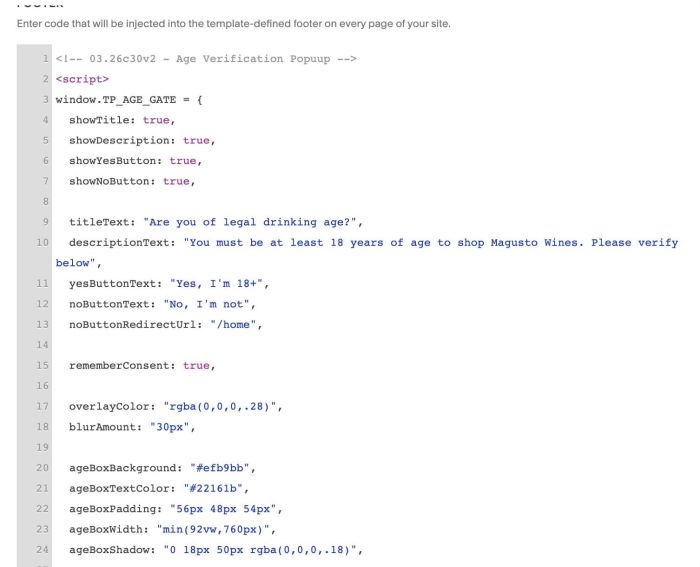
#2. Customize
If you need to customize more, you can message me or use this AI tool, it was designed for the Squarespace site.
#2.1. You can change disable/enable/change text button here
showTitle: true,
showDescription: true,
showYesButton: true,
showNoButton: true,

titleText: "Are you of legal drinking age?",
descriptionText: "You must be at least 18 years of age to shop Magusto Wines. Please verify below",
yesButtonText: "Yes, I'm 18+",
noButtonText: "No, I'm not",
noButtonRedirectUrl: "/home",
#2.2. Show Popup Once or always show after click Yes
rememberConsent: true,
#2.3. Change Overlay Color/Blur site background
overlayColor: "rgba(0,0,0,.28)",
 blurAmount: "30px",
#2.4. Other style: box, text, button
ageBoxBackground: "#efb9bb",
  ageBoxTextColor: "#22161b",
  ageBoxPadding: "56px 48px 54px",
  ageBoxWidth: "min(92vw,760px)",
  ageBoxShadow: "0 18px 50px rgba(0,0,0,.18)",

  titleFontSize: "clamp(34px,5vw,64px)",
  titleLineHeight: ".95",
  titleFontWeight: "900",
  titleLetterSpacing: ".02em",
  titleTextTransform: "uppercase",

  descriptionFontSize: "clamp(15px,1.6vw,24px)",
  descriptionLineHeight: "1.35",
  descriptionFontWeight: "800",
  descriptionLetterSpacing: ".03em",
  descriptionTextTransform: "uppercase",
  descriptionSpaceAbove: "26px",

  buttonBackground: "#8b342a",
  buttonTextColor: "#f5d4d0",
  buttonFontSize: "22px",
  buttonLineHeight: "1.2",
  buttonFontWeight: "inherit",
  buttonLetterSpacing: "normal",
  buttonTextTransform: "none",
  buttonPaddingTopBottom: "16px",
  buttonPaddingLeftRight: "28px",
  buttonBorderRadius: "999px",
  buttonSpaceAbove: "40px"
#2.5. If you use Personal/Basic Plan and your plan doesn’t support Injection, you can edit Site Footer.
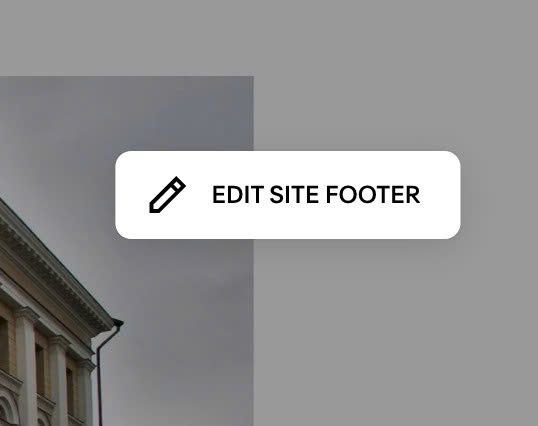
Add a Markdown Block

Paste this code into Markdown Block.
<script>
window.TP_AGE_GATE = {
  showTitle: true,
  showDescription: true,
  showYesButton: true,
  showNoButton: true,

  titleText: "Are you of legal drinking age?",
  descriptionText: "You must be at least 18 years of age to shop Magusto Wines. Please verify below",
  yesButtonText: "Yes, I'm 18+",
  noButtonText: "No, I'm not",
  noButtonRedirectUrl: "/home",

  rememberConsent: true,

  overlayColor: "rgba(0,0,0,.28)",
  blurAmount: "30px",

  ageBoxBackground: "#efb9bb",
  ageBoxTextColor: "#22161b",
  ageBoxPadding: "56px 48px 54px",
  ageBoxWidth: "min(92vw,760px)",
  ageBoxShadow: "0 18px 50px rgba(0,0,0,.18)",

  titleFontSize: "clamp(34px,5vw,64px)",
  titleLineHeight: ".95",
  titleFontWeight: "900",
  titleLetterSpacing: ".02em",
  titleTextTransform: "uppercase",

  descriptionFontSize: "clamp(15px,1.6vw,24px)",
  descriptionLineHeight: "1.35",
  descriptionFontWeight: "800",
  descriptionLetterSpacing: ".03em",
  descriptionTextTransform: "uppercase",
  descriptionSpaceAbove: "26px",

  buttonBackground: "#8b342a",
  buttonTextColor: "#f5d4d0",
  buttonFontSize: "22px",
  buttonLineHeight: "1.2",
  buttonFontWeight: "inherit",
  buttonLetterSpacing: "normal",
  buttonTextTransform: "none",
  buttonPaddingTopBottom: "16px",
  buttonPaddingLeftRight: "28px",
  buttonBorderRadius: "999px",
  buttonSpaceAbove: "40px"
};
</script>
<div id="tp-age-gate" hidden><div class="tp-age-gate__panel" role="dialog" aria-modal="true" aria-labelledby="tp-age-gate-title" aria-describedby="tp-age-gate-text"><h2 id="tp-age-gate-title" class="tp-age-gate__title"></h2><p id="tp-age-gate-text" class="tp-age-gate__text"></p><div class="tp-age-gate__actions"><button class="tp-age-gate__btn" type="button" data-age="yes"></button><button class="tp-age-gate__btn" type="button" data-age="no"></button></div></div></div>
<script src="https://code.beaverhero.com/other/0326c30v2agepopup.js"></script>