Description
- falling stars effect
- view demo – password: abc
- buy me a coffee

#1. Install Code
#1.1. Hover on Page where you want to add this effect > Click Gear icon
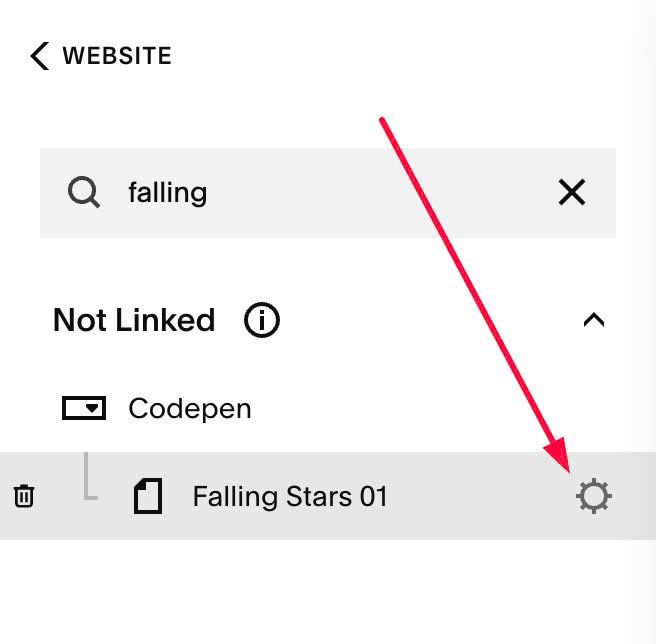
Click Advanced > Paste this code
- If you use Personal/Basic Plan and your plan doesn’t support Injection, you can see #3.1
<!-- 05.26c31v2 Falling Stars 1 -->
<script>
window.FallingStarsConfig = {
  target: "page",
  sectionId: "",
  starColor: "green",
  starSize: 12,
  starSizeMobile: 8,
  starIcon: '<svg xmlns="http://www.w3.org/2000/svg" viewBox="0 0 640 640"><path d="M320.1 32C329.1 32 337.4 37.1 341.5 45.1L415 189.3L574.9 214.7C583.8 216.1 591.2 222.4 594 231C596.8 239.6 594.5 249 588.2 255.4L473.7 369.9L499 529.8C500.4 538.7 496.7 547.7 489.4 553C482.1 558.3 472.4 559.1 464.4 555L320.1 481.6L175.8 555C167.8 559.1 158.1 558.3 150.8 553C143.5 547.7 139.8 538.8 141.2 529.8L166.4 369.9L52 255.4C45.6 249 43.4 239.6 46.2 231C49 222.4 56.3 216.1 65.3 214.7L225.2 189.3L298.8 45.1C302.9 37.1 311.2 32 320.2 32zM320.1 108.8L262.3 222C258.8 228.8 252.3 233.6 244.7 234.8L119.2 254.8L209 344.7C214.4 350.1 216.9 357.8 215.7 365.4L195.9 490.9L309.2 433.3C316 429.8 324.1 429.8 331 433.3L444.3 490.9L424.5 365.4C423.3 357.8 425.8 350.1 431.2 344.7L521 254.8L395.5 234.8C387.9 233.6 381.4 228.8 377.9 222L320.1 108.8z"/></svg>',
  interval: 50,
};
</script>
<script src="https://code.beaverhero.com/other/0526c31v2fallingstars1.js"></script>

#2. Customize
#2.1. To change stars color, you can change Line 06
starColor: "green",
you can use color name (green) or hex color (#f1f, #000…)
#2.2. To change stars size, you can change Line 07, Line 08
starSize: 12,
 starSizeMobile: 8,
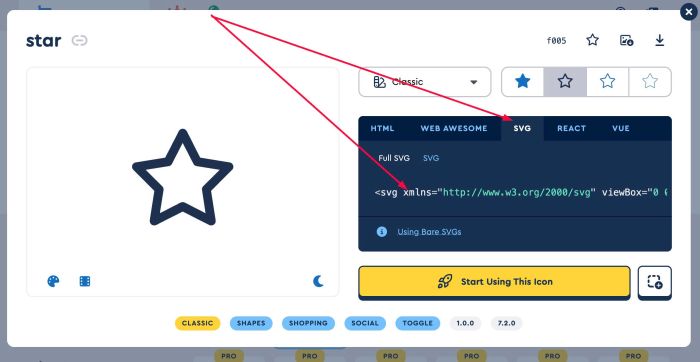
#2.3. To change stars icon to another icon, you can change Line 09
starIcon: '<svg xmlns="http://www.w3.org/2000/svg" viewBox="0 0 640 640"><path d="M320.1 32C329.1 32 337.4 37.1 341.5 45.1L415 189.3L574.9 214.7C583.8 216.1 591.2 222.4 594 231C596.8 239.6 594.5 249 588.2 255.4L473.7 369.9L499 529.8C500.4 538.7 496.7 547.7 489.4 553C482.1 558.3 472.4 559.1 464.4 555L320.1 481.6L175.8 555C167.8 559.1 158.1 558.3 150.8 553C143.5 547.7 139.8 538.8 141.2 529.8L166.4 369.9L52 255.4C45.6 249 43.4 239.6 46.2 231C49 222.4 56.3 216.1 65.3 214.7L225.2 189.3L298.8 45.1C302.9 37.1 311.2 32 320.2 32zM320.1 108.8L262.3 222C258.8 228.8 252.3 233.6 244.7 234.8L119.2 254.8L209 344.7C214.4 350.1 216.9 357.8 215.7 365.4L195.9 490.9L309.2 433.3C316 429.8 324.1 429.8 331 433.3L444.3 490.9L424.5 365.4C423.3 357.8 425.8 350.1 431.2 344.7L521 254.8L395.5 234.8C387.9 233.6 381.4 228.8 377.9 222L320.1 108.8z"/></svg>',
Here I use SVG icon from FontAwesome site, you can find free icon there
#3. Other
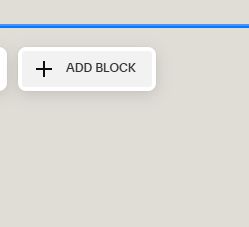
#3.1. If you use Personal/Basic Plan and your plan doesn’t support Injection, you can edit Page (page where you want to add effect) > Add a Block
Choose Markdown

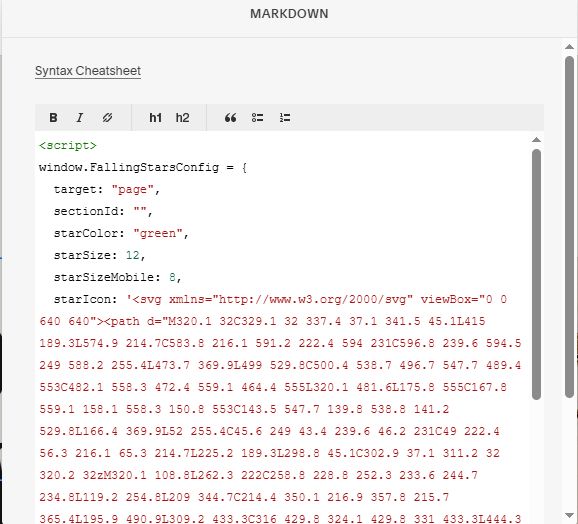
Paste this code into Markdown
<script>
window.FallingStarsConfig = {
  target: "page",
  sectionId: "",
  starColor: "green",
  starSize: 12,
  starSizeMobile: 8,
  starIcon: '<svg xmlns="http://www.w3.org/2000/svg" viewBox="0 0 640 640"><path d="M320.1 32C329.1 32 337.4 37.1 341.5 45.1L415 189.3L574.9 214.7C583.8 216.1 591.2 222.4 594 231C596.8 239.6 594.5 249 588.2 255.4L473.7 369.9L499 529.8C500.4 538.7 496.7 547.7 489.4 553C482.1 558.3 472.4 559.1 464.4 555L320.1 481.6L175.8 555C167.8 559.1 158.1 558.3 150.8 553C143.5 547.7 139.8 538.8 141.2 529.8L166.4 369.9L52 255.4C45.6 249 43.4 239.6 46.2 231C49 222.4 56.3 216.1 65.3 214.7L225.2 189.3L298.8 45.1C302.9 37.1 311.2 32 320.2 32zM320.1 108.8L262.3 222C258.8 228.8 252.3 233.6 244.7 234.8L119.2 254.8L209 344.7C214.4 350.1 216.9 357.8 215.7 365.4L195.9 490.9L309.2 433.3C316 429.8 324.1 429.8 331 433.3L444.3 490.9L424.5 365.4C423.3 357.8 425.8 350.1 431.2 344.7L521 254.8L395.5 234.8C387.9 233.6 381.4 228.8 377.9 222L320.1 108.8z"/></svg>',
  interval: 50,
};
</script>
<script src="https://code.beaverhero.com/other/0526c31v2fallingstars1.js"></script>