Description
- flip icon section, you can enable title, description, icon
- view demo – password: abc
- buy me a coffee

#1. Install Code
#1.1. First, add a Section > Choose Team > Choose Section with (i) icon

#1.2. Make sure you use Simple List

#1.3. You can add your desired icon/text at tab Content

#1.4. You can enable item button + add URL if you want. You can also skip this step

#1.5. Hover on top right of section > Click EDIT SECTION
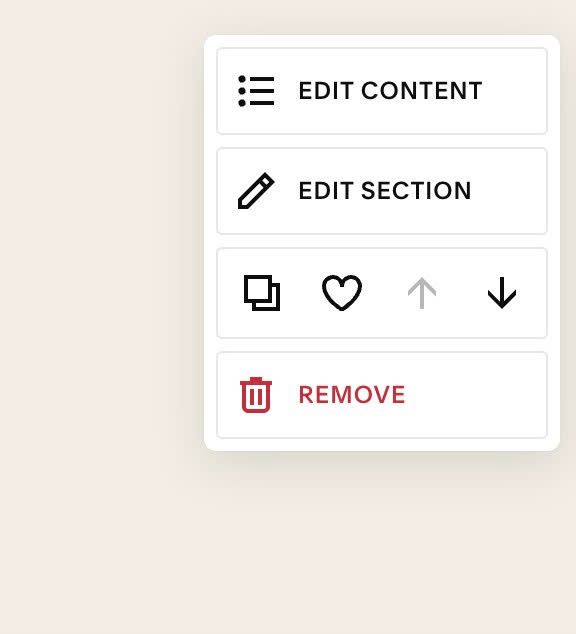
at Format > Anchor Link > enter word: flipsection

#1.6. Hover on Page where you use Team List Simple > Click Gear icon

Click Advanced > Paste this code
- If you use Personal Plan/Basic Plan and your plan doesn’t support Injection, see #3.1.
<!-- 06.26c01v8 Flip icon Section -->
<script>
window.FLIP_SECTION_CONFIG = {
  frontImage: true,
  frontTitle: true,
  frontDescription: false,

  backImage: false,
  backTitle: true,
  backDescription: true,

  imageMode: 'fixed',
  imageFixedSize: '56px',

  titleTag: 'h4',
  titleFontSize: '',
  descFontSize: '',
  titleColor: '',
  descColor: '',

  frontBackgroundColor: '#ffffff',
  backBackgroundColor: '#ffffff',
  frontOverlayColor: 'rgba(0,0,0,0.35)',

  linkEnabled: true,
  mobileTapDelay: 5000,

  padding: '18px',
  flipSpeed: '0.6s',
  cardRadius: '0px',
};
</script>
<script src="https://code.beaverhero.com/list/0626c01v8flipiconsection.js">
</script>
<style>body:not(.sqs-edit-mode-active) section[id*="flipsection"] li.list-item>div:not(.fs-inner) {opacity: 0;}
section[id*="flipsection"] .user-items-list>ul {opacity: 1 !important;}section[id*="flipsection"] li.list-item h4, section[id*="flipsection"] li.list-item p {margin-top: 2px !important;margin-bottom: 2px !important;}.fs-fixed-mode.fs-front, .fs-fixed-mode.fs-back {gap: 2px !important;}</style>

#2. Customize
#2.1. To enable/disable icon/title/description in Front or Back (Flip), you can change Line 04 to Line 10
frontImage: true,
frontTitle: true,
frontDescription: false,

backImage: false,
backTitle: true,
backDescription: true,
#2.2. To change Icon Size, you can change Line 13
imageFixedSize: '56px',
#2.3. To change Title, Description Color or Size, you can change Line 16 to Line 19
titleFontSize: '',
descFontSize: '',
titleColor: '',
descColor: '',
to something like this
titleFontSize: '20px',
descFontSize: '14px',
titleColor: '#000',
descColor: '#f1f',
#2.4. To change White Background to another color, you can change Line 21, Line 22
frontBackgroundColor: '#ffffff',
  backBackgroundColor: '#ffffff',
#2.5. To enable/disable Link, you can change Line 25
linkEnabled: true,
and make sure you added Link to item button
#2.6. By default, on mobile, users click item, it will open page after 5 seconds, you can change Line 26
mobileTapDelay: 5000,
#3. Other
#3.1. If you use Personal/Basic Plan and your plan doesn’t support Injection, you can edit Current page > Add a Block
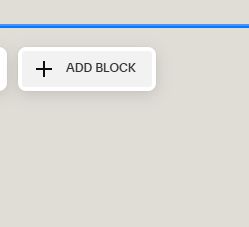
Choose Markdown

Paste this code into Markdown
<script>
window.FLIP_SECTION_CONFIG = {
  frontImage: true,
  frontTitle: true,
  frontDescription: false,

  backImage: false,
  backTitle: true,
  backDescription: true,

  imageMode: 'fixed',
  imageFixedSize: '56px',

  titleTag: 'h4',
  titleFontSize: '',
  descFontSize: '',
  titleColor: '',
  descColor: '',

  frontBackgroundColor: '#ffffff',
  backBackgroundColor: '#ffffff',
  frontOverlayColor: 'rgba(0,0,0,0.35)',

  linkEnabled: true,
  mobileTapDelay: 5000,

  padding: '18px',
  flipSpeed: '0.6s',
  cardRadius: '0px',
};
</script>
<script src="https://code.beaverhero.com/list/0626c01v8flipiconsection.js">
</script>
<style>body:not(.sqs-edit-mode-active) section[id*="flipsection"] li.list-item>div:not(.fs-inner) {opacity: 0;}
section[id*="flipsection"] .user-items-list>ul {opacity: 1 !important;}section[id*="flipsection"] li.list-item h4, section[id*="flipsection"] li.list-item p {margin-top: 2px !important;margin-bottom: 2px !important;}.fs-fixed-mode.fs-front, .fs-fixed-mode.fs-back {gap: 2px !important;}</style>
