Description
- change Related Products to Carousel
- view demo – password: abc
- buy me a coffee

#1. Install Code
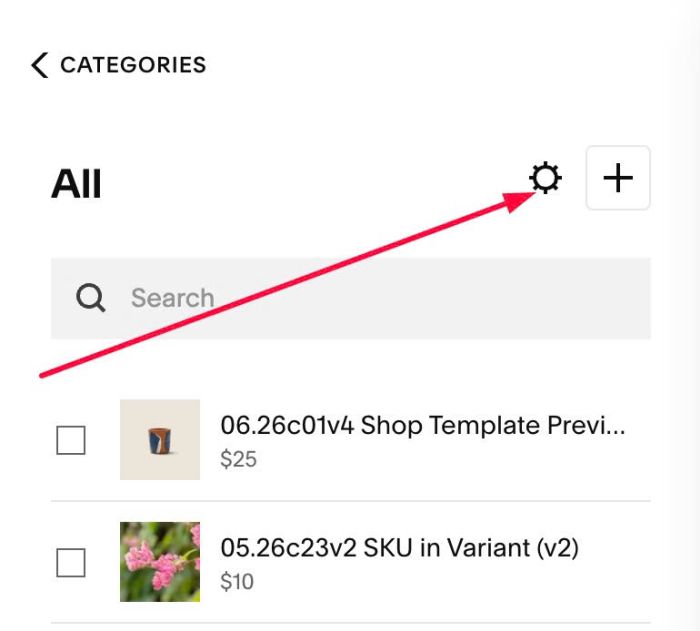
#1.1. Click Gear icon on Store Page
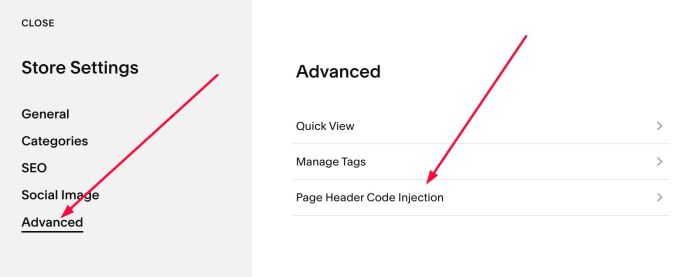
Next, click Advanced > Page Header Code Injection
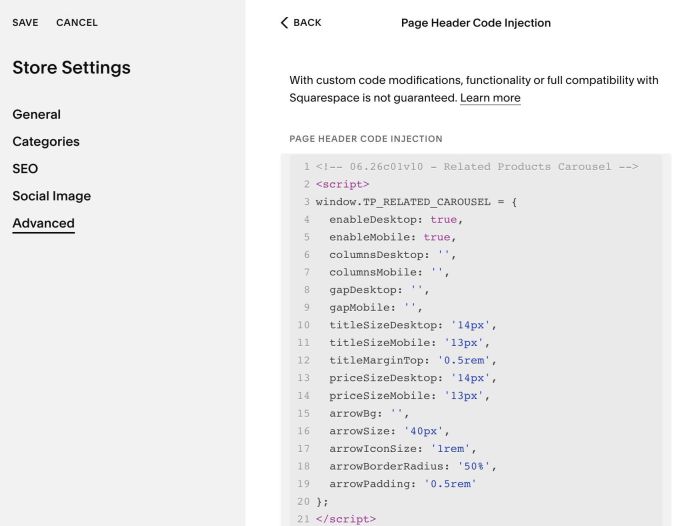
#1.2. Add this code into Right box
<!-- 06.26c01v10 - Related Products Carousel -->
<script>
window.TP_RELATED_CAROUSEL = {
  enableDesktop: true,
  enableMobile: true,
  columnsDesktop: '',
  columnsMobile: '',
  gapDesktop: '',
  gapMobile: '',
  titleSizeDesktop: '14px',
  titleSizeMobile: '13px',
  titleMarginTop: '0.5rem',
  priceSizeDesktop: '14px',
  priceSizeMobile: '13px',
  arrowBg: '',
  arrowSize: '40px',
  arrowIconSize: '1rem',
  arrowBorderRadius: '50%',
  arrowPadding: '0.5rem'
};
</script>
<script src="https://code.beaverhero.com/productdetail/0626c01v10relatedproductscarousel.js"></script>
#2. Customize
#2.1. To enable/disable Carousel on Desktop or Mobile only, change Line 04, Line 05
enableDesktop: true,
enableMobile: true,
#2.2. To change number of columns on Desktop/Mobile
By default, it is 2 columns on both Desktop – Mobile, however you can adjust this value by change Line 06, Line 07
columnsDesktop: '',
columnsMobile: '',
to something like this
columnsDesktop: '4',
columnsMobile: '1',
#2.3. Gap between Products
By default, it will use gap from Squarespace system, however you can change it by adjusting Line 08, Line 09
gapDesktop: '',
gapMobile: '',
to something like this
gapDesktop: '40px',
gapMobile: '10px',
#2.4. To change Product Title, Price size, you can change Line 10 to Line 14
titleSizeDesktop: '14px',
titleSizeMobile: '13px',
titleMarginTop: '0.5rem',
priceSizeDesktop: '14px',
priceSizeMobile: '13px',
#2.5. To change Arrow Style, you can change Line 15 to Line 19
arrowBg: '',
arrowSize: '40px',
arrowIconSize: '1rem',
arrowBorderRadius: '50%',
arrowPadding: '0.5rem'
Note: Arrow Background – Product Title will use Same Color
#2.6. To change space between Left Arrow – Left of Image/Right Arrow – Right of Image, you can use this under main code
<style>
button.tp-rpc-nav.tp-rpc-prev {
    left: 10px !important;
}
button.tp-rpc-nav.tp-rpc-next {
    right: 10px !important;
}
</style>