To add Slideshow with Text/Counter Number under Image, like this.

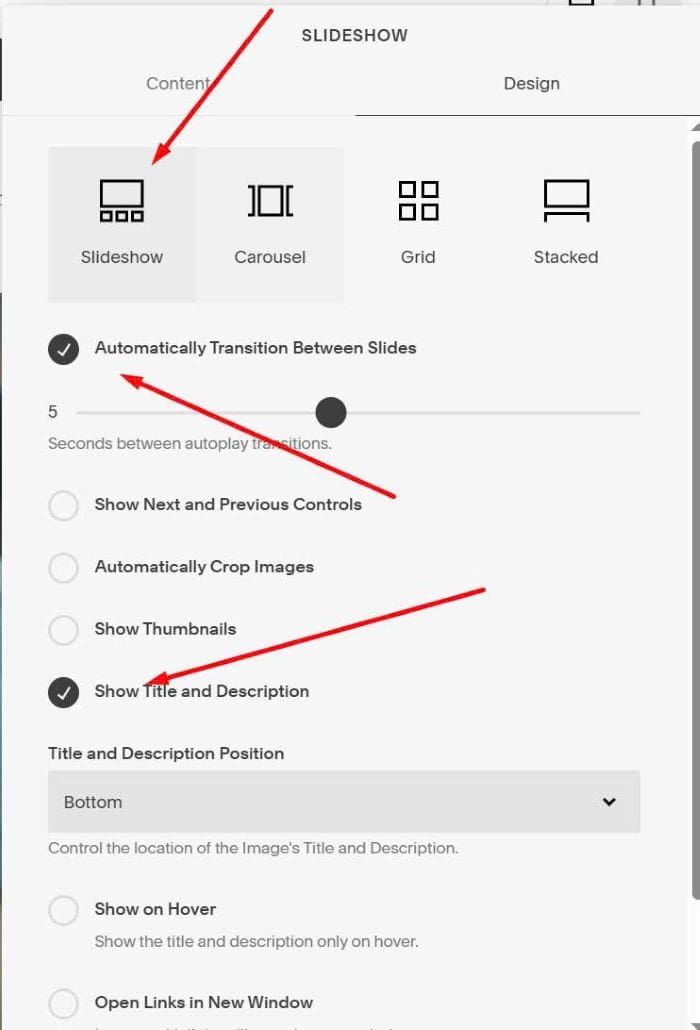
#1. First, add a Gallery Block Slideshow with these options.
#2. Edit each Image, use this format to Title field
Above all, even above the great design concepts, I appreciate your leadership style and how you kept everything organized and moving forward.<em>1/3</em>

#3. Use this code to Page Header Injection
<script src="https://ajax.googleapis.com/ajax/libs/jquery/3.6.1/jquery.min.js"></script>
<script>
$(document).ready(function(){
  $(".meta-title").each(function(){
    $(this).html($(this).text());
  });
});
</script>
<style>
.meta {
    position: relative !important;
    background: transparent !important;
    left: unset !important;
    width: 100% !important;
}
.meta * {
    color: #000 !important;
    font-size: 14px !important;
}
.meta em {
    float: right;
}

.meta-inside {
    padding-top: 5px !important;
  padding-left: 0px !important;
}
.slide {
    transition: opacity 0.8s ease-in-out !important;
}

.slide:not(.sqs-active-slide) {
    opacity: 0 !important;
}

.slide.sqs-active-slide {
    opacity: 1 !important;
}
</style>