Description
- slideshow to grid/grid to slideshow
- use Gallery Section: Slideshow Simple
- view demo – password: abc
Note
- if you use Personal/Basic Plan, message me, I will install code for you
- Buy me a coffee if it is useful
(slideshow view)

(grid view)

#1. Install Code
#1.1. First you need to add an Image Section (choose section with (i) icon)
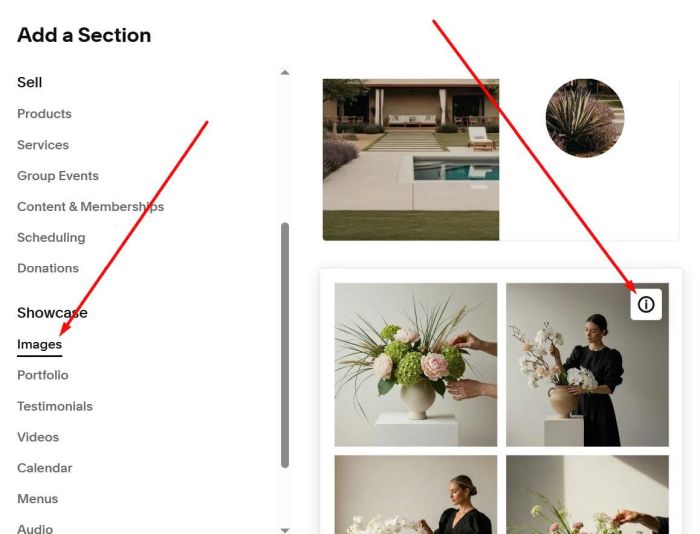
Next, make sure you changed it to Slideshow: Simple

Add your desired images

#1.2. Hover on top right of section > Click Edit Section
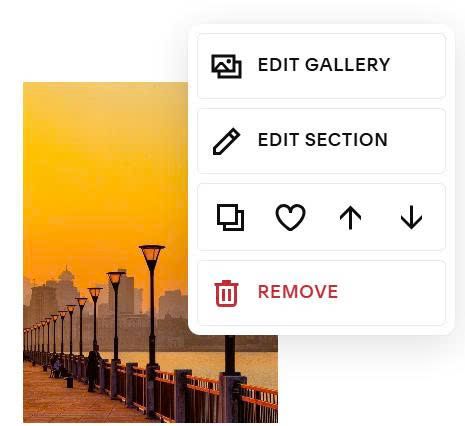
at Anchor Link, enter: thumbnail-slideshow
thumbnail-slideshow

#1.3. Hover on page where you added Slideshow > Click Gear icon

Click Advanced > Paste this code
<!-- 01.26c20v4 Slideshow to Grid -->
<style>
  :root {
      --0126c20v4-slideshow-max-width:900px;
    --0126c20v4-arrow-counter-color:#7b7266;
    --0126c20v4-slideshow-counter-text-size:12px;
    --0126c20v4-slideshow-arrow-size: 14px;
    --0126c20v4-slideshow-arrow-hover-color:#000;
    --0126c20v4-slideshow-image-ratio: 16 / 9;
    --0126c20v4-slideshow-grid-view-image-ratio: 16 / 9;
  }
</style>
<link rel="stylesheet" href="https://cdnjs.cloudflare.com/ajax/libs/font-awesome/6.5.1/css/all.min.css">
<link rel="stylesheet" href="https://code.beaverhero.com/gallerys/slideshowgrid.css"/>
<script src="https://code.beaverhero.com/gallerys/slideshowgrid.js"></script>

#2. Customize
All style options here (Line 03 to Line 11)
:root {
	--0126c20v4-slideshow-max-width:900px;
  --0126c20v4-arrow-counter-color:#7b7266;
  --0126c20v4-slideshow-counter-text-size:12px;
  --0126c20v4-slideshow-arrow-size: 14px;
  --0126c20v4-slideshow-arrow-hover-color:#000;
  --0126c20v4-slideshow-image-ratio: 16 / 9;
  --0126c20v4-slideshow-grid-view-image-ratio: 16 / 9;
}

#2.1. To change number of columns in Grid View, use this code under main code
<style>
/* Desktop */
section[id*="thumbnail-slideshow"] .tp-ss-grid {
    grid-template-columns: repeat(4,1fr) !important;
    grid-gap: 10px 10px !important;
}
/* Mobile */
@media screen and (max-width:767px) {
    section[id*="thumbnail-slideshow"] .tp-ss-grid {
        grid-template-columns: repeat(2,1fr) !important;
        grid-gap: 5px 5px !important;
    }
}
</style>
If you have any problems, you can email or message me.