Description
- parallax effect, same as parallax on Squarespace 7.0
- view demo – password: abc
- buy me a coffee
#1. Install code
#1.1. First, hover on top right of all sections where you want to add Parallax > Click Edit Section

at Anchor Link, enter word: parallax
parallax
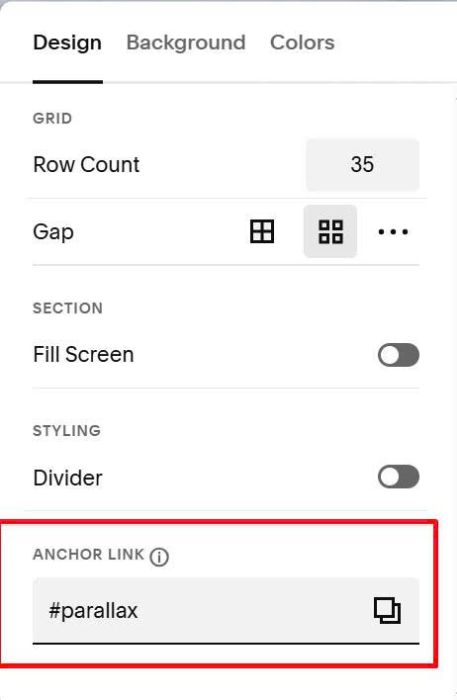
#1.2. If you want to apply to multiple sections on same page, you can enter word: parallax, parallax2, parallax3…for these sections.
Like this

or this

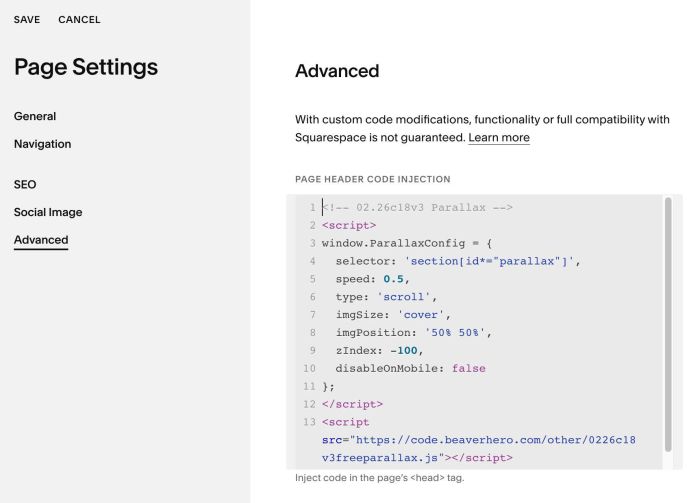
#1.3. Hover on page where you will use Parallax > Click Gear icon

Click Advanced > Paste this code
- If you use Personal/Basic Plan and your plan doesn’t support Injection, see #3.1
<!-- 02.26c18v3 Parallax -->
<script>
window.ParallaxConfig = {
  selector: 'section[id*="parallax"]',
  speed: 0.5,
  type: 'scroll',
  imgSize: 'cover',
  imgPosition: '50% 50%',
  zIndex: -100,
  disableOnMobile: false
};
</script>
<script src="https://code.beaverhero.com/other/0226c18v3freeparallax.js"></script>
#2. Customize
all options in line 03 to line 11
window.ParallaxConfig = {
  selector: 'section[id*="parallax"]',
  speed: 0.5,
  type: 'scroll',
  imgSize: 'cover',
  imgPosition: '50% 50%',
  zIndex: -100,
  disableOnMobile: false
};
#3. Other
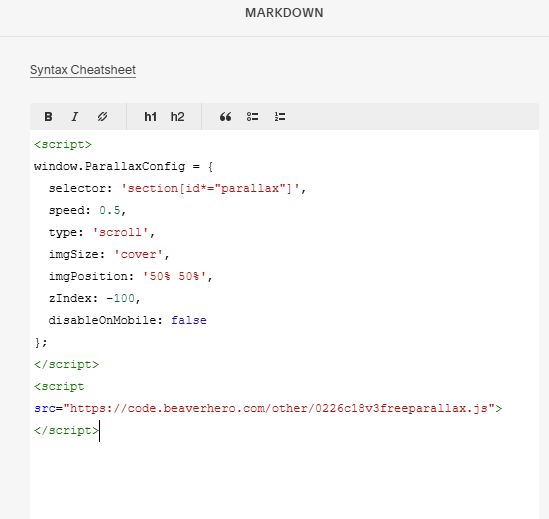
#3.1. If you use Personal/Basic Plan and your plan doesn’t support Injection, you can edit current page (page where you want to apply Parallax) > Add a Markdown Block.

Then paste this code into Markdown Block
<script>
window.ParallaxConfig = {
  selector: 'section[id*="parallax"]',
  speed: 0.5,
  type: 'scroll',
  imgSize: 'cover',
  imgPosition: '50% 50%',
  zIndex: -100,
  disableOnMobile: false
};
</script>
<script src="https://code.beaverhero.com/other/0226c18v3freeparallax.js"></script>