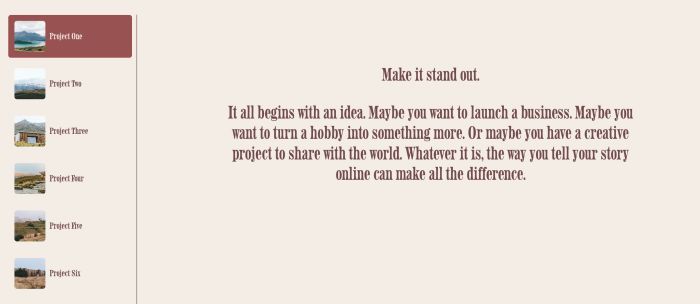
Description
- make WM Tabs Plugin autoscroll
- pause on hover
- open page on tab click
- view demo – password: abc
- buy me a coffee
Note: this extra code for WM Tabs Plugin
#1. Install Code
#1.1. Hover on Page where you use Tabs Plugin > Click Gear icon
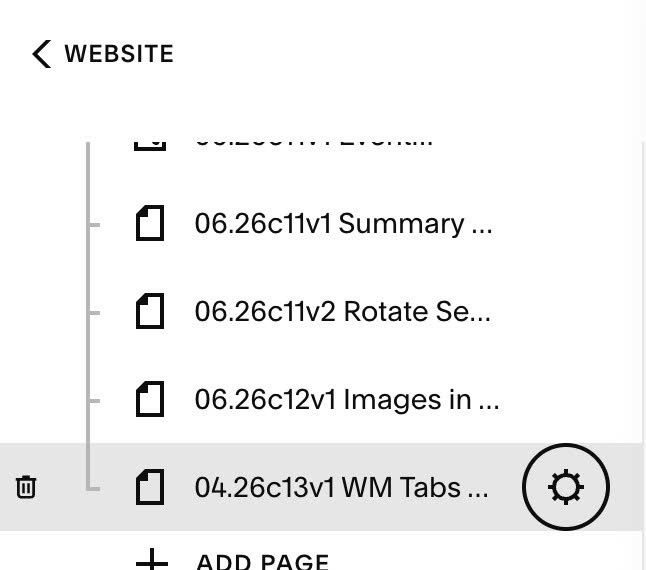
Click Advanced > Paste this code
<!-- @tuanphan - 04.26c13v1 WM Tabs Autoscroll -->
<script>
window.wmAutoTabConfig = {
  instances: 'all',
  interval: 4000,
  pauseOnHover: true,
  clickToOpen: true,
  openInNewTab: true,
  mobileDelay: 5000,
};
</script>
<script>
window.addEventListener('wmTabs:afterOpenTab', function init() {
  window.removeEventListener('wmTabs:afterOpenTab', init);

  var cfg = window.wmAutoTabConfig;
  var allInstances = wmTabs.instances;
  if (!allInstances || !allInstances.length) return;

  var targets = cfg.instances === 'all'
    ? allInstances
    : cfg.instances.map(function(i) { return allInstances[i]; }).filter(Boolean);

  function isMobile() {
    return window.matchMedia('(pointer: coarse)').matches;
  }

  targets.forEach(function(instance) {
    var current = 0;
    var total = instance.tabs.length;
    var paused = false;
    var mobileOpenTimers = {};

    setInterval(function() {
      if (paused) return;
      current = (current + 1) % total;
      instance.openTab(instance.tabs[current].id);
    }, cfg.interval);

    if (cfg.pauseOnHover) {
      instance.el.addEventListener('mouseenter', function() { paused = true; });
      instance.el.addEventListener('mouseleave', function() { paused = false; });
    }

    if (cfg.clickToOpen) {
      instance.tabs.forEach(function(tab, index) {
        tab.button.addEventListener('click', function() {
          var url = tab.item && tab.item.fullUrl;
          if (!url) return;

          if (isMobile()) {
            if (mobileOpenTimers[index]) {
              clearTimeout(mobileOpenTimers[index]);
              delete mobileOpenTimers[index];
              return;
            }
            mobileOpenTimers[index] = setTimeout(function() {
              delete mobileOpenTimers[index];
              cfg.openInNewTab ? window.open(url, '_blank') : window.location.href = url;
            }, cfg.mobileDelay);
          } else {
            cfg.openInNewTab ? window.open(url, '_blank') : window.location.href = url;
          }
        });
      });
    }
  });
});
</script>
Note:
- You can also add code to Code Injection > Footer (under Plugin code)
- If you have problem when edit code in Edit Mode, you can access Safe Mode or increase autoscroll speed (then when you’ve done edit, change speed back again)
#2. Customize
#2.1. Some options you can adjust (line 03 to line 10)
- interval = speed, 4000 = 4 seconds
- pauseonHover (pause autoscroll on hover a tab or tab content): true = enable, false = disable
- clickToOpen (open new page on click tab): true = enable, false = disable
- openInNewTab (open page in new tab or same tab): true = open in new tab, false = open in current tab
- mobileDelay (tap on mobile and then 5 seconds it will open new page): 5000 = 5 seconds
window.wmAutoTabConfig = {
  instanceIndex: 'all',
  interval: 4000,
  pauseOnHover: true,
  clickToOpen: true,
  openInNewTab: true,
  mobileDelay: 5000,
};