Description
- Summary Block Carousel to List Section Carousel
- Sync Products (Title, Price, Category)
- view demo – password: abc
- buy me a coffee

#1. Install Code
If you use Personal/Basic Plan and your plan doesn’t support Injection, see #2.1
#1.1. First, add a Summary Block Carousel

#1.2. Enable these options

#1.3. Hover on top right of section (section where you added Summary Block) > Click EDIT SECTION

at Anchor Link, enter word: carousel-2-list

If you have multiple sections, use: carousel-2-listv2, carousel-2-listv3…
#1.4. Hover on page where you use Summary > Click Gear icon

Click Advanced > Paste this code
<!-- 04.26c30v7 Summary Carousel to List Carousel v1 -->
<script>
window.TpCarousel2Config={
  autoplay:false,
  autoplayDelay:3000,
  showCategory:true
};
</script>
<script src="https://code.beaverhero.com/summaryblock/0426c30v7summary2carousel.js"></script>

#2. Customize
#2.1. If you use Personal/Basic Plan and your plan doesn’t support Injection, you can add a Markdown Block under Summary

Then use this code into Markdown Block
<script>
window.TpCarousel2Config={
  autoplay:false,
  autoplayDelay:3000,
  showCategory:true
};
</script>
<script src="https://code.beaverhero.com/summaryblock/0426c30v7summary2carousel.js"></script>

#2.2. Adding header text

Just add text to this option

#2.3. Enable Category

Use this code to Custom CSS
div.swiper-slide {
    .summary-metadata.summary-metadata--primary, .summary-metadata-item {
    display: block !important;
}}

#2.3v2. To enable Category on specific Summary Block, you can find Summary Block ID

Then use code like this to Custom CSS
#block-yui_3_17_2_1_1777552949094_43457 {
    .summary-metadata.summary-metadata--primary, .summary-metadata-item {
    display: block !important;
}}

#2.4. To disable Title, Price on specific Summary Block, just simply use this option

Or if you want to use code, you can find Summary Block ID
Then use code like this to Custom CSS
#block-yui_3_17_2_1_1777552949094_43457 {
    .summary-title, .summary-price {
        display: none !important;
    }
}

#2.4v2. To disable Title, Price + enable Category, use CSS code like this (remember to change Summary Block ID)
#block-yui_3_17_2_1_1777552949094_43457 {
    .summary-metadata.summary-metadata--primary, .summary-metadata-item {
    display: block !important;
}
 .summary-title, .summary-price {
        display: none !important;
    }
}
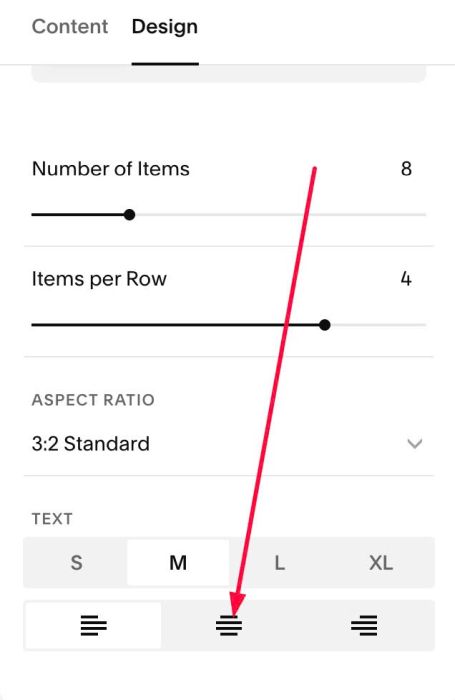
#2.5. To align center text under Image, just use this option in Summary
#2.6. To increase Category size, use this to Custom CSS
div.swiper-slide span.summary-metadata-item * {
    font-size: 20px;
}