Description
- adding filter/search on Summary Block (for Regular Pages)
- view demo – password: abc
- buy me a coffee
#1. Install Code
Note:
- Code will add Filter/Search on Summary Block with Regular Pages only. If you use Summary Block for Collection Pages (Blog, Product, Event, Video, Course…) it won’t work.
- The instructions are a bit difficult to follow; you can email me, and I can install it for you. Then you just need to change options value.
#1.1. Make sure you installed Summary Block on Regular Pages, by using this free plugin
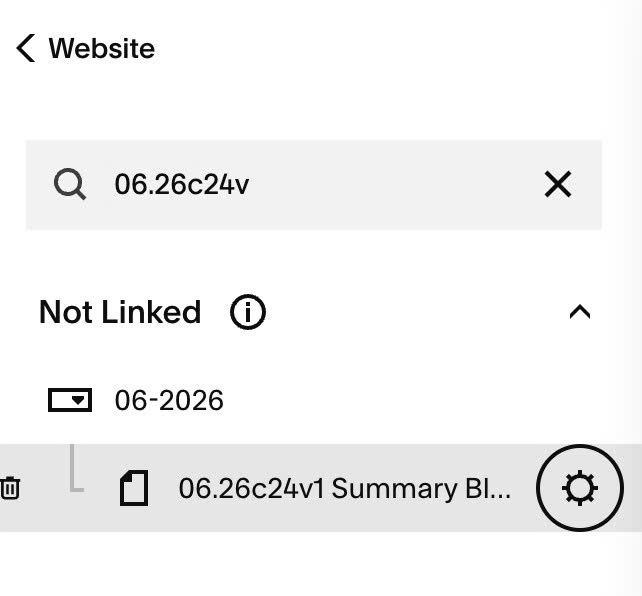
#1.2. Hover on Page where you use Summary Block > Click Gear icon
#1.3. Click Advanced > Paste this code
- If you use Personal/Basic Plan and your plan doesn’t support Injection, see #3.1
<!-- 06.26c24v1 Summary Block Regular Pages Filter -->
<script>
window.SummaryMenuFilterConfig = {
  sectionId: 'sm-pages',
  format: 'dropdown', /* inline or dropdown */
  logic: 'AND',
  multiSelect: false,
  showCount: true,
  hideEmpty: true,
  divider: '/',

  filters: [
    {
      label: 'Destination',
      options: ['Italy', 'Brazil', 'US', 'Singapore', 'Canada', 'UK', 'France', 'Japan'],
      // allLabel: 'All',
      // logic: 'or',
      // enable: true,
    },
    {
      label: 'Guests',
      options: ['0 - 19', '20 - 100', '101 - 500', '501 - 1000'],
      // allLabel: 'All',
      // logic: 'or',
      // enable: true,
    },
    {
      label: 'Views',
      options: ['Sea views', 'City skyline', 'Beachfront', 'Mountain views'],
      // allLabel: 'All',
      // logic: 'or',
      // enable: true,
    }
  ],

  search: {
    enable: true,
    placeholder: 'Search...',
    fields: ['title', 'excerpt', 'tags'],
    width: '240px',
    background: '#ffffff',
    border: '1px solid #000000',
    borderRadius: '4px',
    textSize: '14px',
    textColor: '#000000',
    placeholderColor: '#888888'
  },

  style: {
    gap: '8px',
    rowGap: '16px',
    marginBottom: '24px',
    fontSize: '13px',
    labelWeight: '600',
    activeColor: 'transparent',
    activeTextColor: '#000000',
    inactiveColor: 'transparent',
    inactiveTextColor: '#000000',
    dropdown: {
      minWidth: '160px',
      background: '#ffffff',
      border: '1px solid #000000',
      borderRadius: '4px',
      textSize: '14px',
      textColor: '#000000',
      panelBackground: '#ffffff',
      hoverBackground: '#f2f2f2'
    }
  },

  plugins: []
};
</script>
<script src="https://code.beaverhero.com/summaryblock/0626c24v1sbregularpagesfilter.js">
</script>
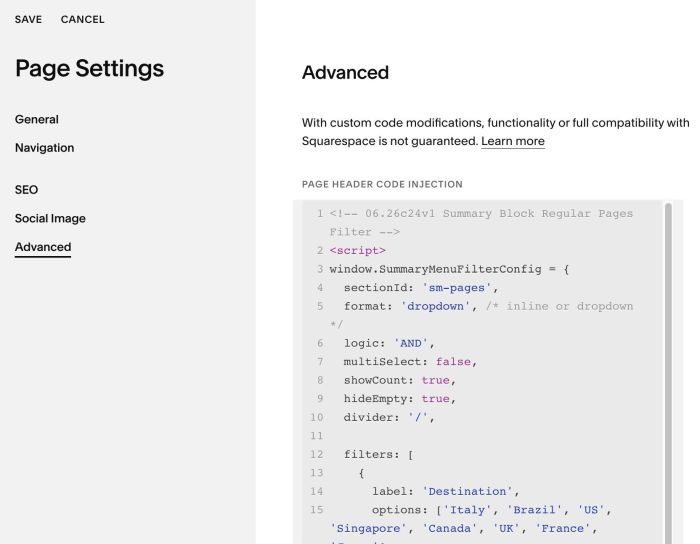
#1.4. To add Filter Categories, you can add text to Page SEO Description, use format
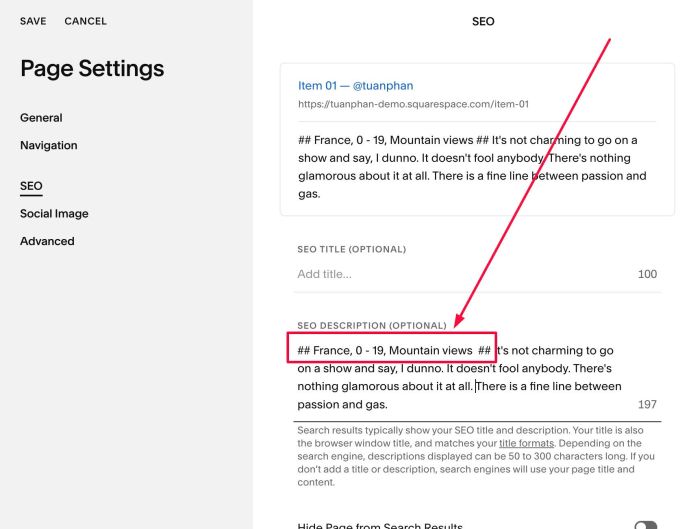
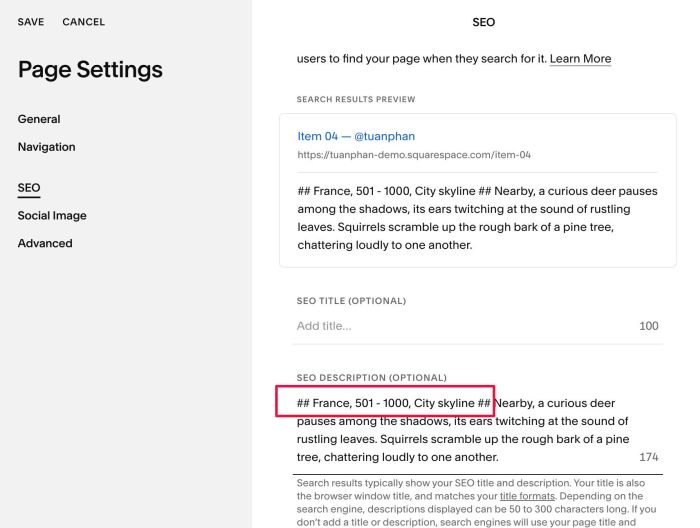
## category 01, category 02, category 03, category 04...##
Something like this
## France, 0 - 19, Mountain views ##
or like this
## France, 501 - 1000, City skyline ##
#1.5. Add Filter Options in the code (Line 12 to Line 34)
filters: [
   {
     label: 'Destination',
     options: ['Italy', 'Brazil', 'US', 'Singapore', 'Canada', 'UK', 'France', 'Japan'],
     // allLabel: 'All',
     // logic: 'or',
     // enable: true,
   },
   {
     label: 'Guests',
     options: ['0 - 19', '20 - 100', '101 - 500', '501 - 1000'],
     // allLabel: 'All',
     // logic: 'or',
     // enable: true,
   },
   {
     label: 'Views',
     options: ['Sea views', 'City skyline', 'Beachfront', 'Mountain views'],
     // allLabel: 'All',
     // logic: 'or',
     // enable: true,
   }
 ],
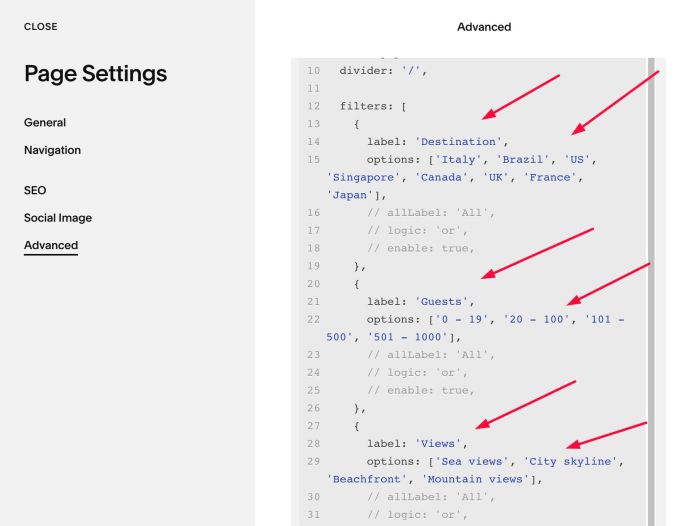
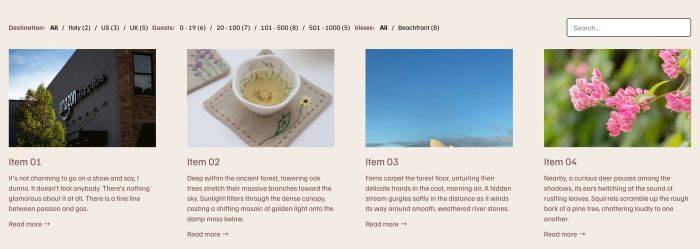
It will show like this. (Here I use Inline format)

#2. Customize
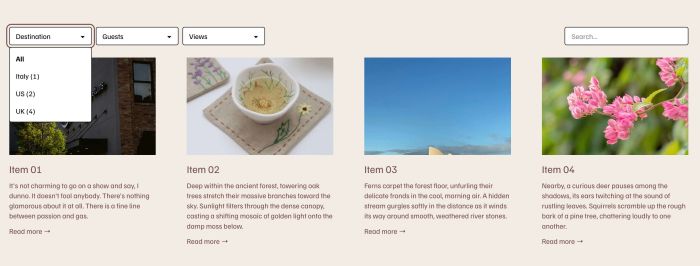
#2.1. To set Dropdown or Inline format
Dropdown
Inline
You can change Line 05
format: 'inline', /* inline or dropdown */
to something like this
format: 'dropdown', /* inline or dropdown */
#2.2. To disable a Filter: in each filter, find this line
- enable: true = show filter
- enable: false = hide filter
// enable: true,
change it to something like this
enable: false,
#2.3. To enable/disable Search input, change Line 37, from true to false
search: {
  enable: true,
  placeholder: 'Search...',
  fields: ['title', 'excerpt', 'tags'],
  width: '240px',
  background: '#ffffff',
  border: '1px solid #000000',
  borderRadius: '4px',
  textSize: '14px',
  textColor: '#000000',
  placeholderColor: '#888888'
},
to something like this
search: {
  enable: false,
  placeholder: 'Search...',
  fields: ['title', 'excerpt', 'tags'],
  width: '240px',
  background: '#ffffff',
  border: '1px solid #000000',
  borderRadius: '4px',
  textSize: '14px',
  textColor: '#000000',
  placeholderColor: '#888888'
},
#2.4. To change style of Search – Dropdown Filters, you can change Line 36 to Line 69
search: {
  enable: true,
  placeholder: 'Search...',
  fields: ['title', 'excerpt', 'tags'],
  width: '240px',
  background: '#ffffff',
  border: '1px solid #000000',
  borderRadius: '4px',
  textSize: '14px',
  textColor: '#000000',
  placeholderColor: '#888888'
},

style: {
  gap: '8px',
  rowGap: '16px',
  marginBottom: '24px',
  fontSize: '13px',
  labelWeight: '600',
  activeColor: 'transparent',
  activeTextColor: '#000000',
  inactiveColor: 'transparent',
  inactiveTextColor: '#000000',
  dropdown: {
    minWidth: '160px',
    background: '#ffffff',
    border: '1px solid #000000',
    borderRadius: '4px',
    textSize: '14px',
    textColor: '#000000',
    panelBackground: '#ffffff',
    hoverBackground: '#f2f2f2'
  }
},
#2.5. To move Search on right of screen, use this under main code
<style>
  @media screen and (min-width:768px) {
  #sm-pages .smf-bar input {
    margin-right: 0;
    margin-left: auto;
    }}
</style>
#2.6. To move each filter bar on each own line, use this under main code
<style>
.smf-group {
    flex: 100% !important;
}
</style>
#3. Other
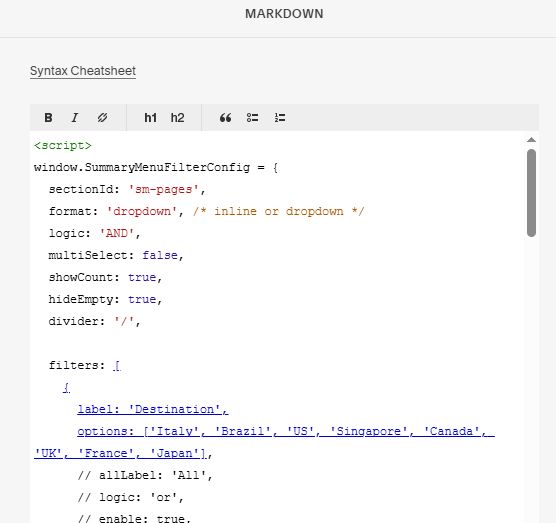
#3.1. If you use Personal/Basic Plan and your plan doesn’t support Injection, you can add a Block under Summary Block

Choose Markdown

Add this code into Markdown
<script>
window.SummaryMenuFilterConfig = {
  sectionId: 'sm-pages',
  format: 'dropdown', /* inline or dropdown */
  logic: 'AND',
  multiSelect: false,
  showCount: true,
  hideEmpty: true,
  divider: '/',

  filters: [
    {
      label: 'Destination',
      options: ['Italy', 'Brazil', 'US', 'Singapore', 'Canada', 'UK', 'France', 'Japan'],
      // allLabel: 'All',
      // logic: 'or',
      // enable: true,
    },
    {
      label: 'Guests',
      options: ['0 - 19', '20 - 100', '101 - 500', '501 - 1000'],
      // allLabel: 'All',
      // logic: 'or',
      // enable: true,
    },
    {
      label: 'Views',
      options: ['Sea views', 'City skyline', 'Beachfront', 'Mountain views'],
      // allLabel: 'All',
      // logic: 'or',
      // enable: true,
    }
  ],

  search: {
    enable: true,
    placeholder: 'Search...',
    fields: ['title', 'excerpt', 'tags'],
    width: '240px',
    background: '#ffffff',
    border: '1px solid #000000',
    borderRadius: '4px',
    textSize: '14px',
    textColor: '#000000',
    placeholderColor: '#888888'
  },

  style: {
    gap: '8px',
    rowGap: '16px',
    marginBottom: '24px',
    fontSize: '13px',
    labelWeight: '600',
    activeColor: 'transparent',
    activeTextColor: '#000000',
    inactiveColor: 'transparent',
    inactiveTextColor: '#000000',
    dropdown: {
      minWidth: '160px',
      background: '#ffffff',
      border: '1px solid #000000',
      borderRadius: '4px',
      textSize: '14px',
      textColor: '#000000',
      panelBackground: '#ffffff',
      hoverBackground: '#f2f2f2'
    }
  },

  plugins: []
};
</script>
<script src="https://code.beaverhero.com/summaryblock/0626c24v1sbregularpagesfilter.js">
</script>