Description
- adding Price to Add to Cart button
- view demo – password: abc
- buy me a coffee

#1. Install Code
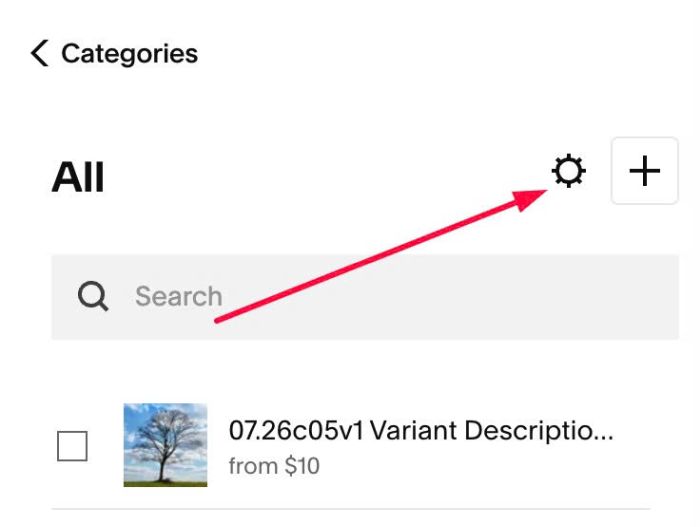
#1.1. Click Gear icon on Store Page
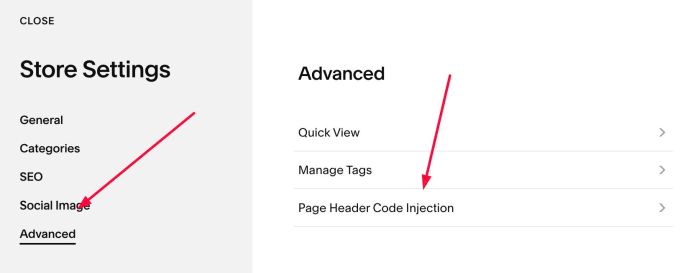
Next, click Advanced > Page Header Code Injection
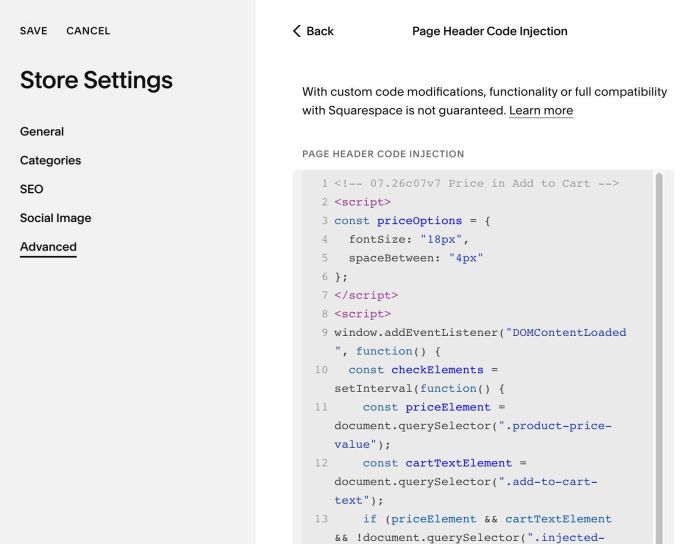
#1.2. Add this code to right box
<!-- 07.26c07v7 Price in Add to Cart -->
<script>
const priceOptions = {
  fontSize: "18px",
  spaceBetween: "4px"
};
</script>
<script>
window.addEventListener("DOMContentLoaded", function() {
  const checkElements = setInterval(function() {
    const priceElement = document.querySelector(".product-price-value");
    const cartTextElement = document.querySelector(".add-to-cart-text");
    if (priceElement && cartTextElement && !document.querySelector(".injected-price")) {
      const priceText = priceElement.textContent.trim();
      const originalText = cartTextElement.textContent.trim();
      cartTextElement.innerHTML = "<span class='injected-price' style='display:block; font-size:" + priceOptions.fontSize + "; margin-bottom:" + priceOptions.spaceBetween + ";'>" + priceText + "</span><span style='display:block;'>" + originalText + "</span>";
      clearInterval(checkElements);
    }
  }, 100);
  setTimeout(function() { clearInterval(checkElements); }, 5000);
});
</script>
#2. Customize
#2.1. To change Price size, change Line 04
fontSize: "18px",
#2.2. To change space between Price – Add to Cart, change Line 05
spaceBetween: "4px"