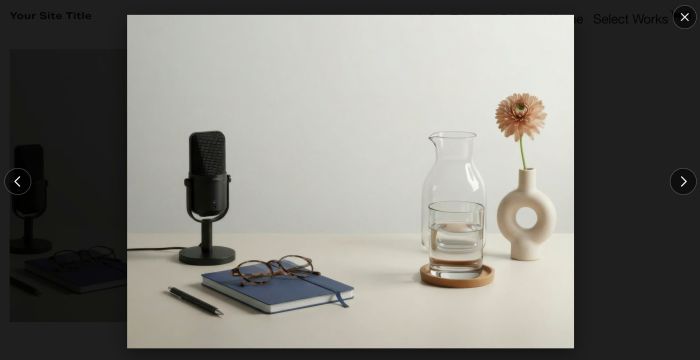
Description
- click blog item from blog overview page will open large image in lightbox, click blog title/read more still open blog post detail
- view demo – password: abc
- buy me a coffee
#1. Install Code
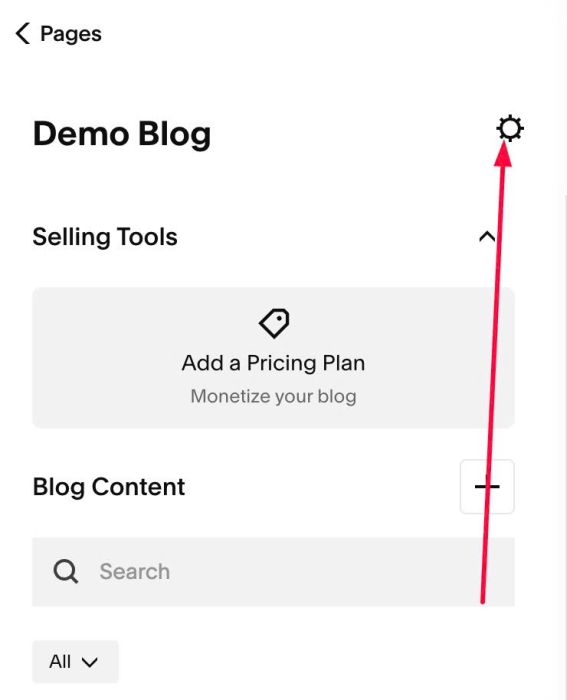
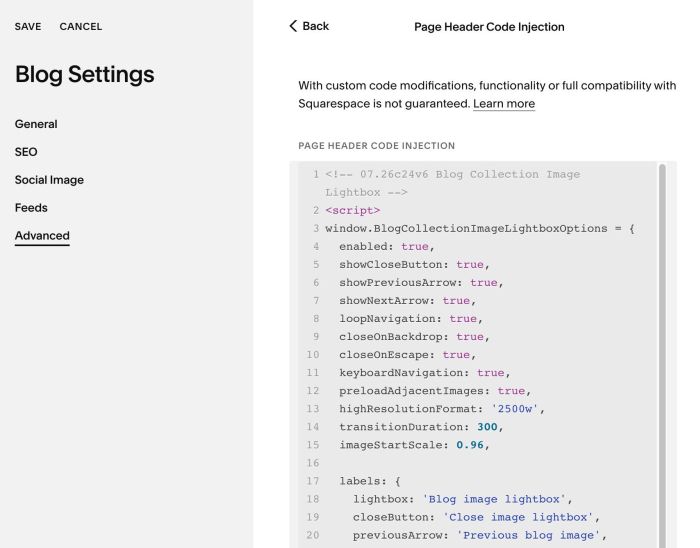
#1.1. Click Gear icon on Blog Page
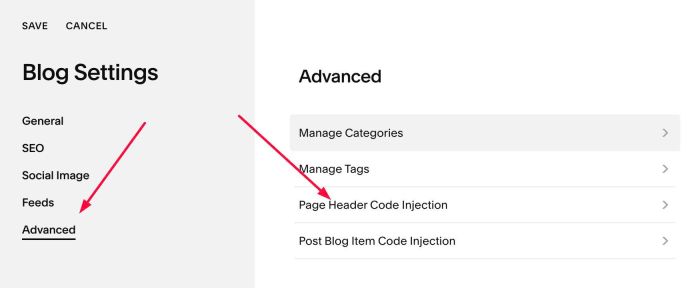
#1.2. Click Advanced > Page Header Code Injection
#1.3. Paste this code
- If your site is Personal/Basic Plan and it doesn’t support Injection, see #3.1
<!-- 07.26c24v6 Blog Collection Image Lightbox -->
<script>
window.BlogCollectionImageLightboxOptions = {
  enabled: true,
  showCloseButton: true,
  showPreviousArrow: true,
  showNextArrow: true,
  loopNavigation: true,
  closeOnBackdrop: true,
  closeOnEscape: true,
  keyboardNavigation: true,
  preloadAdjacentImages: true,
  highResolutionFormat: '2500w',
  transitionDuration: 300,
  imageStartScale: 0.96,

  labels: {
    lightbox: 'Blog image lightbox',
    closeButton: 'Close image lightbox',
    previousArrow: 'Previous blog image',
    nextArrow: 'Next blog image'
  },

  colors: {
    overlayBackground: 'rgba(0, 0, 0, 0.88)',
    closeButtonBackground: 'rgba(0, 0, 0, 0.55)',
    closeButtonIcon: '#ffffff',
    closeButtonBorder: 'rgba(255, 255, 255, 0.35)',
    previousArrowBackground: 'rgba(0, 0, 0, 0.55)',
    previousArrowIcon: '#ffffff',
    previousArrowBorder: 'rgba(255, 255, 255, 0.35)',
    nextArrowBackground: 'rgba(0, 0, 0, 0.55)',
    nextArrowIcon: '#ffffff',
    nextArrowBorder: 'rgba(255, 255, 255, 0.35)',
    focusOutline: '#ffffff',
    imageShadow: 'rgba(0, 0, 0, 0.45)'
  },

  dimensions: {
    imageMaxWidth: '90vw',
    imageMaxHeight: '90vh',
    imageBorderRadius: '0px',
    closeButtonWidth: '48px',
    closeButtonHeight: '48px',
    closeButtonTop: '18px',
    closeButtonRight: '18px',
    closeIconWidth: '24px',
    closeIconHeight: '24px',
    previousArrowWidth: '54px',
    previousArrowHeight: '54px',
    previousArrowLeft: '18px',
    previousArrowIconWidth: '28px',
    previousArrowIconHeight: '28px',
    nextArrowWidth: '54px',
    nextArrowHeight: '54px',
    nextArrowRight: '18px',
    nextArrowIconWidth: '28px',
    nextArrowIconHeight: '28px'
  }
};
</script>
<script src="https://code.beaverhero.com/blogpost/0726c24v6blogcollectionimglb.js"></script>
#2. Customize
All style options in top of code
enabled: true,
 showCloseButton: true,
 showPreviousArrow: true,
 showNextArrow: true,
 loopNavigation: true,
 closeOnBackdrop: true,
 closeOnEscape: true,
 keyboardNavigation: true,
 preloadAdjacentImages: true,
 highResolutionFormat: '2500w',
 transitionDuration: 300,
 imageStartScale: 0.96,

 labels: {
   lightbox: 'Blog image lightbox',
   closeButton: 'Close image lightbox',
   previousArrow: 'Previous blog image',
   nextArrow: 'Next blog image'
 },

 colors: {
   overlayBackground: 'rgba(0, 0, 0, 0.88)',
   closeButtonBackground: 'rgba(0, 0, 0, 0.55)',
   closeButtonIcon: '#ffffff',
   closeButtonBorder: 'rgba(255, 255, 255, 0.35)',
   previousArrowBackground: 'rgba(0, 0, 0, 0.55)',
   previousArrowIcon: '#ffffff',
   previousArrowBorder: 'rgba(255, 255, 255, 0.35)',
   nextArrowBackground: 'rgba(0, 0, 0, 0.55)',
   nextArrowIcon: '#ffffff',
   nextArrowBorder: 'rgba(255, 255, 255, 0.35)',
   focusOutline: '#ffffff',
   imageShadow: 'rgba(0, 0, 0, 0.45)'
 },

 dimensions: {
   imageMaxWidth: '90vw',
   imageMaxHeight: '90vh',
   imageBorderRadius: '0px',
   closeButtonWidth: '48px',
   closeButtonHeight: '48px',
   closeButtonTop: '18px',
   closeButtonRight: '18px',
   closeIconWidth: '24px',
   closeIconHeight: '24px',
   previousArrowWidth: '54px',
   previousArrowHeight: '54px',
   previousArrowLeft: '18px',
   previousArrowIconWidth: '28px',
   previousArrowIconHeight: '28px',
   nextArrowWidth: '54px',
   nextArrowHeight: '54px',
   nextArrowRight: '18px',
   nextArrowIconWidth: '28px',
   nextArrowIconHeight: '28px'
 }
#3. Other
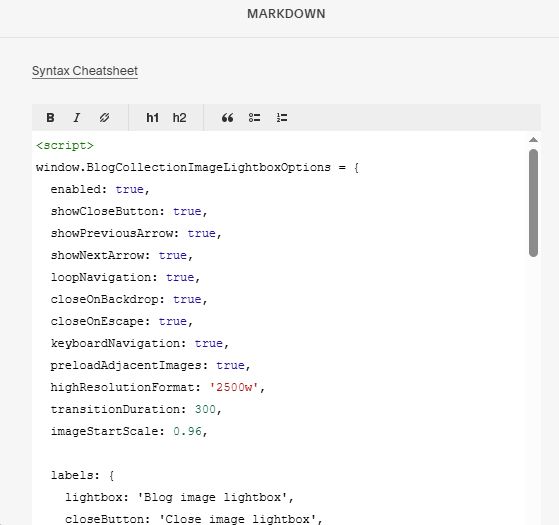
#3.1. If you use Personal/Basic Plan and your plan doesn’t support Injection, you can edit Site Footer
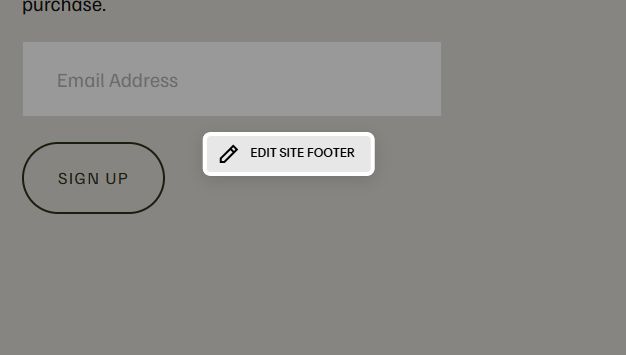
Add a Markdown Block

Add this code into Markdown
<script>
window.BlogCollectionImageLightboxOptions = {
  enabled: true,
  showCloseButton: true,
  showPreviousArrow: true,
  showNextArrow: true,
  loopNavigation: true,
  closeOnBackdrop: true,
  closeOnEscape: true,
  keyboardNavigation: true,
  preloadAdjacentImages: true,
  highResolutionFormat: '2500w',
  transitionDuration: 300,
  imageStartScale: 0.96,

  labels: {
    lightbox: 'Blog image lightbox',
    closeButton: 'Close image lightbox',
    previousArrow: 'Previous blog image',
    nextArrow: 'Next blog image'
  },

  colors: {
    overlayBackground: 'rgba(0, 0, 0, 0.88)',
    closeButtonBackground: 'rgba(0, 0, 0, 0.55)',
    closeButtonIcon: '#ffffff',
    closeButtonBorder: 'rgba(255, 255, 255, 0.35)',
    previousArrowBackground: 'rgba(0, 0, 0, 0.55)',
    previousArrowIcon: '#ffffff',
    previousArrowBorder: 'rgba(255, 255, 255, 0.35)',
    nextArrowBackground: 'rgba(0, 0, 0, 0.55)',
    nextArrowIcon: '#ffffff',
    nextArrowBorder: 'rgba(255, 255, 255, 0.35)',
    focusOutline: '#ffffff',
    imageShadow: 'rgba(0, 0, 0, 0.45)'
  },

  dimensions: {
    imageMaxWidth: '90vw',
    imageMaxHeight: '90vh',
    imageBorderRadius: '0px',
    closeButtonWidth: '48px',
    closeButtonHeight: '48px',
    closeButtonTop: '18px',
    closeButtonRight: '18px',
    closeIconWidth: '24px',
    closeIconHeight: '24px',
    previousArrowWidth: '54px',
    previousArrowHeight: '54px',
    previousArrowLeft: '18px',
    previousArrowIconWidth: '28px',
    previousArrowIconHeight: '28px',
    nextArrowWidth: '54px',
    nextArrowHeight: '54px',
    nextArrowRight: '18px',
    nextArrowIconWidth: '28px',
    nextArrowIconHeight: '28px'
  }
};
</script>
<script src="https://code.beaverhero.com/blogpost/0726c24v6blogcollectionimglb.js"></script>