Description
- adding a background image with film grain animation effect on blog overview page
- view demo – password: abc
- buy me a coffee

#1. Install Code
#1.1. Click Gear icon on Blog Page

#1.2. Click Advanced > Page Header Code Injection
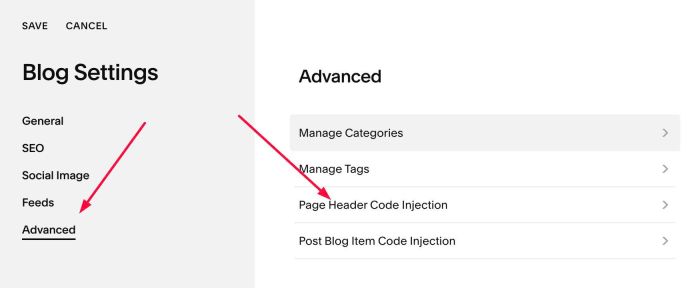
#1.3. Paste this code
- If your site is Personal/Basic Plan and it doesn’t support Injection, see #3.1
<!-- 08.26c06v2 Blog Page Film Grain Animation -->
<script>
window.BlogFilmGrainOptions = {
  pageSelector: '#page',
  backgroundImage: 'https://images.squarespace-cdn.com/content/v1/5ec321c2af33de48734cc929/1755889154109-2I4Z9DKESBO13FRFHQDY/imgg-demo-Mp7JMOJ2.png',
  backgroundPosition: 'center center',
  backgroundSize: 'cover',
  overlayStartColor: 'rgba(0, 0, 0, 0)',
  overlayEndColor: 'rgba(0, 0, 0, 0.5)',
  contentTextColor: '#ffffff',
  grainTexture: 'https://upload.wikimedia.org/wikipedia/commons/7/76/1k_Dissolve_Noise_Texture.png',
  grainOpacity: 0.1,
  grainDuration: '8s',
  grainSteps: 10,
  grainBlendMode: 'normal'
};
</script>
<script src="https://code.beaverhero.com/blogpage/0826c06v2blogpagefilmgrainanimation.js"></script>

#2. Customize
#2.1. You can change blog background image in line 03
backgroundImage: 'https://images.squarespace-cdn.com/content/v1/5ec321c2af33de48734cc929/1755889154109-2I4Z9DKESBO13FRFHQDY/imgg-demo-Mp7JMOJ2.png',
#2.2. If you need to tweak more you can use this AI Assistant (designed for Squarespace sites)
#3. Other
#3.1. If you use Personal/Basic Plan and your plan doesn’t support Injection, you can edit Site Footer > Add a Markdown Block

Add this code into Markdown
<script>
window.BlogFilmGrainOptions = {
  pageSelector: '#page',
  backgroundImage: 'https://images.squarespace-cdn.com/content/v1/5ec321c2af33de48734cc929/1755889154109-2I4Z9DKESBO13FRFHQDY/imgg-demo-Mp7JMOJ2.png',
  backgroundPosition: 'center center',
  backgroundSize: 'cover',
  overlayStartColor: 'rgba(0, 0, 0, 0)',
  overlayEndColor: 'rgba(0, 0, 0, 0.5)',
  contentTextColor: '#ffffff',
  grainTexture: 'https://upload.wikimedia.org/wikipedia/commons/7/76/1k_Dissolve_Noise_Texture.png',
  grainOpacity: 0.1,
  grainDuration: '8s',
  grainSteps: 10,
  grainBlendMode: 'normal'
};
</script>
<script src="https://code.beaverhero.com/blogpage/0826c06v2blogpagefilmgrainanimation.js"></script>
