Description
- adding terms of use checkbox to form block, users need to choose this option before click submit
- view demo – password: abc
- buy me a coffee

#1. Install Code
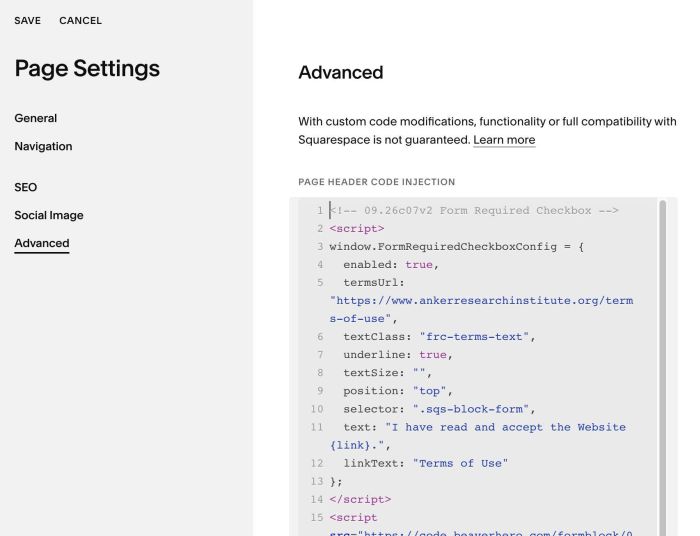
#1.1. Hover on Page where you use Form Block > Click Gear icon

#1.2. Click Advanced > Paste this code
<!-- 09.26c07v2 Form Required Checkbox -->
<script>
window.FormRequiredCheckboxConfig = {
  enabled: true,
  termsUrl: "https://www.ankerresearchinstitute.org/terms-of-use",
  textClass: "frc-terms-text",
  underline: true,
  textSize: "",
  position: "top",
  selector: ".sqs-block-form",
  text: "I have read and accept the Website {link}.",
  linkText: "Terms of Use"
};
</script>
<script src="https://code.beaverhero.com/formblock/0926c07v2formrequiredcheckboxv2.js"></script>
#2. Customize
#2.1. To change text, change this line 11 – 12
text: "I have read and accept the Website {link}.",
linkText: "Terms of Use"
#2.2. To change URL, change this line 05
termsUrl: "https://www.ankerresearchinstitute.org/terms-of-use",
#2.3. To change text size, change line 08. By default, it will inherit style of “Sign up for news and updates” text size
textSize: "0.9em",
#2.4. If you want to make it apply to all Form Blocks in Blog Post, change line 10
selector: ".sqs-block-form",
to this
selector: ".blog-item-content-wrapper .sqs-block-form",
then move all code to Code Injection > Footer
#2.5. To add space under Sign up for news and updates, use this code under main code
<style>
  .frc-consent+div.option {
    margin-bottom: 0.7em !important;
}
</style>