Description
- adding category to product title, you can set position: above title, under title, under description
- view demo – password: abc
- buy me a coffee

#1. Install Code
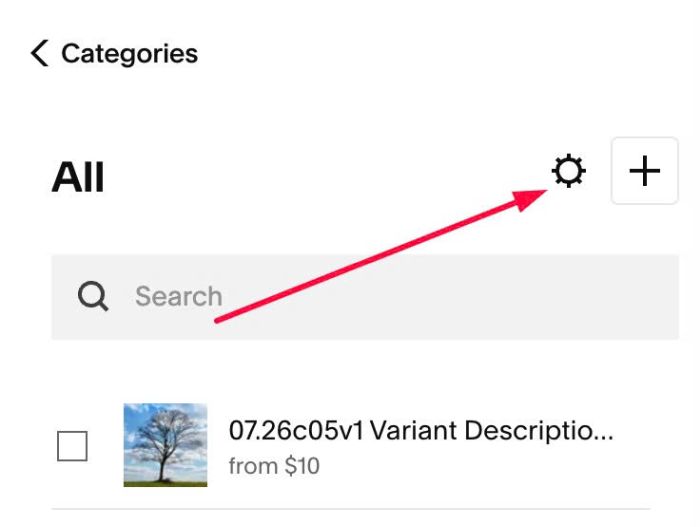
#1.1. Click Gear icon on Store Page
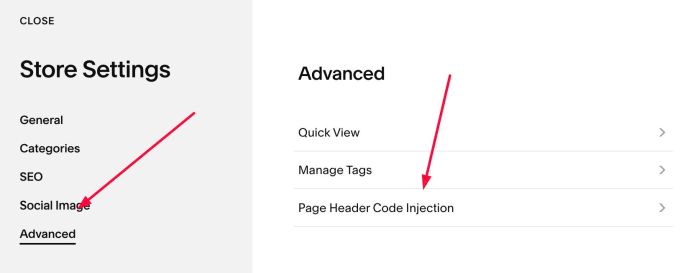
Next, click Advanced > Page Header Code Injection
#1.2. Add this code to right box
<!-- 09.26c07v6 Product Name Category -->
<script>
window.ProductNameCategoryConfig = {
  position: 'above-title', /* above-title, below-title, below-description */
  extraClass: '',
  enableLink: true,
  showParents: true,
  limit: 0,
  fontSize: '',
  gapBetween: '10px',
  gapToTitle: '10px',
  gapToDescription: '10px',
  textColor: '#714b4b',
  hoverColor: '',
  borderColor: '#714b4b',
  backgroundColor: ''
};
</script>
<script src="https://code.beaverhero.com/productdetail/0926c07v6productnamecategory.js"></script>

#2. Customize
#2.1. You can set 3 positions for category: above product title, under product title, under product description
position: 'above-title', /* above-title, below-title, below-description */
#2.2. To disable/enable category link, change line 06
- true = enable
- false = disable
enableLink: true,
#2.3. Other options in line 09 – line 16
fontSize: '',
gapBetween: '10px',
gapToTitle: '10px',
gapToDescription: '10px',
textColor: '#714b4b',
hoverColor: '',
borderColor: '#714b4b',
backgroundColor: ''