Description
- Want a small label with a line in front of it? Set the text to Paragraph 3, give it a text color in the editor, and this CSS adds the line and letter spacing automatically
- buy me a coffee

#1. Install Code
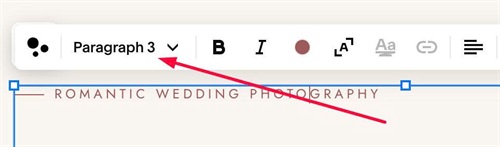
#1.1. First, you need to use Paragraph 3
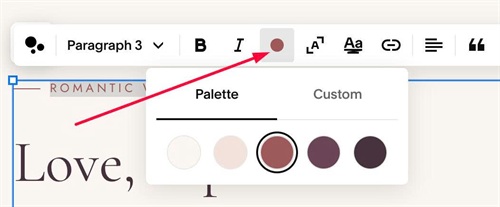
#1.2. Next, you need to set it a color (any colors)
#1.3. Next, use this code to Custom CSS
p.sqsrte-small:has(span[class*="sqsrte-text-color"]) {
  color: var(--sqsp-palette-accent-color);
  letter-spacing: .26em !important;
}

p.sqsrte-small:has(span[class*="sqsrte-text-color"])::before {
  content: "";
  display: inline-block;
  width: 28px;
  height: 1px;
  margin-right: 10px;
  vertical-align: middle;
  background-color: currentColor;
}
#1.4. Customize
To change gap between Line – Text, change this line
margin-right: 10px;
To change line width/line height, change this
width: 28px;
   height: 1px;
To change line color, change this line (you can use hex or color name or rgb, rgba)
background-color: currentColor;