Gallery Section Grid shows captions as plain text under each image. This code turns each image into a card: odd items keep the caption below the image on a light background, and every second item puts the caption over the full image with a dark overlay.

#1. Install Code
#1.1. Make sure you use Gallery Section Grid Simple + Enabled Captions
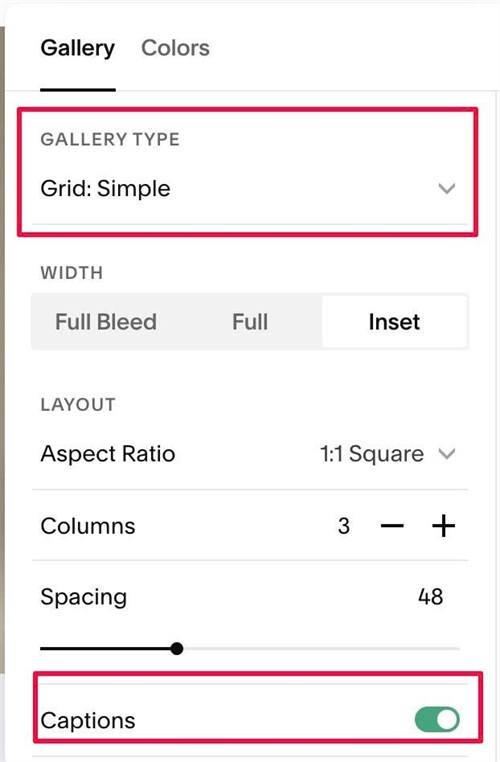
#1.2. Enter desired caption text/url
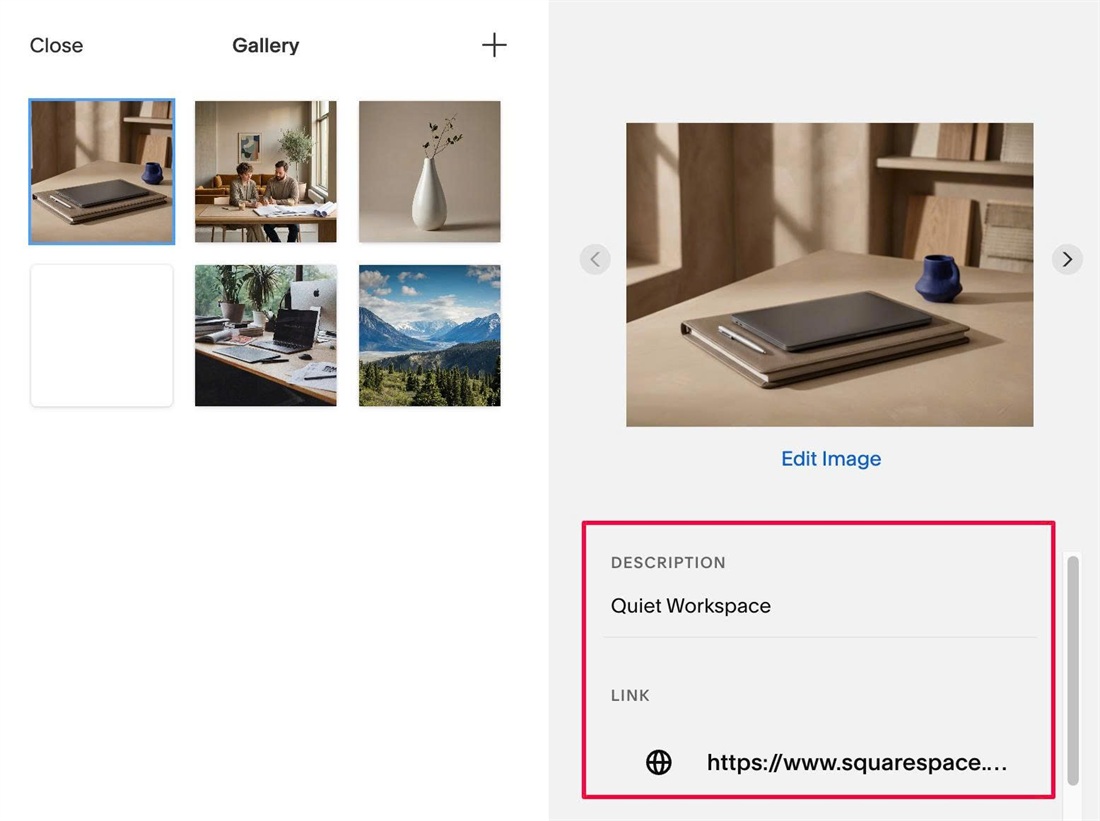
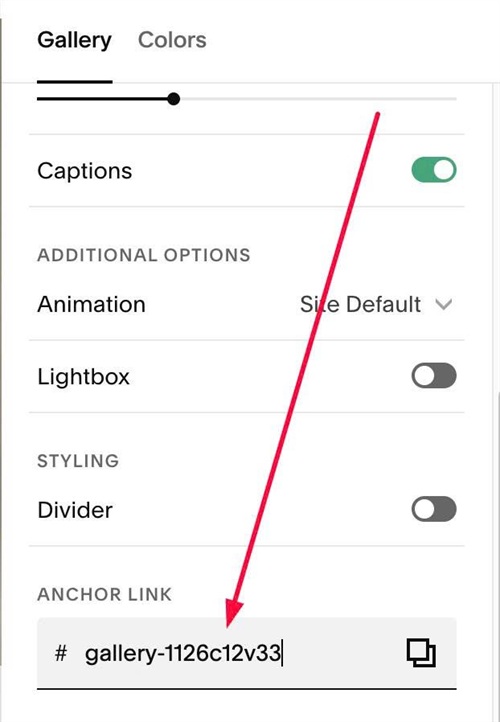
#1.3. Hover on top right of Gallery > Click EDIT SECTION > at Anchor Link > enter word: gallery-1126c12v33
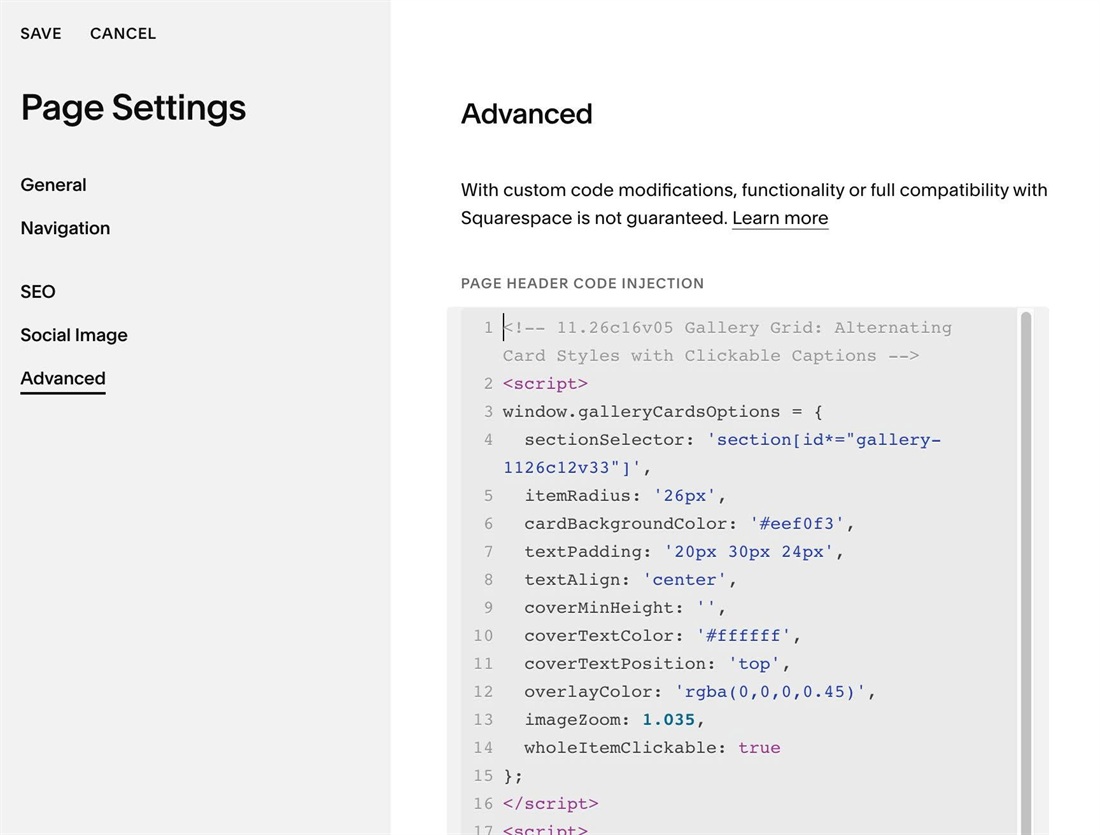
#1.4. Use code to Page Header Injection
<!-- 11.26c16v05 Gallery Grid: Alternating Card Styles with Clickable Captions -->
<script>
window.galleryCardsOptions = {
  sectionSelector: 'section[id*="gallery-1126c12v33"]',
  itemRadius: '26px',
  cardBackgroundColor: '#eef0f3',
  textPadding: '20px 30px 24px',
  textAlign: 'center',
  coverMinHeight: '',
  coverTextColor: '#ffffff',
  coverTextPosition: 'top',
  overlayColor: 'rgba(0,0,0,0.45)',
  imageZoom: 1.035,
  wholeItemClickable: true
};
</script>
<script>
(function(){
var o=Object.assign({sectionSelector:'section[id*="gallery-1126c12v33"]',itemRadius:'26px',cardBackgroundColor:'#eef0f3',textPadding:'20px 30px 24px',textAlign:'left',coverMinHeight:'',coverTextColor:'#ffffff',coverTextPosition:'top',overlayColor:'rgba(0,0,0,0.45)',imageZoom:1.035,wholeItemClickable:true},window.galleryCardsOptions||{});
function d(p,v){return v!==''&&v!=null?p+':'+v+';':''}
var s=o.sectionSelector,i=s+' .gallery-grid-item',c=i+':nth-child(even)',sid='gallery-cards-style-'+s.replace(/[^\w-]/g,'');
function style(){
if(document.getElementById(sid))return;
var pos={top:'flex-start',center:'center',bottom:'flex-end'}[o.coverTextPosition]||'';
var css=i+'{position:relative;isolation:isolate;overflow:hidden;display:flex;flex-direction:column;'+d('border-radius',o.itemRadius)+d('background-color',o.cardBackgroundColor)+'}'+
(o.imageZoom!==''?i+' .gallery-grid-item-wrapper img{transition:transform .4s ease}'+i+':hover .gallery-grid-item-wrapper img{transform:scale('+o.imageZoom+')}':'')+
i+' .gallery-caption{box-sizing:border-box;width:100%;'+d('padding',o.textPadding)+d('text-align',o.textAlign)+'}'+
(o.wholeItemClickable?i+'.has-clickthrough{cursor:pointer}':'')+
c+'{'+d('min-height',o.coverMinHeight)+d('justify-content',pos)+'}'+
c+' .gallery-grid-item-wrapper{position:absolute!important;inset:0!important;z-index:-2;width:100%!important;height:100%!important;padding:0!important}'+
c+' .gallery-grid-image-link,'+c+' .gallery-grid-item-wrapper img{position:absolute!important;inset:0!important;width:100%!important;height:100%!important;object-fit:cover}'+
c+':before{content:"";position:absolute;inset:0;z-index:-1;pointer-events:none;'+d('background',o.overlayColor)+'}'+
(o.coverTextColor!==''?c+' .gallery-caption,'+c+' .gallery-caption *{color:'+o.coverTextColor+'!important}':'')+
'@media(prefers-reduced-motion:reduce){'+i+' .gallery-grid-item-wrapper img{transition:none}}';
var el=document.createElement('style');el.id=sid;el.textContent=css;document.head.appendChild(el);
}
function bind(){
document.querySelectorAll(i+'.has-clickthrough').forEach(function(f){
if(f.getAttribute('data-gc-click'))return;
f.setAttribute('data-gc-click','1');
f.addEventListener('click',function(e){
var a=f.querySelector('.gallery-grid-image-link');
if(a&&!e.target.closest('a'))a.click();
});
});
}
function init(){style();if(!o.wholeItemClickable)return;bind();new MutationObserver(bind).observe(document.body,{childList:true,subtree:true})}
if(document.readyState!=='loading')init();else document.addEventListener('DOMContentLoaded',init);
})();
</script>
#1.5. Customize
To edit text background, change this
cardBackgroundColor: '#eef0f3',
To edit text color (text over image), overlay color
coverTextColor: '#ffffff',
coverTextPosition: 'top',
overlayColor: 'rgba(0,0,0,0.45)',
To align text to center/right
textAlign: 'center',