Gallery Block Grid shows image titles as plain text under each image. This code turns each image into a card: odd items keep the title below the image on a light background, and every second item puts the title over the full image with a dark overlay, keeping the image’s focal point.

#1. Install Code
#1.1. Make sure you use Gallery Block Grid + enabled Titles
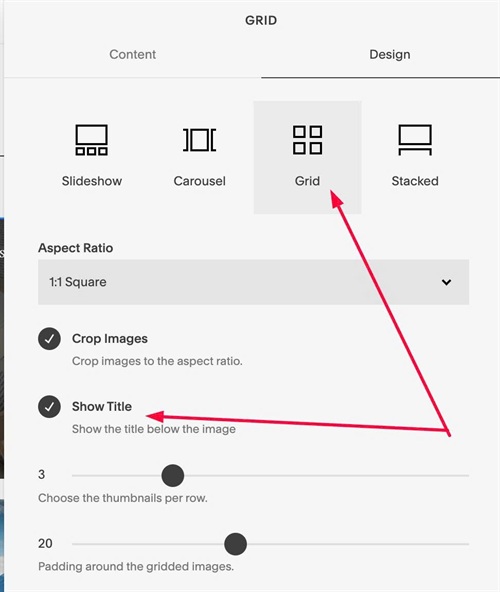
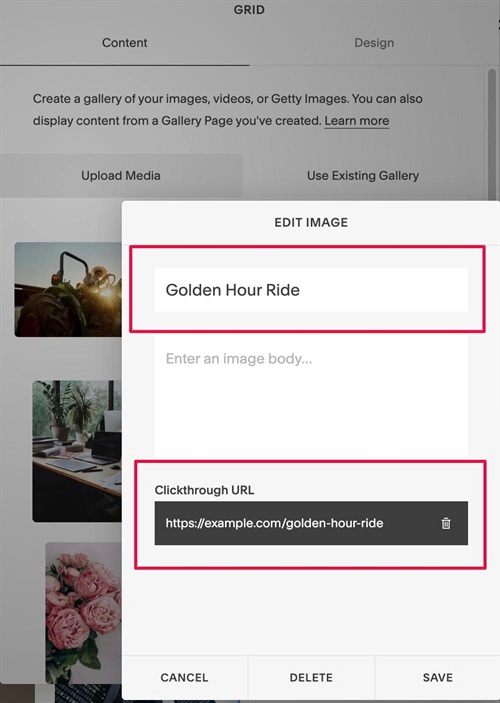
#1.2. Make sure you added Title or both Titles + URL
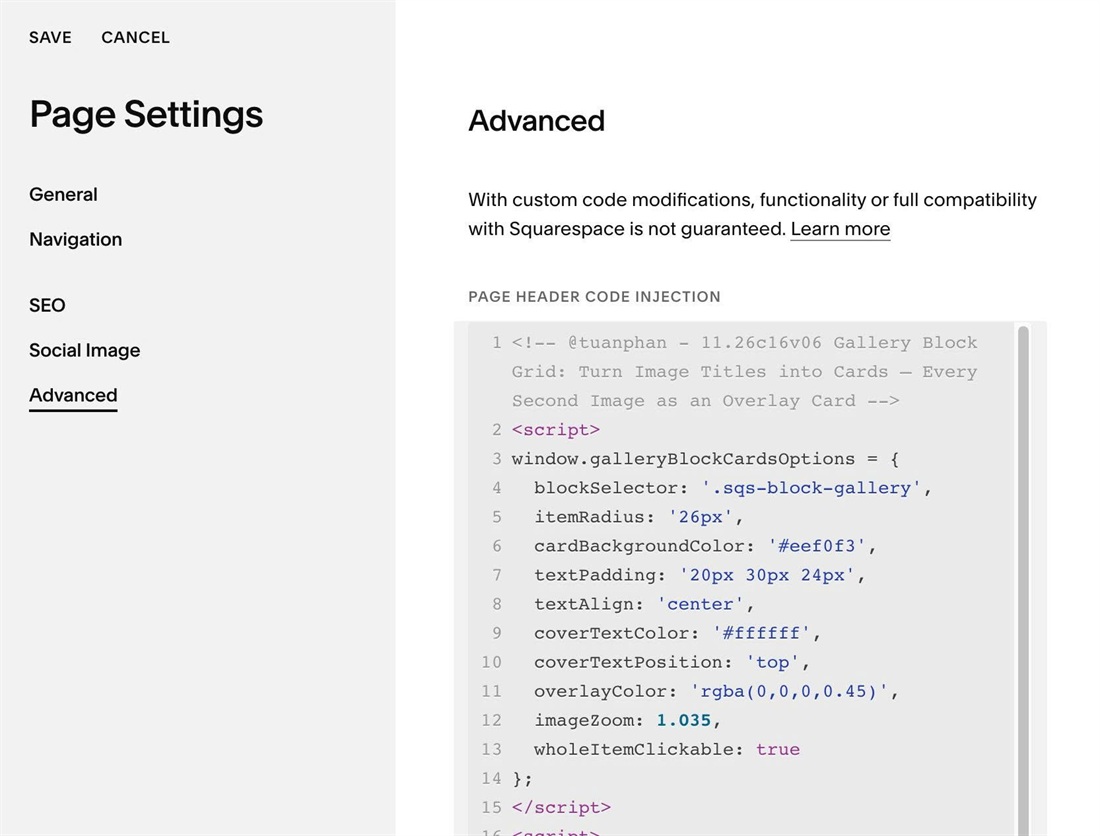
#1.3. Use this code to Page Header Injection
<!-- @tuanphan - 11.26c16v06 Gallery Block Grid: Turn Image Titles into Cards – Every Second Image as an Overlay Card -->
<script>
window.galleryBlockCardsOptions = {
  blockSelector: '.sqs-block-gallery',
  itemRadius: '26px',
  cardBackgroundColor: '#eef0f3',
  textPadding: '20px 30px 24px',
  textAlign: 'center',
  coverTextColor: '#ffffff',
  coverTextPosition: 'top',
  overlayColor: 'rgba(0,0,0,0.45)',
  imageZoom: 1.035,
  wholeItemClickable: true
};
</script>
<script>
(function(){
var o=Object.assign({blockSelector:'#block-yui_3_17_2_1_1794785280651_29322',itemRadius:'26px',cardBackgroundColor:'#eef0f3',textPadding:'20px 30px 24px',textAlign:'center',coverTextColor:'#ffffff',coverTextPosition:'top',overlayColor:'rgba(0,0,0,0.45)',imageZoom:1.035,wholeItemClickable:true},window.galleryBlockCardsOptions||{});
function d(p,v){return v!==''&&v!=null?p+':'+v+';':''}
var s=o.blockSelector+' .sqs-gallery-block-grid',g=s+' .sqs-gallery-design-grid',l=g+' .slide',i=l+' .margin-wrapper',c=l+':nth-child(even) .margin-wrapper',sid='gallery-block-cards-style-'+o.blockSelector.replace(/[^\w-]/g,'');
function style(){
if(document.getElementById(sid))return;
var pos={top:'top:0;',center:'top:50%;transform:translateY(-50%);',bottom:'bottom:0;'}[o.coverTextPosition]||'top:0;';
var css=g+'{display:flex!important;flex-wrap:wrap}'+
l+'{display:flex!important;float:none!important}'+
i+'{flex:1 1 auto;position:relative;isolation:isolate;overflow:hidden;'+d('border-radius',o.itemRadius)+d('background-color',o.cardBackgroundColor)+'}'+
i+' .image-slide-title{box-sizing:border-box;margin:0!important;'+d('padding',o.textPadding)+d('text-align',o.textAlign)+'}'+
(o.imageZoom!==''?i+' img{transition:transform .4s ease}'+i+':hover img{transform:scale('+o.imageZoom+')}':'')+
(o.wholeItemClickable?i+'.gbc-click{cursor:pointer}':'')+
c+' img{position:absolute!important;inset:0!important;left:0!important;top:0!important;z-index:-2;width:100%!important;height:100%!important;max-width:none!important;object-fit:cover}'+
c+':before{content:"";position:absolute;inset:0;z-index:-1;pointer-events:none;'+d('background',o.overlayColor)+'}'+
c+' .image-slide-title{position:absolute;left:0;right:0;'+pos+(o.coverTextColor!==''?'color:'+o.coverTextColor+'!important':'')+'}'+
'@media(prefers-reduced-motion:reduce){'+i+' img{transition:none}}';
var el=document.createElement('style');el.id=sid;el.textContent=css;document.head.appendChild(el);
}
function run(){
document.querySelectorAll(c+' img[data-image-focal-point]').forEach(function(img){
var f=img.getAttribute('data-image-focal-point').split(',');
if(f.length===2)img.style.objectPosition=(f[0]*100)+'% '+(f[1]*100)+'%';
});
if(!o.wholeItemClickable)return;
document.querySelectorAll(i).forEach(function(m){
var a=m.querySelector('a.image-slide-anchor[href]');
if(!a||m.classList.contains('gbc-click'))return;
m.classList.add('gbc-click');
m.addEventListener('click',function(e){if(!e.target.closest('a'))a.click()});
});
}
function init(){style();run();new MutationObserver(run).observe(document.body,{childList:true,subtree:true})}
if(document.readyState!=='loading')init();else document.addEventListener('DOMContentLoaded',init);
})();
</script>
#1.4. Customize
To edit text background color, change this
cardBackgroundColor: '#eef0f3',
To edit text over image color, edit this
coverTextColor: '#ffffff',
To change overaly color
overlayColor: 'rgba(0,0,0,0.45)',