Squarespace has no option to add an icon or dot before text. This CSS adds a pulsing dot before any Paragraph 3 text in a section, which is great for labels like “Available for new projects” or “Now booking 2027”.

#1. Install Code
#1.1. First, add a Paragraph 3 text
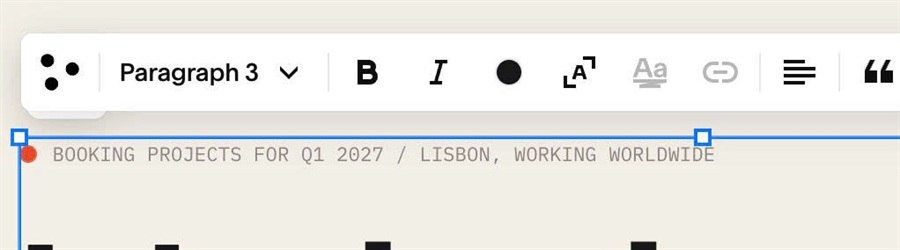
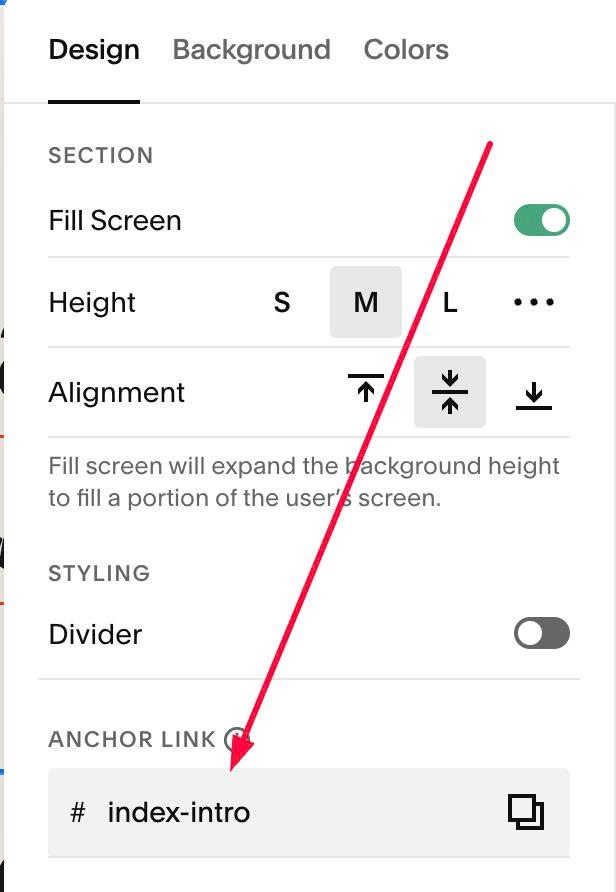
#1.2. Next, hover on top right of section > Click EDIT SECTION > at Design > Anchor Link > enter word: index-intro
#1.3. Next, use this code to Custom CSS
/* Paragraph 3 Dots */
#index-intro {
  --dot-size: 8px;
  --dot-color: #E8462A;
  --dot-gap: 10px;
  --dot-pulse-size: 7px;
  --dot-speed: 2.4s;
  p.sqsrte-small:not(:empty)::before {
    content: "";
    display: inline-block;
    width: var(--dot-size);
    height: var(--dot-size);
    margin-right: var(--dot-gap);
    border-radius: 50%;
    background: var(--dot-color);
    vertical-align: middle;
    position: relative;
    top: -.1em;
    animation: index-intro-dot-pulse var(--dot-speed) ease-in-out infinite;
  }
}
@keyframes index-intro-dot-pulse {
  0%, 100% { box-shadow: 0 0 0 0 var(--dot-color) }
  50% { box-shadow: 0 0 0 var(--dot-pulse-size) transparent }
}
#1.4. Customize
To change dot size + dot color, edit this
--dot-size: 8px;
--dot-color: #E8462A;
To chang gap between text – dot, edit this
--dot-gap: 10px;