Description
- adding timeline1 style with Team Section
- view demo – password: abc
- buy me a coffee if it is useful for you

#1. Install Code
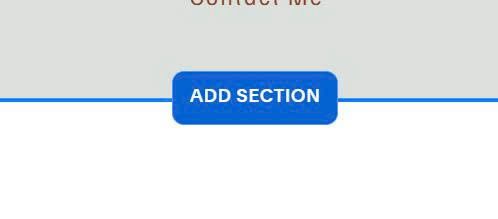
#1.1. First you need to add Section
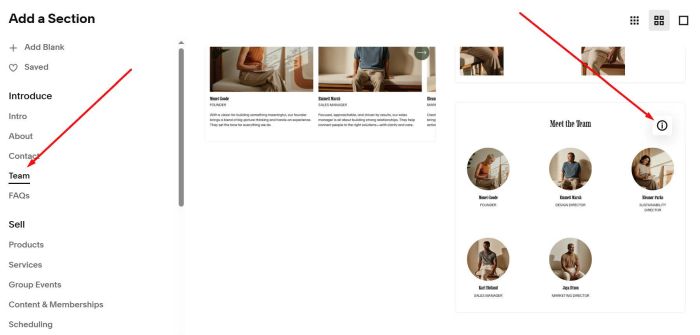
Choose Team > Choose section with (i) icon. You need to add 3 Team sections
Make sure use Simple List
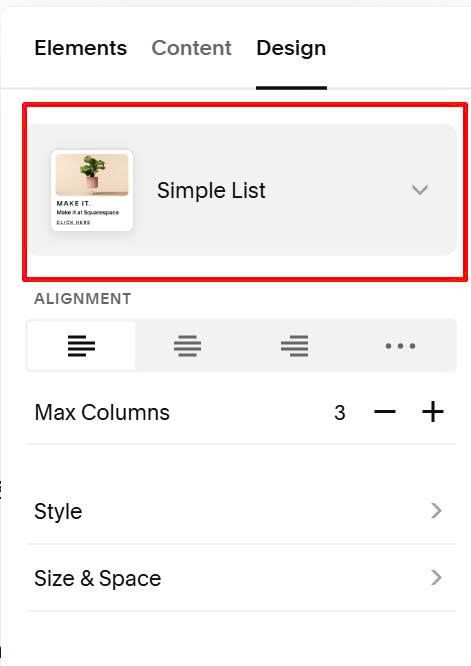
#1.2. Next, enable these options

and add your desired text

#1.3. Hover on top right of section > click Edit Section

at Anchor Link, enter word: timeline1
timeline1

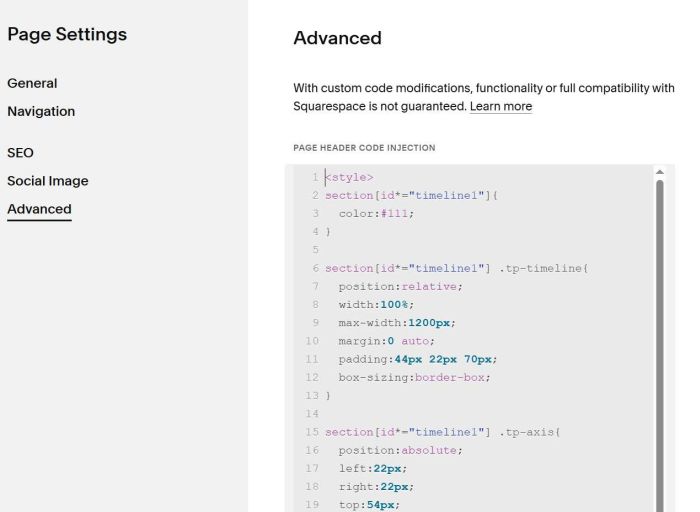
#1.4. Hover on page where you added Team Section > Click Gear icon

Click Advanced > Paste this code
<style>
section[id*="timeline1"]{
  color:#111;
}

section[id*="timeline1"] .tp-timeline{
  position:relative;
  width:100%;
  max-width:1200px;
  margin:0 auto;
  padding:44px 22px 70px;
  box-sizing:border-box;
}

section[id*="timeline1"] .tp-axis{
  position:absolute;
  left:22px;
  right:22px;
  top:54px;
  height:0;
  pointer-events:none;
}

section[id*="timeline1"] .tp-axis-line{
  position:absolute;
  left:0;
  right:0;
  top:-1.5px;
  height:3px;
  background:#9ac01c;
}

section[id*="timeline1"] .tp-axis-arrow{
  position:absolute;
  right:-16px;
  top:-4.5px;
  transform:translateY(-2px);
  width:0;
  height:0;
  border-top:6px solid transparent;
  border-bottom:6px solid transparent;
  border-left:16px solid #9ac01c;
}

section[id*="timeline1"] .tp-points{
  position:relative;
  display:flex;
  align-items:flex-start;
  justify-content:space-between;
  width:100%;
}

section[id*="timeline1"] .tp-startDot{
  position:relative;
  flex:0 0 18px;
  width:18px;
}

section[id*="timeline1"] .tp-startDot .tp-dot{
  width:18px;
  height:18px;
  margin:0;
  border-radius:999px;
  background:#9ac01c;
  border:0;
  position:relative;
  z-index:2;
  transform:translateY(3px);
}

section[id*="timeline1"] .tp-point{
  position:relative;
  flex:1 1 0;
  min-width:0;
  text-align:center;
  cursor:default;
}

section[id*="timeline1"] .tp-dot{
  width:14px;
  height:14px;
  border-radius:999px;
  background:#fff;
  border:3px solid #9ac01c;
  margin:0 auto;
  position:relative;
  z-index:2;
  box-sizing:border-box;
  transform:translateY(3px);
}

section[id*="timeline1"] .tp-point.tp-blue .tp-dot{
  border-color:#2a7de1;
}

section[id*="timeline1"] .tp-title{
  position:absolute;
  left:85%;
  top:-12px;
  transform:translateX(-50%) translateY(-100%) rotate(-45deg);
  transform-origin:bottom left;
  font-weight:600;
  font-size:14px;
  color:#111;
  white-space:nowrap;
  line-height:1;
}

section[id*="timeline1"] .tp-point.tp-blue .tp-title{
  color:#2a7de1;
}

section[id*="timeline1"] .tp-desc{
  position:absolute;
  top:23px;
  left:50%;
  transform:translateX(-50%) translateY(-4px);
  background:#fff;
  padding:10px 12px;
  border-radius:6px;
  box-shadow:0 8px 22px rgba(0,0,0,.14);
  white-space:nowrap;
  font-size:13px;
  opacity:0;
  pointer-events:none;
  transition:opacity .2s ease, transform .2s ease;
  z-index:5;
}

section[id*="timeline1"] .tp-desc::after{
  content:"";
  position:absolute;
  top:-8px;
  left:50%;
  transform:translateX(-50%);
  width:0;
  height:0;
  border-left:8px solid transparent;
  border-right:8px solid transparent;
  border-bottom:8px solid #fff;
}

section[id*="timeline1"] .tp-point:hover .tp-desc{
  opacity:1;
  transform:translateX(-50%) translateY(6px);
}

body:not(.sqs-edit-mode) section[id*="timeline1"] ul.user-items-list-item-container.user-items-list-simple{
  display:none !important;
}

body.sqs-edit-mode section[id*="timeline1"] .tp-timeline{
  display:none !important;
}

body:not(.sqs-edit-mode) section[id*="timeline1"] .content-wrapper{
  padding-top:clamp(28px,6vh,90px) !important;
  padding-bottom:clamp(28px,6vh,90px) !important;
}

@media (max-width: 720px){
  section[id*="timeline1"] .tp-timeline{
    padding:40px 14px 64px;
  }

  section[id*="timeline1"] .tp-dot{
    width:12px;
    height:12px;
  }

  section[id*="timeline1"] .tp-startDot{
    flex-basis:16px;
    width:16px;
  }

  section[id*="timeline1"] .tp-startDot .tp-dot{
    width:16px;
    height:16px;
  }

  section[id*="timeline1"] .tp-title{
    font-size:13px;
  }

  section[id*="timeline1"] .tp-desc{
    font-size:12.5px;
  }
}
</style>

<script>
!function(){var e={sectionSelector:'section[id*="timeline1"]',listSelector:"ul.user-items-list-item-container.user-items-list-simple",itemSelector:"li.list-item",titleSelector:".list-item-content__title",descSelector:".list-item-content__description",maxTries:120,delay:250};function t(e){var t=document.createElement("div");return t.innerHTML=e||"",(t.textContent||"").replace(/\s+/g," ").trim()}function r(r){return Array.prototype.slice.call(r.querySelectorAll(e.itemSelector)).map((function(r){var i=r.querySelector(e.titleSelector),n=r.querySelector(e.descSelector);return{title:i?(i.textContent||"").trim():"",desc:n?t(n.innerHTML):""}})).filter((function(e){return e.title||e.desc}))}function i(e,t){var r=e.querySelector(".tp-timeline");r&&r.remove();var i=document.createElement("div");i.className="tp-timeline";var n=document.createElement("div");n.className="tp-axis",n.innerHTML='<div class="tp-axis-line"></div><div class="tp-axis-arrow"></div>';var c=document.createElement("div");c.className="tp-points";var l=document.createElement("div");l.className="tp-startDot",l.innerHTML='<div class="tp-dot"></div>',c.appendChild(l),t.forEach((function(e,t){var r=document.createElement("div");r.className="tp-point"+(1===t?" tp-blue":""),r.innerHTML='<div class="tp-dot"></div><div class="tp-title"></div><div class="tp-desc"></div>',r.querySelector(".tp-title").textContent=e.title||"Point "+(t+1),r.querySelector(".tp-desc").textContent=e.desc||"",c.appendChild(r)})),i.appendChild(n),i.appendChild(c);var o=e.querySelector(".content");o?o.insertBefore(i,o.firstChild):e.appendChild(i)}function n(){var t=document.querySelector(e.sectionSelector);if(!t)return!1;var n=t.querySelector(e.listSelector);if(!n)return!1;var c=r(n);return!!c.length&&(i(t,c),function(t){if(!t.__tpObserver){var n=t.querySelector(e.listSelector);if(n){var c=new MutationObserver((function(){var n=t.querySelector(e.listSelector);if(n){var c=r(n);c.length&&i(t,c)}}));c.observe(n,{childList:!0,subtree:!0,characterData:!0}),t.__tpObserver=c}}}(t),!0)}function c(){var t=0;!function r(){n()||(t+=1)>=e.maxTries||setTimeout(r,e.delay)}()}c(),document.addEventListener("DOMContentLoaded",c),document.addEventListener("mercury:load",c)}();
</script>
#2. Customize
#2.1. To change green horizontal line color, find these code
section[id*="timeline1"] .tp-axis-line {
    position: absolute;
    left: 0;
    right: 0;
    top: -1.5px;
    height: 3px;
    background: #9ac01c;
}
#2.2. To change circle green, find these
section[id*="timeline1"] .tp-dot {
    width: 14px;
    height: 14px;
    border-radius: 999px;
    background: #fff;
    border: 3px solid #9ac01c;
    margin: 0 auto;
    position: relative;
    z-index: 2;
    box-sizing: border-box;
    transform: translateY(3px);
}
#2.3. To change start circle green, find these
section[id*="timeline1"] .tp-startDot .tp-dot {
    width: 18px;
    height: 18px;
    margin: 0;
    border-radius: 999px;
    background: #9ac01c;
    border: 0;
    position: relative;
    z-index: 2;
    transform: translateY(3px);
}
#2.4. To change green arrow, find these
section[id*="timeline1"] .tp-axis-arrow {
    position: absolute;
    right: -16px;
    top: -4.5px;
    transform: translateY(-2px);
    width: 0;
    height: 0;
    border-top: 6px solid transparent;
    border-bottom: 6px solid transparent;
    border-left: 16px solid #9ac01c;
}
#2.4. To change title style, find these
section[id*="timeline1"] .tp-title {
    position: absolute;
    left: 85%;
    top: -12px;
    transform: translateX(-50%) translateY(-100%) rotate(-45deg);
    transform-origin: bottom left;
    font-weight: 600;
    font-size: 14px;
    color: #111;
    white-space: nowrap;
    line-height: 1;
}
#2.5. To change description style, find these
section[id*="timeline1"] .tp-desc {
    position: absolute;
    top: 23px;
    left: 50%;
    transform: translateX(-50%) translateY(-4px);
    background: #fff;
    padding: 10px 12px;
    border-radius: 6px;
    box-shadow: 0 8px 22px rgba(0, 0, 0, .14);
    white-space: nowrap;
    font-size: 13px;
    opacity: 0;
    pointer-events: none;
    transition: opacity .2s ease, transform .2s ease;
    z-index: 5;
}