Description
- adding shipping rates calculator
- view demo – password: abc
- buy me a coffee
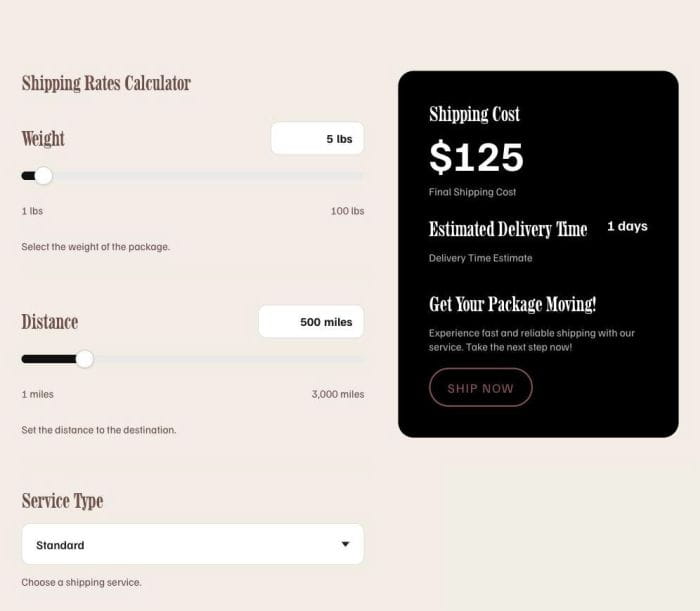
#1. Install Code
This is just a calculator using a sample formula, but you can easily send it to AI (ChatGPT or Claude. I recommend this AI chat bot, it is designed for Squarespace site) to customize it to your specific needs – and, notably, it can sync with your Squarespace style. You can also use this free calculator tool to create a calculator.
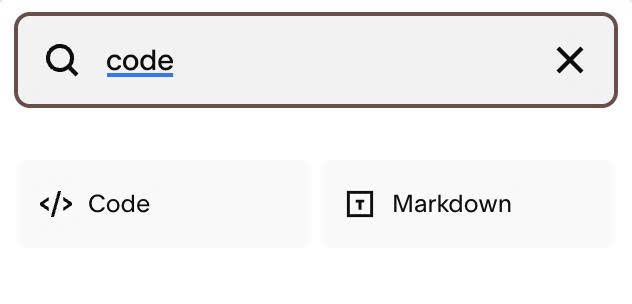
#1.1. You can edit Page where you want to place Calculator > Add a Code Block
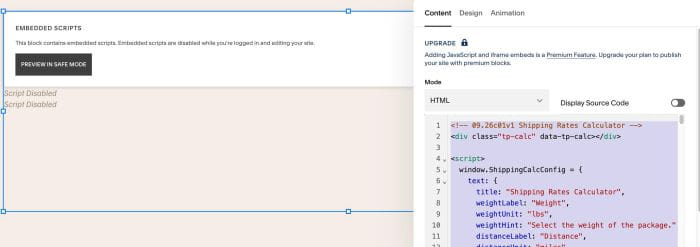
#1.2. Add this code into Code Block
<!-- 09.26c01v1 Shipping Rates Calculator -->
<div class="tp-calc" data-tp-calc></div>

<script>
  window.ShippingCalcConfig = {
    text: {
      title: "Shipping Rates Calculator",
      weightLabel: "Weight",
      weightUnit: "lbs",
      weightHint: "Select the weight of the package.",
      distanceLabel: "Distance",
      distanceUnit: "miles",
      distanceHint: "Set the distance to the destination.",
      serviceLabel: "Service Type",
      serviceHint: "Choose a shipping service.",
      costHeading: "Shipping Cost",
      costHint: "Final Shipping Cost",
      etaLabel: "Estimated Delivery Time",
      etaHint: "Delivery Time Estimate",
      etaUnit: "days",
      ctaHeading: "Get Your Package Moving!",
      ctaHint: "Experience fast and reliable shipping with our service. Take the next step now!",
      ctaButton: "Ship Now",
      ctaHref: "#"
    },
    tags: {
      // HTML tag per text; style (size/color) inherits from the tag on the site
      title: "h2",
      weightLabel: "h3",
      distanceLabel: "h3",
      serviceLabel: "h3",
      costHeading: "h3",
      etaLabel: "h3",
      ctaHeading: "h3"
    },
    colors: {
      // "" = inherit from the tag/class; set a value to override
      title: "",
      label: "",
      smallText: "",
      cardBg: "#000000",
      cardHeading: "#ffffff",
      cardValue: "#ffffff",
      cardMuted: "rgba(255,255,255,0.7)"
    },
    slider: {
      trackFill: "#111111",
      trackEmpty: "#eaeaea",
      thumbBg: "#ffffff",
      thumbBorder: "#cccccc",
      trackHeight: "12px",
      thumbSize: "26px"
    },
    layout: {
      valueInputWidth: "72px" // width of the Weight/Distance number inputs
    },
    button: {
      // "" = inherit the native button classes; set a value to override
      text: "",
      bg: "",
      border: "",
      hoverText: "",
      hoverBg: "",
      hoverBorder: ""
    },
    ranges: {
      weight: { min: 1, max: 100, step: 1, value: 5 },
      distance: { min: 1, max: 3000, step: 1, value: 500 }
    },
    formula: {
      currencySymbol: "$",
      moneyDecimals: 2,
      baseFee: 0,
      rateByService: { 1: 0.05, 2: 0.10, 3: 0.20 },
      milesPerDayByService: { 1: 500, 2: 250, 3: 100 },
      // Optional. Return a number; leave null to use the built-in formula.
      // costFn(weight, distance, service, formula) -> cost
      // daysFn(weight, distance, service, formula) -> days
      costFn: null,
      daysFn: null
    },
    services: [
      { value: 1, label: "Standard" },
      { value: 2, label: "Express" },
      { value: 3, label: "Overnight" }
    ]
  };
</script>

<script>
  (function () {
    var CFG = window.ShippingCalcConfig;

    var CSS =
      ".tp-calc,.tp-calc *{box-sizing:border-box}" +
      ".tp-calc{--tp-card-bg:#000;--tp-track-fill:#111;--tp-track-empty:#eaeaea;--tp-thumb-bg:#fff;--tp-thumb-border:#ccc;--tp-track-h:12px;--tp-thumb-size:26px;--tp-input-w:72px;--tp-pill-min-width:84px;--tp-card-radius:22px;color:inherit}" +
      ".tp-calc__wrap{max-width:1180px;margin:40px auto;padding:0 24px;display:grid;grid-template-columns:1.1fr 0.9fr;gap:48px;align-items:start}" +
      ".tp-calc__h{margin:0}" +
      ".tp-calc__title{margin:0 0 32px}" +
      ".tp-calc__field{padding:6px 0}" +
      ".tp-calc__labelRow{display:flex;align-items:center;justify-content:space-between;gap:16px;margin-bottom:18px}" +
      ".tp-calc__sm{margin:14px 0 0}" +
      ".tp-calc__pill{min-width:var(--tp-pill-min-width);background:#fff;border:1px solid #dcdcdc;border-radius:12px;padding:12px 16px;display:inline-flex;gap:5px;align-items:center;justify-content:center;font-weight:600;font-size:17px;color:#111}" +
      ".tp-calc__num{width:var(--tp-input-w);border:0;background:transparent;padding:0;margin:0;font:inherit;color:inherit;text-align:right;-moz-appearance:textfield;appearance:textfield}" +
      ".tp-calc__num::-webkit-outer-spin-button,.tp-calc__num::-webkit-inner-spin-button{-webkit-appearance:none;margin:0}" +
      ".tp-calc__range{width:100%;-webkit-appearance:none;appearance:none;height:var(--tp-track-h);border-radius:999px;margin:4px 0 0;cursor:pointer;background:linear-gradient(90deg,var(--tp-track-fill) 0%,var(--tp-track-fill) var(--tp-fill,0%),var(--tp-track-empty) var(--tp-fill,0%),var(--tp-track-empty) 100%)}" +
      ".tp-calc__range::-webkit-slider-thumb{-webkit-appearance:none;appearance:none;width:var(--tp-thumb-size);height:var(--tp-thumb-size);border-radius:50%;background:var(--tp-thumb-bg);border:1px solid var(--tp-thumb-border);box-shadow:0 1px 3px rgba(0,0,0,.2);cursor:pointer}" +
      ".tp-calc__range::-moz-range-thumb{width:var(--tp-thumb-size);height:var(--tp-thumb-size);border-radius:50%;background:var(--tp-thumb-bg);border:1px solid var(--tp-thumb-border);cursor:pointer}" +
      ".tp-calc__minmax{display:flex;justify-content:space-between;margin-top:12px}" +
      ".tp-calc__divider{height:1px;background:#ededed;margin:30px 0}" +
      ".tp-calc__dd{position:relative;margin-top:16px}" +
      ".tp-calc__ddBtn{width:100%;display:flex;align-items:center;justify-content:space-between;padding:18px 20px;border:1px solid #dcdcdc;border-radius:12px;background:#fff;font-family:inherit;font-size:17px;font-weight:500;color:#111;cursor:pointer;text-align:left}" +
      ".tp-calc__chev{width:0;height:0;border-left:6px solid transparent;border-right:6px solid transparent;border-top:7px solid #222;transition:transform .18s ease;flex:none}" +
      ".tp-calc__dd.is-open .tp-calc__chev{transform:rotate(180deg)}" +
      ".tp-calc__ddList{list-style:none;margin:6px 0 0;padding:6px;position:absolute;left:0;right:0;top:100%;z-index:20;background:#fff;border:1px solid #dcdcdc;border-radius:12px;box-shadow:0 10px 30px rgba(0,0,0,.12)}" +
      ".tp-calc__ddList[hidden]{display:none}" +
      ".tp-calc__ddOpt{padding:14px 16px;border-radius:8px;font-size:17px;color:#111;cursor:pointer}" +
      ".tp-calc__ddOpt:hover{background:#f4f4f4}" +
      ".tp-calc__ddOpt.is-selected{background:#f0f0f0;font-weight:600}" +
      ".tp-calc__card{width:100%;background:var(--tp-card-bg);border-radius:var(--tp-card-radius);padding:44px}" +
      ".tp-calc__card .tp-calc__h{margin:0 0 4px}" +
      ".tp-calc__total{font-weight:800;font-size:60px;line-height:1;margin:10px 0 6px}" +
      ".tp-calc__etaRow{display:flex;justify-content:space-between;align-items:flex-start;gap:16px}" +
      ".tp-calc__etaVal{font-size:20px;font-weight:700;white-space:nowrap}" +
      ".tp-calc__spacer{height:26px}" +
      ".tp-calc__spacer--lg{height:40px}" +
      ".tp-calc__btn{margin-top:20px}" +
      "@media (max-width:980px){.tp-calc__wrap{grid-template-columns:1fr;gap:28px}.tp-calc__card{padding:34px}}" +
      "@media (max-width:520px){.tp-calc__card{padding:28px}.tp-calc__total{font-size:52px}}";

    function decl(prop, val) { return val ? prop + ":" + val + " !important;" : ""; }

    function buttonCSS() {
      var B = CFG.button;
      var base = decl("color", B.text) + decl("background-color", B.bg) + decl("border-color", B.border);
      var hover = decl("color", B.hoverText) + decl("background-color", B.hoverBg) + decl("border-color", B.hoverBorder);
      var out = "";
      if (base) out += ".tp-calc a.tp-calc__btn{" + base + "}";
      if (hover) out += ".tp-calc a.tp-calc__btn:hover{" + hover + "}";
      return out;
    }

    function injectCSS() {
      if (window.__tpCalcStyled) return;
      window.__tpCalcStyled = true;
      var st = document.createElement("style");
      st.type = "text/css";
      st.textContent = CSS + buttonCSS();
      document.head.appendChild(st);
    }

    function el(tag, cls, txt) {
      var e = document.createElement(tag);
      if (cls) e.className = cls;
      if (txt != null) e.textContent = txt;
      return e;
    }

    function fmtNum(n) { return (+n).toLocaleString("en-US"); }

    function heading(tag, txt, color) {
      var e = el(tag, "tp-calc__h", txt);
      if (color) e.style.color = color;
      return e;
    }

    function smallP(txt, color) {
      var e = el("p", "sqsrte-small tp-calc__sm", txt);
      if (color) e.style.color = color;
      return e;
    }

    function round2(n) { return Math.round((+n + Number.EPSILON) * 100) / 100; }

    function formatMoney(n) {
      var F = CFG.formula;
      var v = round2(n);
      var d = Math.max(0, F.moneyDecimals | 0);
      var fixed = v.toFixed(d);
      var isInt = Math.abs(v - Math.round(v)) < 1e-9;
      if (d > 0 && isInt) return F.currencySymbol + Math.round(v);
      return F.currencySymbol + fixed;
    }

    function calcCost(w, d, s) {
      var F = CFG.formula;
      if (typeof F.costFn === "function") return round2(F.costFn(w, d, s, F));
      var rate = +F.rateByService[s] || 0;
      return round2((+F.baseFee || 0) + w * d * rate);
    }

    function calcDays(w, d, s) {
      var F = CFG.formula;
      if (typeof F.daysFn === "function") return F.daysFn(w, d, s, F);
      var mpd = +F.milesPerDayByService[s] || 1;
      return Math.ceil(d / mpd);
    }

    function clampInt(v, min, max) {
      v = Math.round(+v);
      if (!isFinite(v)) v = min;
      return Math.min(max, Math.max(min, v));
    }

    function numField(o) {
      var node = el("div", "tp-calc__field");
      var row = el("div", "tp-calc__labelRow");
      row.appendChild(heading(o.tag, o.label, CFG.colors.label));

      var pill = el("div", "tp-calc__pill");
      var input = el("input", "tp-calc__num");
      input.type = "number";
      input.min = o.r.min; input.max = o.r.max; input.step = o.r.step; input.value = o.r.value;
      input.setAttribute("aria-label", o.label);
      pill.appendChild(input);
      pill.appendChild(el("span", null, o.unit));
      row.appendChild(pill);
      node.appendChild(row);

      var range = el("input", "tp-calc__range");
      range.type = "range";
      range.min = o.r.min; range.max = o.r.max; range.step = o.r.step; range.value = o.r.value;
      range.setAttribute("aria-label", o.label);
      node.appendChild(range);

      var mm = el("div", "tp-calc__minmax");
      var s1 = el("span", "sqsrte-small", fmtNum(o.r.min) + " " + o.unit);
      var s2 = el("span", "sqsrte-small", fmtNum(o.r.max) + " " + o.unit);
      if (CFG.colors.smallText) { s1.style.color = CFG.colors.smallText; s2.style.color = CFG.colors.smallText; }
      mm.appendChild(s1); mm.appendChild(s2);
      node.appendChild(mm);

      node.appendChild(smallP(o.hint, CFG.colors.smallText));

      function get() {
        var raw = input.value === "" ? o.r.min : input.value;
        return clampInt(raw, o.r.min, o.r.max);
      }
      function fill() {
        var v = +range.value, min = +range.min, max = +range.max;
        range.style.setProperty("--tp-fill", ((v - min) / (max - min)) * 100 + "%");
      }
      function sync(v) { range.value = v; fill(); }

      var cb = function () {};
      input.addEventListener("input", function () { cb(); });
      input.addEventListener("change", function () { input.value = get(); cb(); });
      range.addEventListener("input", function () { input.value = range.value; cb(); });

      return { node: node, get: get, sync: sync, onChange: function (f) { cb = f; } };
    }

    function serviceField() {
      var node = el("div", "tp-calc__field");
      node.appendChild(heading(CFG.tags.serviceLabel, CFG.text.serviceLabel, CFG.colors.label));

      var dd = el("div", "tp-calc__dd");
      var ddBtn = el("button", "tp-calc__ddBtn");
      ddBtn.type = "button";
      ddBtn.setAttribute("aria-haspopup", "listbox");
      ddBtn.setAttribute("aria-expanded", "false");
      var lbl = el("span", null, CFG.services[0].label);
      var chev = el("span", "tp-calc__chev");
      chev.setAttribute("aria-hidden", "true");
      ddBtn.appendChild(lbl); ddBtn.appendChild(chev);

      var list = el("ul", "tp-calc__ddList");
      list.setAttribute("role", "listbox");
      list.hidden = true;

      var current = CFG.services[0].value;

      function open() { dd.classList.add("is-open"); list.hidden = false; ddBtn.setAttribute("aria-expanded", "true"); }
      function close() { dd.classList.remove("is-open"); list.hidden = true; ddBtn.setAttribute("aria-expanded", "false"); }

      var cb = function () {};

      CFG.services.forEach(function (s, i) {
        var li = el("li", "tp-calc__ddOpt" + (i === 0 ? " is-selected" : ""), s.label);
        li.setAttribute("role", "option");
        li.setAttribute("data-value", s.value);
        li.addEventListener("click", function () {
          current = s.value;
          lbl.textContent = s.label;
          var all = list.querySelectorAll(".tp-calc__ddOpt");
          for (var j = 0; j < all.length; j++) all[j].classList.remove("is-selected");
          li.classList.add("is-selected");
          close();
          cb();
        });
        list.appendChild(li);
      });

      dd.appendChild(ddBtn); dd.appendChild(list);
      node.appendChild(dd);
      node.appendChild(smallP(CFG.text.serviceHint, CFG.colors.smallText));

      ddBtn.addEventListener("click", function (e) {
        e.stopPropagation();
        if (dd.classList.contains("is-open")) close(); else open();
      });
      document.addEventListener("click", function (e) { if (!dd.contains(e.target)) close(); });
      ddBtn.addEventListener("keydown", function (e) { if (e.key === "Escape") close(); });

      return { node: node, get: function () { return current; }, onChange: function (f) { cb = f; } };
    }

    function mount(root) {
      if (!root || root.dataset.tpDone === "1") return;
      root.dataset.tpDone = "1";

      var T = CFG.text, G = CFG.tags, K = CFG.colors, S = CFG.slider, R = CFG.ranges;

      root.style.setProperty("--tp-card-bg", K.cardBg);
      root.style.setProperty("--tp-track-fill", S.trackFill);
      root.style.setProperty("--tp-track-empty", S.trackEmpty);
      root.style.setProperty("--tp-thumb-bg", S.thumbBg);
      root.style.setProperty("--tp-thumb-border", S.thumbBorder);
      root.style.setProperty("--tp-track-h", S.trackHeight);
      root.style.setProperty("--tp-thumb-size", S.thumbSize);
      root.style.setProperty("--tp-input-w", CFG.layout.valueInputWidth);

      var wrap = el("div", "tp-calc__wrap");
      var left = el("div", "tp-calc__left");
      var right = el("div", "tp-calc__right");

      var title = heading(G.title, T.title, K.title);
      title.classList.add("tp-calc__title");
      left.appendChild(title);

      var wField = numField({ label: T.weightLabel, tag: G.weightLabel, unit: T.weightUnit, hint: T.weightHint, r: R.weight });
      left.appendChild(wField.node);
      left.appendChild(el("div", "tp-calc__divider"));

      var dField = numField({ label: T.distanceLabel, tag: G.distanceLabel, unit: T.distanceUnit, hint: T.distanceHint, r: R.distance });
      left.appendChild(dField.node);
      left.appendChild(el("div", "tp-calc__divider"));

      var sField = serviceField();
      left.appendChild(sField.node);

      var card = el("div", "tp-calc__card");
      card.appendChild(heading(G.costHeading, T.costHeading, K.cardHeading));
      var total = el("div", "tp-calc__total");
      total.style.color = K.cardValue;
      card.appendChild(total);
      card.appendChild(smallP(T.costHint, K.cardMuted));
      card.appendChild(el("div", "tp-calc__spacer"));

      var etaRow = el("div", "tp-calc__etaRow");
      var etaLeft = el("div");
      etaLeft.appendChild(heading(G.etaLabel, T.etaLabel, K.cardHeading));
      etaLeft.appendChild(smallP(T.etaHint, K.cardMuted));
      var etaVal = el("div", "tp-calc__etaVal");
      etaVal.style.color = K.cardValue;
      etaRow.appendChild(etaLeft); etaRow.appendChild(etaVal);
      card.appendChild(etaRow);

      card.appendChild(el("div", "tp-calc__spacer tp-calc__spacer--lg"));
      card.appendChild(heading(G.ctaHeading, T.ctaHeading, K.cardHeading));
      card.appendChild(smallP(T.ctaHint, K.cardMuted));

      var btn = el("a", "btn btn--border theme-btn--primary-inverse sqs-button-element--primary tp-calc__btn", T.ctaButton);
      btn.setAttribute("href", T.ctaHref);
      btn.setAttribute("rel", "noopener");
      card.appendChild(btn);

      right.appendChild(card);
      wrap.appendChild(left); wrap.appendChild(right);
      root.appendChild(wrap);

      function recalc() {
        var w = wField.get(), d = dField.get(), s = +sField.get() || 1;
        wField.sync(w); dField.sync(d);
        total.textContent = formatMoney(calcCost(w, d, s));
        etaVal.textContent = calcDays(w, d, s) + " " + T.etaUnit;
      }

      wField.onChange(recalc);
      dField.onChange(recalc);
      sField.onChange(recalc);
      recalc();
    }

    function init() {
      var nodes = document.querySelectorAll("[data-tp-calc]");
      for (var i = 0; i < nodes.length; i++) mount(nodes[i]);
    }

    function ready(fn) {
      if (document.readyState !== "loading") fn();
      else document.addEventListener("DOMContentLoaded", fn);
    }

    injectCSS();
    ready(init);

    if (!window.__tpCalcBound) {
      window.__tpCalcBound = true;
      window.addEventListener("mercury:load", init);
    }
  })();
</script>
#2. Customize
#2.1. To change text, change line 06 – 25
text: {
      title: "Shipping Rates Calculator",
      weightLabel: "Weight",
      weightUnit: "lbs",
      weightHint: "Select the weight of the package.",
      distanceLabel: "Distance",
      distanceUnit: "miles",
      distanceHint: "Set the distance to the destination.",
      serviceLabel: "Service Type",
      serviceHint: "Choose a shipping service.",
      costHeading: "Shipping Cost",
      costHint: "Final Shipping Cost",
      etaLabel: "Estimated Delivery Time",
      etaHint: "Delivery Time Estimate",
      etaUnit: "days",
      ctaHeading: "Get Your Package Moving!",
      ctaHint: "Experience fast and reliable shipping with our service. Take the next step now!",
      ctaButton: "Ship Now",
      ctaHref: "#"
    },
#2.2. Style will inherit from Tags. You can set tags for all elements here (line 26 – 35)
tags: {
  // HTML tag per text; style (size/color) inherits from the tag on the site
  title: "h2",
  weightLabel: "h3",
  distanceLabel: "h3",
  serviceLabel: "h3",
  costHeading: "h3",
  etaLabel: "h3",
  ctaHeading: "h3"
},
#2.3. To change color, change line 36 – 45
colors: {
  // "" = inherit from the tag/class; set a value to override
  title: "",
  label: "",
  smallText: "",
  cardBg: "#000000",
  cardHeading: "#ffffff",
  cardValue: "#ffffff",
  cardMuted: "rgba(255,255,255,0.7)"
},
#2.4. To change scroll/track bar style, change line 46 – 53
slider: {
      trackFill: "#111111",
      trackEmpty: "#eaeaea",
      thumbBg: "#ffffff",
      thumbBorder: "#cccccc",
      trackHeight: "12px",
      thumbSize: "26px"
    },
#2.5. To change input width, change line 54 – 56
layout: {
      valueInputWidth: "72px" // width of the Weight/Distance number inputs
    },
#2.6. To change button style (it will inherit from Primary Button Style), you can change line 57 to line 65
button: {
      // "" = inherit the native button classes; set a value to override
      text: "",
      bg: "",
      border: "",
      hoverText: "",
      hoverBg: "",
      hoverBorder: ""
    },
#2.7. To set Weight, Distance, change line 67 – 69
ranges: {
     weight: { min: 1, max: 100, step: 1, value: 5 },
     distance: { min: 1, max: 3000, step: 1, value: 500 }
   },
#2.8. To change Services dropdown value, change line 82 – 86
services: [
     { value: 1, label: "Standard" },
     { value: 2, label: "Express" },
     { value: 3, label: "Overnight" }
   ]
#2.9. To change formula, change line 70 – 81
formula: {
     currencySymbol: "$",
     moneyDecimals: 2,
     baseFee: 0,
     rateByService: { 1: 0.05, 2: 0.10, 3: 0.20 },
     milesPerDayByService: { 1: 500, 2: 250, 3: 100 },
     // Optional. Return a number; leave null to use the built-in formula.
     // costFn(weight, distance, service, formula) -> cost
     // daysFn(weight, distance, service, formula) -> days
     costFn: null,
     daysFn: null
   },
For example, if you want to change Cost formula, change line 79
costFn: null,
to something like this
costFn: function (weight, distance, service, formula) {
  return 5 + weight * 1.2 + distance * 0.03;
},
or similar with Days, we will change
daysFn: null
to
daysFn: function (weight, distance, service, formula) {
  return Math.ceil(distance / 400) + 1;
}
You can ask AI adjust formula for you!