Description
- adding copyright icon with text to Image, you can set text only, icon only, icon with text, this works with Image Blocks, Section Background Images, Portfolio Images, Gallery Images (grid, strips, masonry)
- view demo – password: abc
- buy me a coffee

#1. Install Code
#1.1. Use this code to Code Injection > Footer
<!-- 09.26c25v3 Image Credits v2 -->
<script>
window.ImageCreditsConfig = {
  selector: '.page-section.has-background, .gallery-grid-item-wrapper, .gallery-strips-item-wrapper, .gallery-masonry-item-wrapper, .grid-image-inner-wrapper, .js-content-mode-element-wrapper',
  sourceText: 'fixed',
  text: 'Photo by John Doe',
  textClass: 'sqsrte-small',
  fontSize: '12px',
  fontSizeMobile: '',
  color: '#ffffff',
  left: 'unset',
  right: '20px',
  bottom: '20px',
  mode: 'onlyIcon',
  trigger: 'hover',
  background: 'rgba(0,0,0,0.5)',
  borderRadius: '16px',
  icon: '<svg xmlns="http://www.w3.org/2000/svg" viewBox="0 0 640 640" fill="#fff"><!--!Font Awesome Free v7.3.1 by @fontawesome - https://fontawesome.com License - https://fontawesome.com/license/free Copyright 2026 Fonticons, Inc.--><path d="M320 112C434.9 112 528 205.1 528 320C528 434.9 434.9 528 320 528C205.1 528 112 434.9 112 320C112 205.1 205.1 112 320 112zM320 576C461.4 576 576 461.4 576 320C576 178.6 461.4 64 320 64C178.6 64 64 178.6 64 320C64 461.4 178.6 576 320 576zM269.1 370.9C241 342.8 241 297.2 269.1 269.1C297.2 241 342.8 241 370.9 269.1C380.3 278.5 395.5 278.5 404.8 269.1C414.1 259.7 414.2 244.5 404.8 235.2C357.9 188.3 282 188.3 235.1 235.2C188.2 282.1 188.2 358 235.1 404.9C282 451.8 357.9 451.8 404.8 404.9C414.2 395.5 414.2 380.3 404.8 371C395.4 361.7 380.2 361.6 370.9 371C342.8 399.1 297.2 399.1 269.1 371z"/></svg>',
  iconSize: '24px',
  gap: '8px'
};
</script>
<script src="https://code.beaverhero.com/other/0926c25v3imagecreditsv2.js"></script>
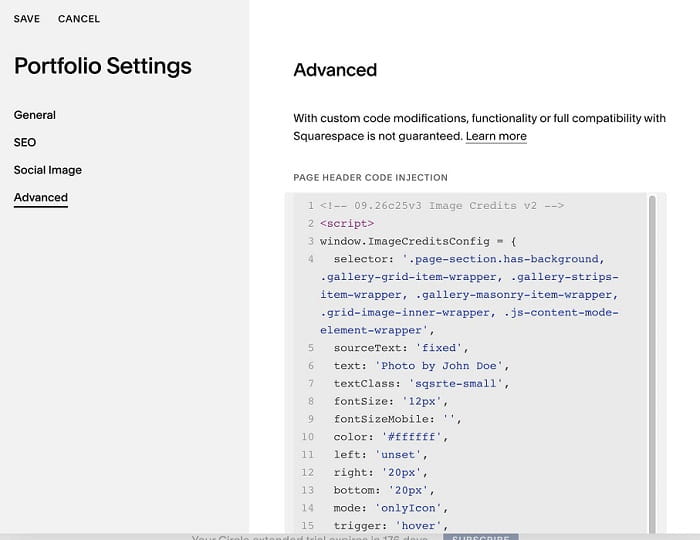
#1.2. To change Text, you can change line 06
text: 'Photo by John Doe',
#1.3. To change text/icon size/position of icon (text), change these lines
 fontSize: '12px',
  fontSizeMobile: '',
  color: '#ffffff',
  left: 'unset',
  right: '20px',
  bottom: '20px',
iconSize: '24px',
#2. Customize
#2.1. Code offers 3 mode: Text, Text + Icon, Icon
Icon Only (Line 14)
- Show icon only
- Hover icon will show Text
mode: 'onlyIcon',
Text Only (Line 14)
mode: 'onlyText',
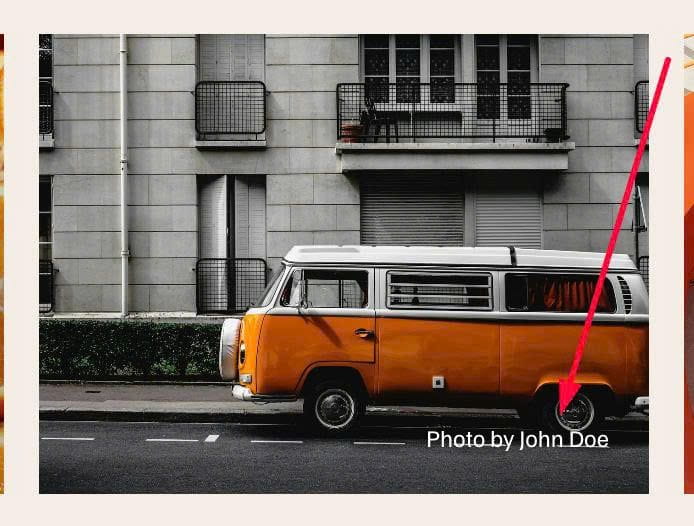
Icon + Text (Line 14)
mode: 'iconText',

#2.2. To change Icon to another icon, you can change Line 18
icon: '<svg xmlns="http://www.w3.org/2000/svg" viewBox="0 0 640 640" fill="#fff"><!--!Font Awesome Free v7.3.1 by @fontawesome - https://fontawesome.com License - https://fontawesome.com/license/free Copyright 2026 Fonticons, Inc.--><path d="M320 112C434.9 112 528 205.1 528 320C528 434.9 434.9 528 320 528C205.1 528 112 434.9 112 320C112 205.1 205.1 112 320 112zM320 576C461.4 576 576 461.4 576 320C576 178.6 461.4 64 320 64C178.6 64 64 178.6 64 320C64 461.4 178.6 576 320 576zM269.1 370.9C241 342.8 241 297.2 269.1 269.1C297.2 241 342.8 241 370.9 269.1C380.3 278.5 395.5 278.5 404.8 269.1C414.1 259.7 414.2 244.5 404.8 235.2C357.9 188.3 282 188.3 235.1 235.2C188.2 282.1 188.2 358 235.1 404.9C282 451.8 357.9 451.8 404.8 404.9C414.2 395.5 414.2 380.3 404.8 371C395.4 361.7 380.2 361.6 370.9 371C342.8 399.1 297.2 399.1 269.1 371z"/></svg>',
Here I use SVG syntax from FontAwesome

#3. Extra
#3.1. New code
- No text with Image has no ALT text
- 2 options: fixed (static text) or ALT (get text from ALT)
<!-- 09.26c25v3 Image Credits v3 -->
<script>
window.ImageCreditsConfig = {
  selector: '.page-section.has-background, .gallery-grid-item-wrapper, .gallery-strips-item-wrapper, .gallery-masonry-item-wrapper, .grid-image-inner-wrapper, .js-content-mode-element-wrapper',
  sourceText: 'ALT', // fixed or ALT
  blankAltNoCopyright: true,
  sourceTextPortfolio: 'codeBlock',
  sourceTextBanner: 'codeBlock',
  text: 'Photo by John Doe',
  textClass: 'sqsrte-small',
  fontSize: '12px',
  fontSizeMobile: '',
  color: '#ffffff',
  left: 'unset',
  right: '20px',
  bottom: '20px',
  mode: 'onlyIcon',
  trigger: 'hover',
  background: 'rgba(0,0,0,0.5)',
  borderRadius: '16px',
  icon: '<svg xmlns="http://www.w3.org/2000/svg" viewBox="0 0 640 640" fill="#fff"><!--!Font Awesome Free v7.3.1 by @fontawesome - https://fontawesome.com License - https://fontawesome.com/license/free Copyright 2026 Fonticons, Inc.--><path d="M320 112C434.9 112 528 205.1 528 320C528 434.9 434.9 528 320 528C205.1 528 112 434.9 112 320C112 205.1 205.1 112 320 112zM320 576C461.4 576 576 461.4 576 320C576 178.6 461.4 64 320 64C178.6 64 64 178.6 64 320C64 461.4 178.6 576 320 576zM269.1 370.9C241 342.8 241 297.2 269.1 269.1C297.2 241 342.8 241 370.9 269.1C380.3 278.5 395.5 278.5 404.8 269.1C414.1 259.7 414.2 244.5 404.8 235.2C357.9 188.3 282 188.3 235.1 235.2C188.2 282.1 188.2 358 235.1 404.9C282 451.8 357.9 451.8 404.8 404.9C414.2 395.5 414.2 380.3 404.8 371C395.4 361.7 380.2 361.6 370.9 371C342.8 399.1 297.2 399.1 269.1 371z"/></svg>',
  iconSize: '24px',
  gap: '8px'
};
</script>
<script src="https://code.beaverhero.com/other/0926c25v3imagecreditsv3.js"></script>
- Option add credit text to Section Background Image, via Code Block
<div data-copyright-text="By J.Reet" data-banner></div>
- Option add credit text to Portfolio Overview Item Image, via Code Block in Portfolio Detail Item
<div data-copyright-text="Photo by Susan Agency"></div>