Description
- Wayline: A Hospital & Healthcare Squarespace Website Template
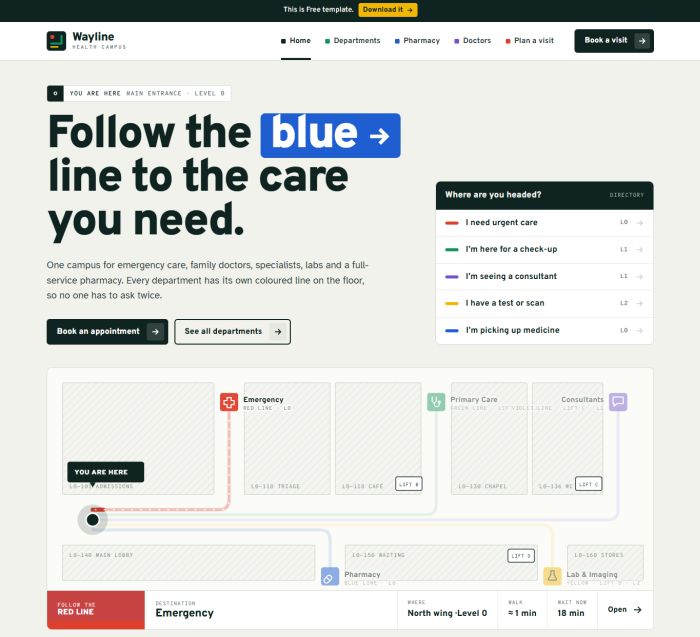
- Wayline is a clean, modern Squarespace template for hospitals, clinics, pharmacies and medical consultants. Its design borrows from real hospital signage: every department has its own coloured line, so visitors always know where to go next. The result feels calm and reassuring for patients, families and visitors.
- view demo – password: abc
- buy me a coffee
- download template
Who it’s for
- Hospitals and multi-department medical centres
- Family practices, outpatient clinics and specialist groups
- Pharmacies and drugstores offering refills, vaccinations and consultations
- Medical consultants, second-opinion services and telehealth providers
Pages included
- Home
- Interactive directory: choose a reason for your visit and the route draws itself across a floor plan, with level, walking time and current wait
- Headline whose colour tag changes with the selected route
- Live waiting-times board by department, with status labels (Open, Busy, Walk-in, Appointment only)
- Overhead-style department directory with arrows and short descriptions on hover
- Waiting-room screen video section with accessibility highlights
- Six-stop “Your visit” timeline
- Pharmacy refill preview
- Doctor door plaques with today’s status flags
- Testimonials designed as visitor badges
- Emergency sign block with phone number and same-day care link
- Departments
- Lift-panel floor selector that filters departments by level
- Department cards with line colour, hours, description and key services
- Department detail (one for each of the eight departments)
- Coloured page header, image and services list
- Route diagram with step-by-step directions from the main entrance
- Opening hours, booking button and clinicians in that department
- Previous and next department navigation
- Pharmacy
- Refill request form with a prescription label that fills in as you type, a barcode and a “Queued” stamp on submit
- Pickup options: counter, 24h locker or delivery
- Product categories shown as a drawer cabinet that opens on hover or tap
- Pharmacy hours and a “Talk to a pharmacist” booking block
- Doctors
- Filter by department
- Door-plaque profiles with room, level and status flags (seeing patients today, available by video, fully booked)
- Booking link on every profile
- Plan a visit
- Appointment form: name, contact, department, date, time of day, in-person or video, and notes
- Patient wristband preview that updates live and “prints” when the request is sent
- Emergency notice
- Getting-here guide by bus or tram, by car (with parking level occupancy) and on foot or bike
- Footer on every page: building directory by level, contact details and opening hours