Description
- The default Newsletter Block takes up a lot of space. This code turns it into a compact one-line signup: the email field and button sit inside a rounded bar, with the disclaimer text placed neatly beside it.
- buy me a coffee

#1. Install Code
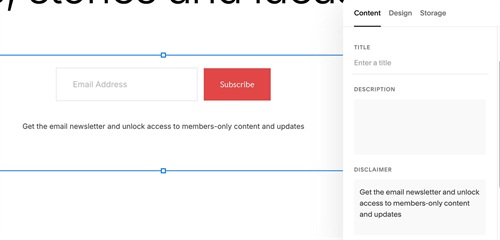
#1.1. First, you need to add a Newsletter with Fields like this
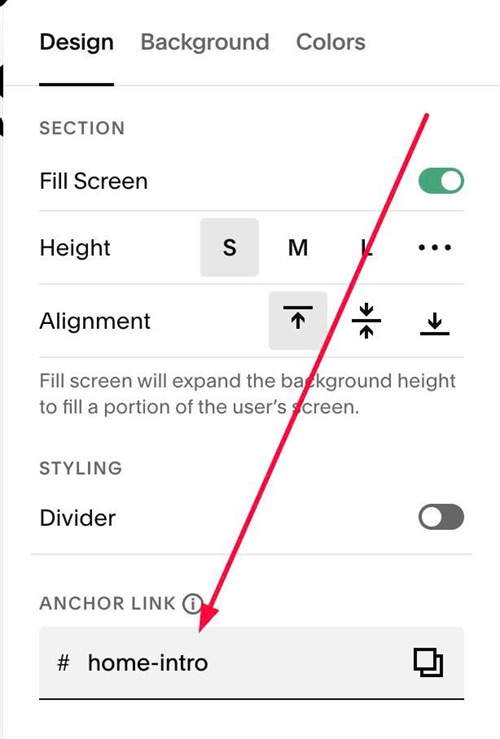
#1.2. Next, hover on top right of section where you use Newsletter > Click EDIT SECTION > at Design > Anchor Link > enter word: home-intro
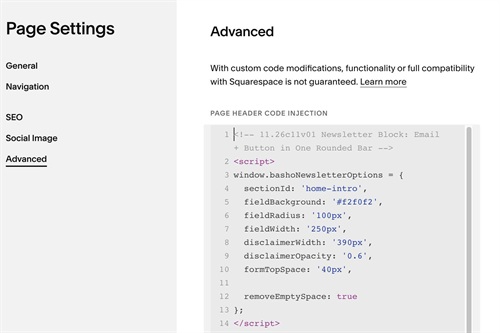
#1.3. Next, use code to Page Header Injection
<!-- 11.26c11v01 Newsletter Block: Email + Button in One Rounded Bar -->
<script>
window.bashoNewsletterOptions = {
  sectionId: 'home-intro',
  fieldBackground: '#f2f0f2',
  fieldRadius: '100px',
  fieldWidth: '250px',
  disclaimerWidth: '390px',
  disclaimerOpacity: '0.6',
  formTopSpace: '40px',

  removeEmptySpace: true
};
</script>
<script src="https://code.beaverhero.com/newsletter/1126c11v01newsletteroneroundedbar.js"></script>
#1.4. Customize
To chang email input color, change this line
fieldBackground: '#f2f0f2',