Description
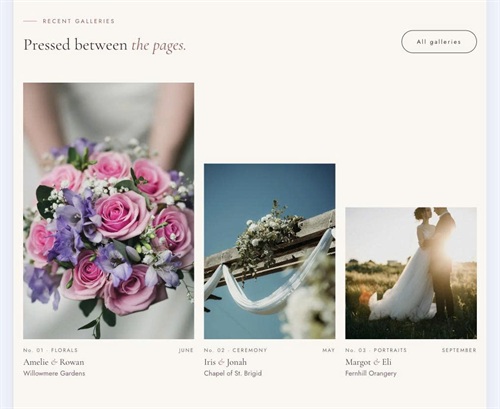
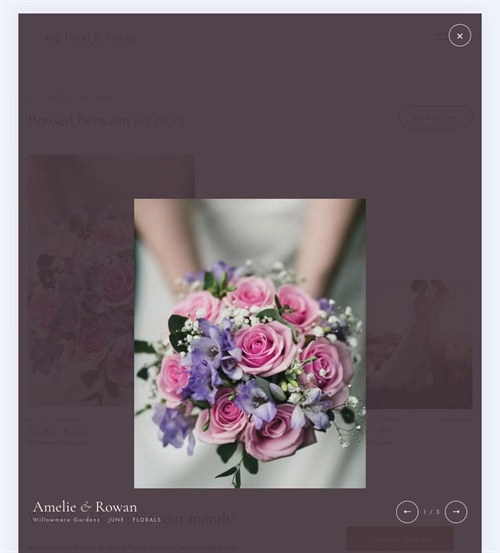
- Summary Block can’t display Portfolio projects, so showing your latest work on the homepage usually means updating it by hand. This code pulls the newest projects from your Portfolio page into a List Section automatically, with their image, title, category, date and excerpt.
- buy me a coffee
#1. Install Code
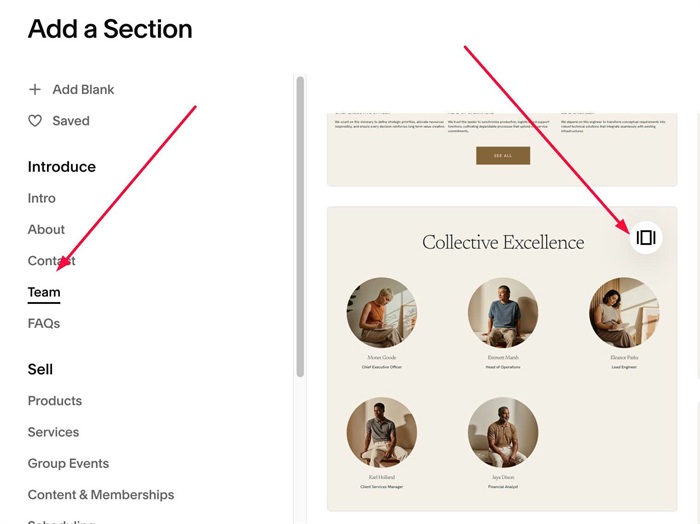
#1.1. First, add a Team Section (Add Section > Choose Team > Choose section with (i) icon)
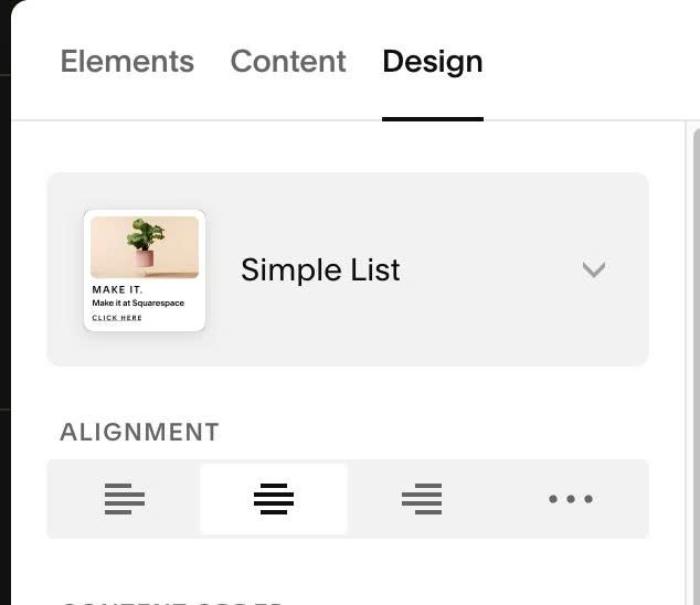
#1.2. Use Simple List design
#1.3. Enable these options
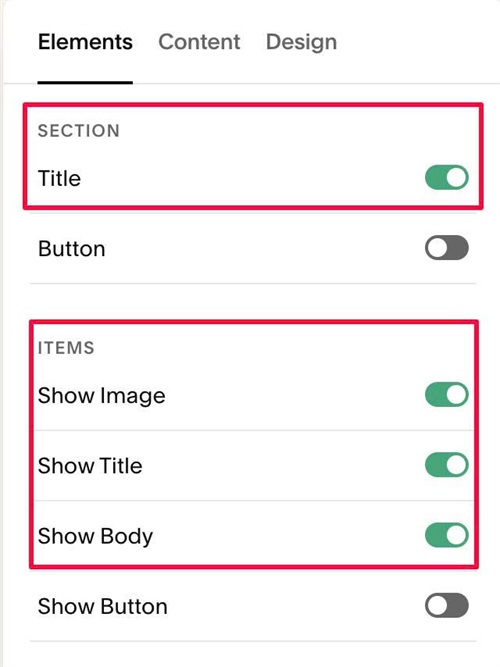
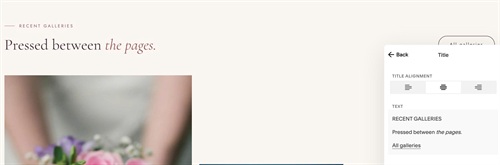
#1.4. at Section Title, enter your desired text
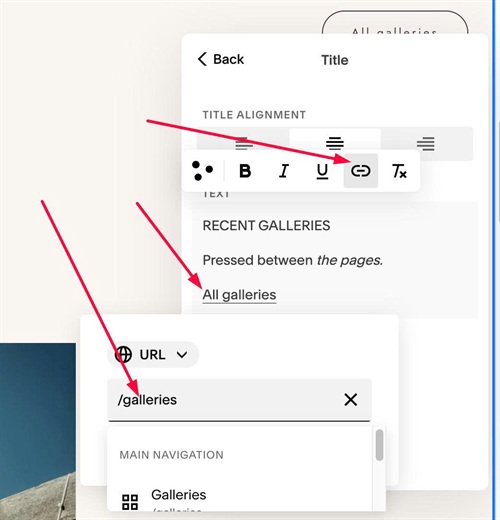
#1.5. Note: You need to enter Portfolio Page URL in All Galleries text
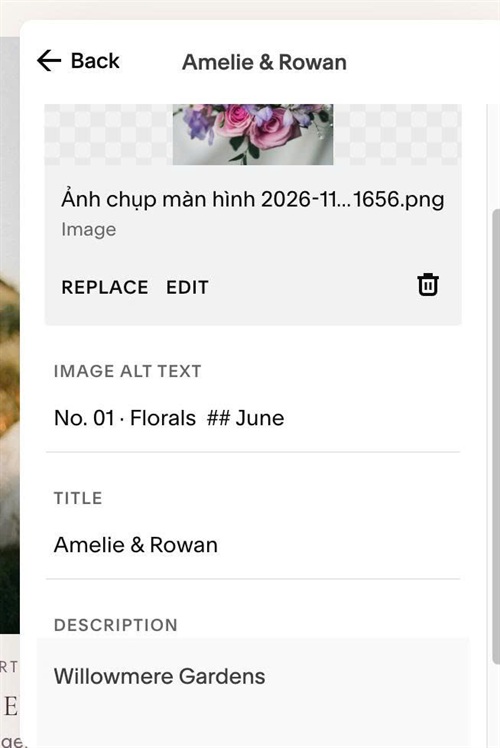
#1.6. Add sample text in each item. Code will pull text from Portfolio Page then add to List. You can follow this to know how to add extra (Category, Date, Excerpt) into Portfolio.
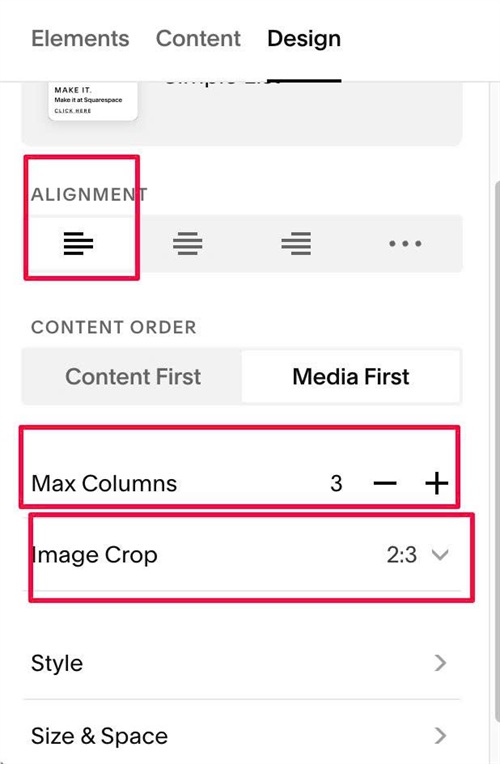
#1.7. Set Alignment to Left, 3 Columns, Image Ratio (Crop, this will be ratio of First Image)
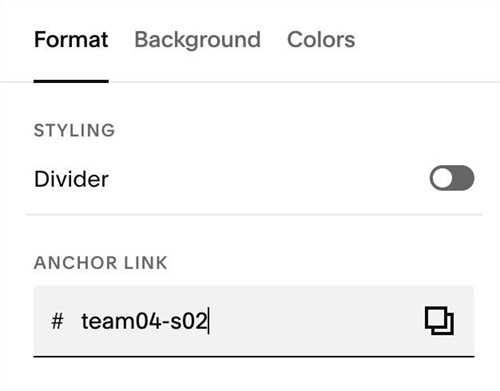
#1.8. Next, hover on top right of section > Click EDIT SECTION > at Format > Anchor Link > enter word: team04-s02
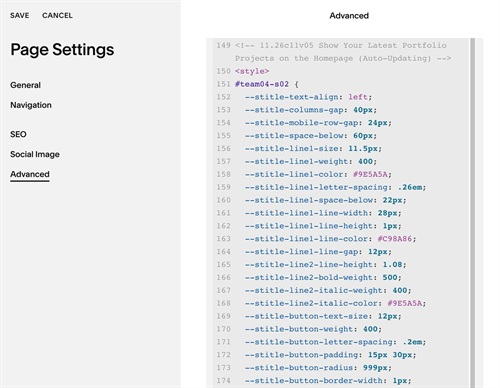
#1.9. Next, use this code to Page Header Injection
<!-- 11.26c11v05 Show Your Latest Portfolio Projects on the Homepage (Auto-Updating) -->
<style>
#team04-s02 {
  --stitle-text-align: left;
  --stitle-columns-gap: 40px;
  --stitle-mobile-row-gap: 24px;
  --stitle-space-below: 60px;
  --stitle-line1-size: 11.5px;
  --stitle-line1-weight: 400;
  --stitle-line1-color: #9E5A5A;
  --stitle-line1-letter-spacing: .26em;
  --stitle-line1-space-below: 22px;
  --stitle-line1-line-width: 28px;
  --stitle-line1-line-height: 1px;
  --stitle-line1-line-color: #C98A86;
  --stitle-line1-line-gap: 12px;
  --stitle-line2-line-height: 1.08;
  --stitle-line2-bold-weight: 500;
  --stitle-line2-italic-weight: 400;
  --stitle-line2-italic-color: #9E5A5A;
  --stitle-button-text-size: 12px;
  --stitle-button-weight: 400;
  --stitle-button-letter-spacing: .2em;
  --stitle-button-padding: 15px 30px;
  --stitle-button-radius: 999px;
  --stitle-button-border-width: 1px;
  --stitle-button-color: #47333D;
  --stitle-button-background: transparent;
  --stitle-button-border-color: #47333D;
  --stitle-button-hover-color: #FFFDFA;
  --stitle-button-hover-background: #47333D;
  --stitle-button-hover-border-color: #47333D;
  .list-section-title {
    display: grid;
    grid-template-columns: 1fr auto;
    column-gap: var(--stitle-columns-gap);
    align-items: end;
    margin-bottom: var(--stitle-space-below);
    text-align: var(--stitle-text-align);
    > p:nth-of-type(1) {
      grid-column: 1;
      grid-row: 1;
      display: flex;
      align-items: center;
      gap: var(--stitle-line1-line-gap);
      margin: 0 0 var(--stitle-line1-space-below);
      font-family: var(--body-font-font-family);
      font-size: var(--stitle-line1-size);
      font-weight: var(--stitle-line1-weight);
      font-style: var(--body-font-font-style);
      line-height: var(--body-font-line-height);
      letter-spacing: var(--stitle-line1-letter-spacing);
      color: var(--stitle-line1-color);
      &::before {
        content: "";
        flex: none;
        width: var(--stitle-line1-line-width);
        height: var(--stitle-line1-line-height);
        background-color: var(--stitle-line1-line-color);
      }
    }
    > p:nth-of-type(2) {
      grid-column: 1;
      grid-row: 2;
      margin: 0;
      line-height: var(--stitle-line2-line-height);
      strong {
        font-weight: var(--stitle-line2-bold-weight);
      }
      em {
        font-weight: var(--stitle-line2-italic-weight);
        color: var(--stitle-line2-italic-color);
      }
    }
    > p:nth-of-type(3) {
      grid-column: 2;
      grid-row: 1 / span 2;
      align-self: end;
      margin: 0;
      line-height: 1;
      a {
        display: inline-flex;
        align-items: center;
        justify-content: center;
        padding: var(--stitle-button-padding);
        border: var(--stitle-button-border-width) solid var(--stitle-button-border-color);
        border-radius: var(--stitle-button-radius);
        background-color: var(--stitle-button-background);
        color: var(--stitle-button-color);
        font-family: var(--body-font-font-family);
        font-size: var(--stitle-button-text-size);
        font-weight: var(--stitle-button-weight);
        font-style: normal;
        line-height: 1.2;
        letter-spacing: var(--stitle-button-letter-spacing);
        text-decoration: none;
        white-space: nowrap;
        transition: background-color .3s, border-color .3s, color .3s;
        &:hover {
          border-color: var(--stitle-button-hover-border-color);
          background-color: var(--stitle-button-hover-background);
          color: var(--stitle-button-hover-color);
        }
      }
    }
    @media (max-width: 767px) {
      grid-template-columns: 1fr;
      row-gap: var(--stitle-mobile-row-gap);
      > p:nth-of-type(3) {
        grid-column: 1;
        grid-row: 3;
        justify-self: start;
      }
    }
  }
}
</style>
<script>
window.HomeFeaturedGalleriesConfig = {
  sectionSelector: '#team04-s02',
  portfolioUrl: '',
  itemCount: 3,

  desktopColumns: '1.3fr 1fr 1fr',
  desktopAlignItems: 'end',
  item2Ratio: '3/4',
  item3Ratio: '1/1',
  listImageSize: '1000w',

  spinnerShow: true,
  spinnerSize: '32px',
  spinnerThickness: '2px',
  spinnerColor: '#9E5A5A',
  spinnerTrackColor: '#E6D3CC',
  loadTimeout: 8000,

  itemHoverLift: '-6px',
  itemHoverZoom: '1.04',
  itemTitleAmpersandItalic: true,
  itemTitleAmpersandColor: '#9E5A5A',
  itemMetaSeparator: ' · ',
  itemMetaSize: '10.5px',
  itemMetaColor: '#7A6570',
  itemMetaLetterSpacing: '.18em',
  itemMetaSpaceTop: '16px',
  itemMetaSpaceBottom: '6px',
  itemExcerptSize: '14px',
  itemExcerptColor: '#7A6570',
  itemExcerptSpaceTop: '2px',

  lightbox: true,
  lightboxImageSize: '1500w',
  lightboxOverlayColor: 'rgba(71, 51, 61, .92)',
  lightboxMaxWidth: '960px',
  lightboxImageRatio: '3/2',
  lightboxImageMaxHeight: '72vh',
  lightboxTitleSize: '32px',
  lightboxTitleSizeMobile: '26px',
  lightboxTitleColor: '#FBF6F1',
  lightboxTitleAmpersandColor: '#E8C4BD',
  lightboxTextSize: '11.5px',
  lightboxTextColor: 'rgba(251, 246, 241, .7)',
  lightboxTextLetterSpacing: '.18em',
  lightboxCounterSize: '12px',
  lightboxCounterLetterSpacing: '.16em',

  arrowSize: '46px',
  arrowIconSize: '18px',
  closeSize: '46px',
  closeIconSize: '24px',

  mobileBreakpoint: 767
};
</script>
<script src="https://code.beaverhero.com/listsimple/1126c11v05team04s02.js"></script>
#2. Customize
#2.1. To change Section Title Style (Line 01), edit this
--stitle-line1-size: 11.5px;
--stitle-line1-weight: 400;
--stitle-line1-color: #9E5A5A;
--stitle-line1-letter-spacing: .26em;
--stitle-line1-space-below: 22px;
#2.2. To change Line style (line before Section Title Line 01), edit this
--stitle-line1-line-width: 28px;
--stitle-line1-line-height: 1px;
--stitle-line1-line-color: #C98A86;
--stitle-line1-line-gap: 12px;
#2.3. To change Section Title Style (Line 02), edit this
--stitle-line2-line-height: 1.08;
--stitle-line2-bold-weight: 500;
--stitle-line2-italic-weight: 400;
--stitle-line2-italic-color: #9E5A5A;
#2.4. To change Section Title Button Style (Line 03), edit this
--stitle-button-text-size: 12px;
--stitle-button-weight: 400;
--stitle-button-letter-spacing: .2em;
--stitle-button-padding: 15px 30px;
--stitle-button-radius: 999px;
--stitle-button-border-width: 1px;
--stitle-button-color: #47333D;
--stitle-button-background: transparent;
--stitle-button-border-color: #47333D;
--stitle-button-hover-color: #FFFDFA;
--stitle-button-hover-background: #47333D;
--stitle-button-hover-border-color: #47333D;
#2.5. To change Ratio of Second, Third Images, edit this
item2Ratio: '3/4',
item3Ratio: '1/1',
#2.6. To change Item Meta (under Image), Item Title, Item Description style, edit this
itemTitleAmpersandItalic: true,
itemTitleAmpersandColor: '#9E5A5A',
itemMetaSeparator: ' · ',
itemMetaSize: '10.5px',
itemMetaColor: '#7A6570',
itemMetaLetterSpacing: '.18em',
itemMetaSpaceTop: '16px',
itemMetaSpaceBottom: '6px',
itemExcerptSize: '14px',
itemExcerptColor: '#7A6570',
itemExcerptSpaceTop: '2px',
#2.7. To change lightbox image/overlay/text style, change this
lightbox: true,
 lightboxImageSize: '1500w',
 lightboxOverlayColor: 'rgba(71, 51, 61, .92)',
 lightboxMaxWidth: '960px',
 lightboxImageRatio: '3/2',
 lightboxImageMaxHeight: '72vh',
 lightboxTitleSize: '32px',
 lightboxTitleSizeMobile: '26px',
 lightboxTitleColor: '#FBF6F1',
 lightboxTitleAmpersandColor: '#E8C4BD',
 lightboxTextSize: '11.5px',
 lightboxTextColor: 'rgba(251, 246, 241, .7)',
 lightboxTextLetterSpacing: '.18em',
 lightboxCounterSize: '12px',
 lightboxCounterLetterSpacing: '.16em',