Description
- Pricing Cards with sub tabs
- view demo – password: abc
- my friend code this, you can send her a coffee if if is useful for you

#1. Install Code
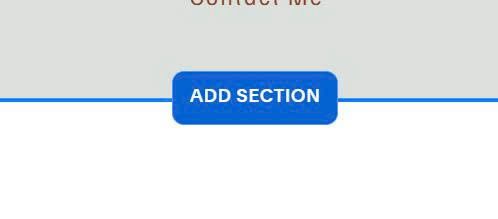
#1.1. First you need to add Section
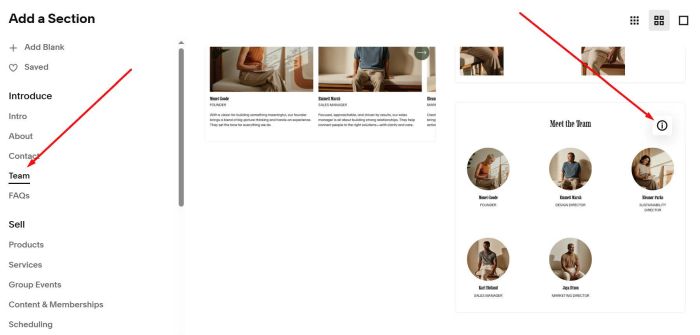
Choose Team > Choose section with (i) icon. You need to add 3 Team sections
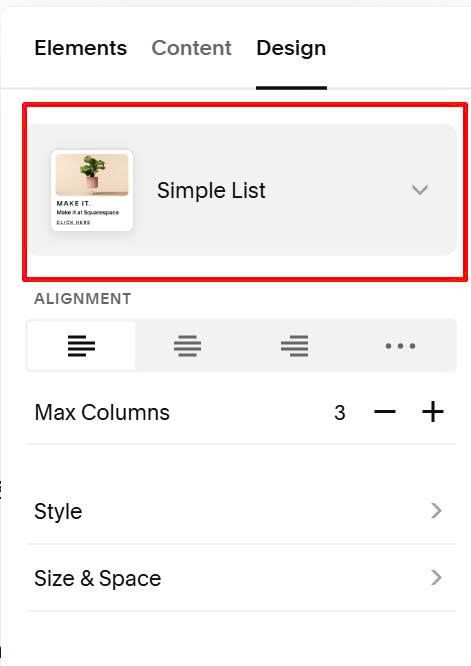
Make sure use Simple List
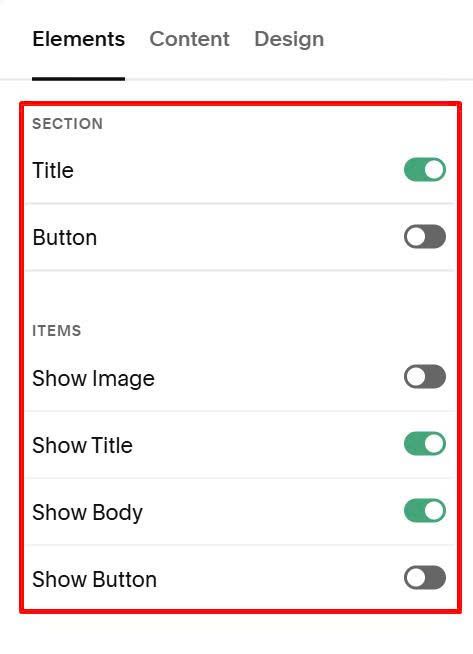
#1.2. Next, enable these options
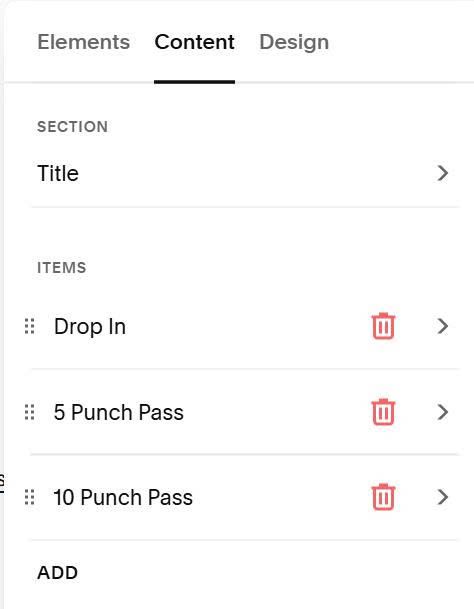
at Content Tab, add your content
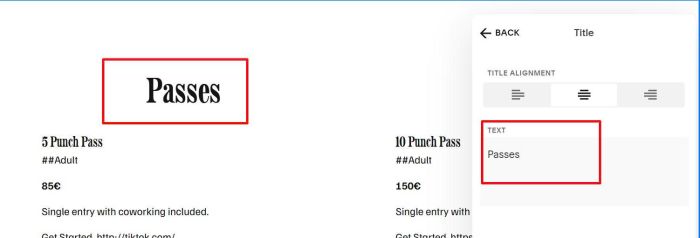
#1.3. at Title tab of First Team Section, add content like this
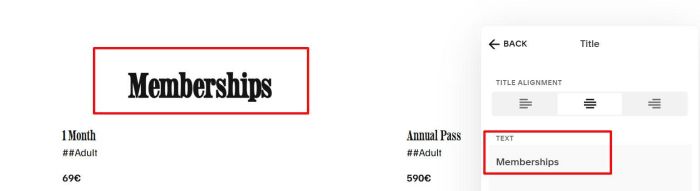
at Title tab of Second Team Section, add this
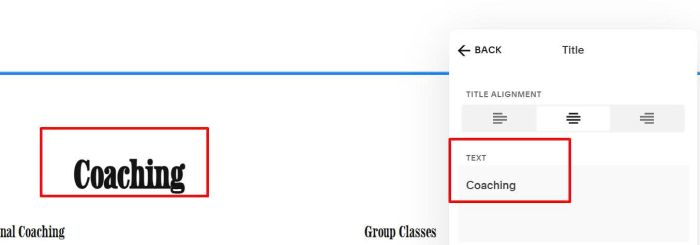
at Title tab of Third Team Section, add this
#1.4. Next, edit Items (repeat similar for second, third section)
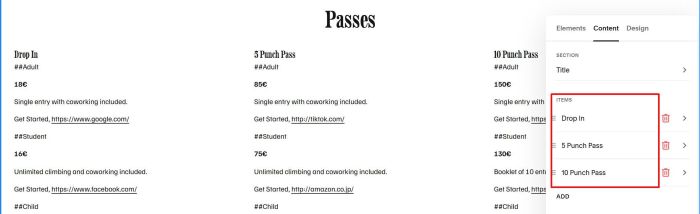
at Title, enter text like this


at Description, use format like this
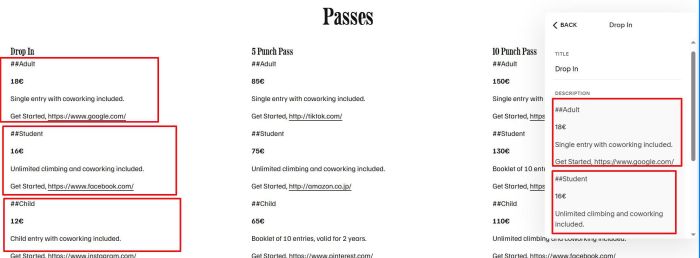
(after using code, we will have result like this)

#1.5. Hover on top right of each section > click Edit Section

at Anchor Link, enter word: pricecard-subtabs-01
pricecard-subtabs-01

at Anchor Link of second team section, enter word: pricecard-subtabs-02
pricecard-subtabs-02

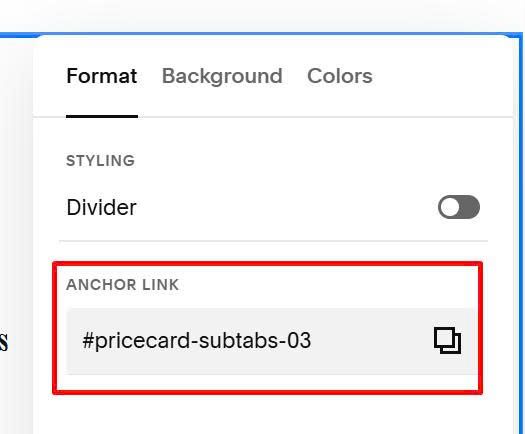
at Anchor Link of third team section, enter word: pricecard-subtabs-03
pricecard-subtabs-03
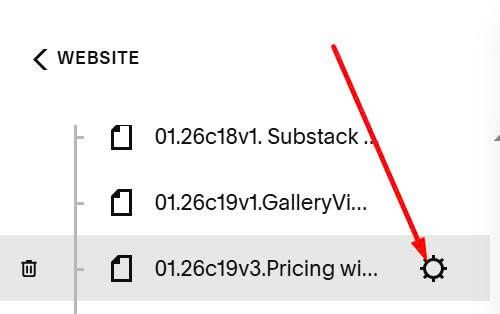
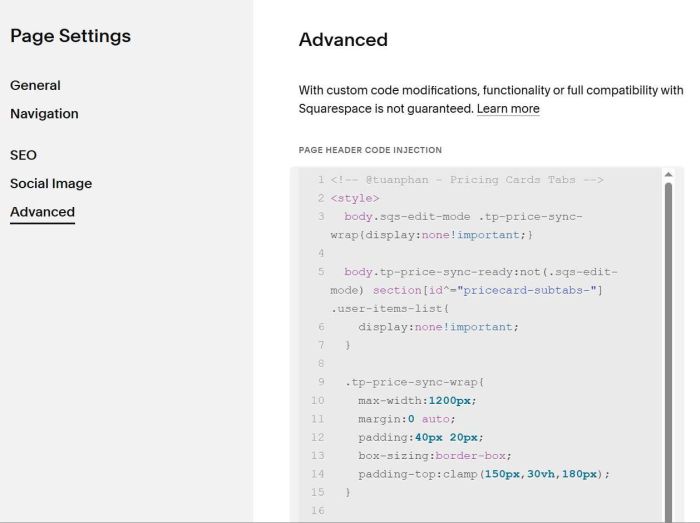
#1.6. Hover on page where you added team sections > Click Gear icon
Click Advanced > Paste this code
<!-- @tuanphan - Pricing Cards Tabs -->
<style>
body.sqs-edit-mode .tp-price-sync-wrap{display:none!important;}
body.tp-price-sync-ready:not(.sqs-edit-mode) section[id^="pricecard-subtabs-"] .user-items-list{
display:none!important;
}
.tp-price-sync-wrap{
max-width:1200px;
margin:0 auto;
padding:40px 20px;
box-sizing:border-box;
padding-top:clamp(150px,30vh,180px);
}
.tp-price-sync-nav{
text-align:center;
margin-bottom:30px;
border-bottom:1px solid #eee;
}
.tp-price-sync-nav .tp-tab-btn{
background:transparent;
color:#333;
border:0;
padding:15px 20px;
cursor:pointer;
margin:0 5px -1px 5px;
font-size:18px;
font-weight:600;
transition:all .3s;
border-bottom:3px solid transparent;
}
.tp-price-sync-nav .tp-tab-btn.is-active{
color:#0d6efd;
border-bottom-color:#0d6efd;
}
.tp-tab-panel{display:none;}
.tp-tab-panel.is-active{display:block;}
.tp-price-grid{
display:grid;
grid-template-columns:repeat(auto-fit,minmax(280px,1fr));
gap:25px;
margin-top:20px;
}
.tp-card{
background:#0052ff;
color:#fff;
padding:40px 30px;
border-radius:16px;
text-align:center;
display:flex;
flex-direction:column;
min-height:420px;
box-sizing:border-box;
}
.tp-card h3,.tp-card p,.tp-card .tp-price{color:#fff;}
.tp-card h3{
font-size:22px;
font-weight:500;
opacity:.9;
margin:0 0 15px;
}
.tp-card .tp-price{
font-size:72px;
font-weight:700;
margin:0;
line-height:1;
min-height:86px;
}
.tp-card .tp-note{
font-size:16px;
opacity:.9;
line-height:1.5;
margin:14px 0 0;
flex-grow:1;
}
.tp-card .tp-btnwrap{
padding-top:12px;
margin-top:auto;
}
.tp-card .tp-btn{
background:#fff;
color:#0052ff;
padding:18px 25px;
border-radius:8px;
text-decoration:none;
font-weight:700;
font-size:16px;
display:block;
width:100%;
transition:transform .2s;
box-sizing:border-box;
text-align:center;
}
.tp-card .tp-btn:hover{transform:scale(1.02);}
.tp-subnav{
display:flex;
justify-content:center;
background:rgba(255,255,255,.1);
border-radius:8px;
padding:4px;
margin:8px 0 18px;
gap:4px;
}
.tp-subnav .tp-subbtn{
background:transparent;
border:0;
color:#fff;
padding:8px 12px;
cursor:pointer;
border-radius:6px;
font-size:14px;
font-weight:600;
flex:1 1 auto;
transition:background-color .3s,color .3s;
white-space:nowrap;
}
.tp-subnav .tp-subbtn.is-active{
background:rgba(255,255,255,.9);
color:#0052ff;
}
.tp-subpanel{display:none;}
.tp-subpanel.is-active{display:block;}
</style>
<script>
(function(){
const SELS=[
'section[id*="pricecard-subtabs-01"]',
'section[id*="pricecard-subtabs-02"]',
'section[id*="pricecard-subtabs-03"]'
];
const clean=(s)=>String(s||"").replace(/\s+/g," ").trim();
const esc=(s)=>String(s??"").replace(/[&<>"']/g,m=>({ "&":"&","<":"<",">":">",'"':""","'":"'" }[m]));
const slug=(s)=>clean(s).toLowerCase().replace(/[^a-z0-9]+/g,"_").replace(/^_+|_+$/g,"");
const normalizeUrl=(u)=>{
const t=clean(u);
if(!t) return "";
if(/^https?:\/\//i.test(t)) return t;
if(/^www\./i.test(t)) return "https://"+t;
if(/^[\w.-]+\.[a-z]{2,}(\/.*)?$/i.test(t)) return "https://"+t;
return t;
};
const getSectionTitle=(sec)=>{
const p=sec.querySelector('.list-section-title p');
return clean(p ? p.textContent : sec.id || "Tab");
};
const getDescLines=(li)=>{
const el=li.querySelector('.list-item-content__description');
if(!el) return [];
const t=(el.innerText || el.textContent || "");
return t.split(/\r?\n/).map(x=>clean(x)).filter(Boolean);
};
const parseBtnLine=(line)=>{
if(!line) return null;
const raw=String(line).trim();
if(!raw) return null;
const parts=raw.split(",").map(x=>x.trim()).filter(Boolean);
if(parts.length<2) return null;
const text=parts[0];
const urlCandidate=parts.slice(1).join(",");
const u=clean(urlCandidate);
const looksLikeUrl=/^(https?:\/\/|www\.)/i.test(u) || /^[\w.-]+\.[a-z]{2,}(\/.*)?$/i.test(u);
if(!looksLikeUrl) return null;
const href=normalizeUrl(u);
if(!text || !href) return null;
return { text, href, target:"_blank" };
};
const parseVariantsFromLines=(lines)=>{
const out=[];
let cur=null;
const pushCur=()=>{
if(!cur) return;
cur.note=clean((cur.noteParts||[]).join(" "));
delete cur.noteParts;
out.push(cur);
cur=null;
};
for(const line of lines){
if(/^##\s*/.test(line)){
pushCur();
cur={ label: clean(line.replace(/^##\s*/,"")), price:"", noteParts:[], btn:null };
continue;
}
if(!cur) continue;
const maybeBtn=parseBtnLine(line);
if(maybeBtn){
cur.btn=maybeBtn;
continue;
}
if(!cur.price){
cur.price=line;
}else{
cur.noteParts.push(line);
}
}
pushCur();
return out.filter(v=>v.label || v.price || v.note);
};
const parseItemToCard=(li)=>{
const title=clean(li.querySelector('.list-item-content__title')?.textContent || "");
const lines=getDescLines(li);
const variants=parseVariantsFromLines(lines);
const a=li.querySelector('a.list-item-content__button');
const fallbackBtn={
text: clean(a?.textContent || ""),
href: a?.getAttribute('href') || "",
target: a?.getAttribute('target') || ""
};
return { title, variants, fallbackBtn };
};
const ready=()=>{
const secs=SELS.map(s=>document.querySelector(s)).filter(Boolean);
const anchor=secs[0];
if(!anchor) return false;
if(document.querySelector('.tp-price-sync-wrap[data-tp-price-sync="1"]')) return true;
const host=document.createElement('div');
host.className='tp-price-sync-wrap';
host.setAttribute('data-tp-price-sync','1');
anchor.parentNode.insertBefore(host, anchor);
const nav=document.createElement('div');
nav.className='tp-price-sync-nav';
host.appendChild(nav);
const panels=document.createElement('div');
panels.className='tp-price-sync-panels';
host.appendChild(panels);
const uid=Math.random().toString(36).slice(2,9);
const buildCard=(card, tabKey)=>{
const vars=(card.variants||[]).slice().sort((a,b)=>{
const A=(a.label||"").toLowerCase(), B=(b.label||"").toLowerCase();
const o=(x)=>x==="adult"?1:x==="student"?2:x==="child"?3:9;
return o(A)-o(B);
});
const base=`tp_${uid}_${tabKey}_${slug(card.title||"card")}`;
const subBtns=vars.map((v,i)=>{
return `<button class="tp-subbtn${i===0?' is-active':''}" data-sub="${esc(base+'_'+i)}">${esc(v.label||('Option '+(i+1)))}</button>`;
}).join("");
const subPanels=vars.map((v,i)=>{
const id=base+'_'+i;
const btn=v.btn || null;
const btxt=btn?.text||"";
const bhref=btn?.href||"";
const btar=btn?.target||"";
return `<div class="tp-subpanel${i===0?' is-active':''}" id="${esc(id)}" data-note="${esc(v.note||"")}" data-btxt="${esc(btxt)}" data-bhref="${esc(bhref)}" data-btar="${esc(btar)}"><div class="tp-price">${esc(v.price||"")}</div></div>`;
}).join("");
const first=vars[0]||{};
const firstBtn=first.btn || (card.fallbackBtn?.text ? card.fallbackBtn : null);
const btnHtml=firstBtn?.text
? `<div class="tp-btnwrap"><a class="tp-btn" href="${esc(firstBtn.href||'#')}"${firstBtn.target?` target="${esc(firstBtn.target)}"`:""}>${esc(firstBtn.text)}</a></div>`
: `<div class="tp-btnwrap"></div>`;
return `<div class="tp-card">
<h3>${esc(card.title||"")}</h3>
<div class="tp-subnav">${subBtns}</div>
${subPanels}
<p class="tp-note">${esc(first.note||"")}</p>
${btnHtml}
</div>`;
};
const tabs=secs.map((sec,i)=>{
const name=getSectionTitle(sec);
const key=`tab_${uid}_${i}`;
const items=[...sec.querySelectorAll('ul.user-items-list-item-container > li.list-item')].map(parseItemToCard);
return {
name,
key,
html:`<div class="tp-tab-panel${i===0?' is-active':''}" data-tabpanel="${esc(key)}">
<div class="tp-price-grid">
${items.map(c=>buildCard(c,key)).join("")}
</div>
</div>`
};
});
nav.innerHTML=tabs.map((t,i)=>`<button class="tp-tab-btn${i===0?' is-active':''}" data-tab="${esc(t.key)}">${esc(t.name)}</button>`).join("");
panels.innerHTML=tabs.map(t=>t.html).join("");
const openTab=(key)=>{
nav.querySelectorAll('.tp-tab-btn').forEach(b=>b.classList.toggle('is-active', b.getAttribute('data-tab')===key));
panels.querySelectorAll('.tp-tab-panel').forEach(p=>p.classList.toggle('is-active', p.getAttribute('data-tabpanel')===key));
};
const syncBtn=(cardEl)=>{
const activePanel=cardEl.querySelector('.tp-subpanel.is-active');
const note=activePanel ? (activePanel.getAttribute('data-note')||"") : "";
const noteEl=cardEl.querySelector('.tp-note');
if(noteEl) noteEl.textContent=note;
const wrap=cardEl.querySelector('.tp-btnwrap');
if(!wrap) return;
const txt=activePanel?.getAttribute('data-btxt')||"";
const href=activePanel?.getAttribute('data-bhref')||"";
const tar=activePanel?.getAttribute('data-btar')||"";
wrap.innerHTML=(txt && href)
? `<a class="tp-btn" href="${esc(href)}"${tar?` target="${esc(tar)}"`:""}>${esc(txt)}</a>`
: ``;
};
const openSub=(btn)=>{
const card=btn.closest('.tp-card');
if(!card) return;
const targetId=btn.getAttribute('data-sub');
card.querySelectorAll('.tp-subbtn').forEach(b=>b.classList.toggle('is-active', b===btn));
card.querySelectorAll('.tp-subpanel').forEach(p=>p.classList.toggle('is-active', p.id===targetId));
syncBtn(card);
};
panels.querySelectorAll('.tp-card').forEach(syncBtn);
nav.addEventListener('click',(e)=>{
const b=e.target.closest('.tp-tab-btn');
if(!b) return;
openTab(b.getAttribute('data-tab'));
});
panels.addEventListener('click',(e)=>{
const b=e.target.closest('.tp-subbtn');
if(!b) return;
openSub(b);
});
document.body.classList.add('tp-price-sync-ready');
return true;
};
const boot=()=>{
if(ready()) return;
let tries=0;
const t=setInterval(()=>{
tries++;
if(ready() || tries>120) clearInterval(t);
},250);
};
if(document.readyState==='loading') document.addEventListener('DOMContentLoaded', boot);
else boot();
document.addEventListener('mercury:load', boot);
})();
</script>
#2. Customize
#2.1. To change tab titles color

Find these lines (active tab)
.tp-price-sync-nav .tp-tab-btn.is-active {
    color: #0d6efd;
    border-bottom-color: #0d6efd;
}
and these lines
.tp-price-sync-nav .tp-tab-btn {
    background: transparent;
    color: #333;
    border: 0;
    padding: 15px 20px;
    cursor: pointer;
    margin: 0 5px -1px 5px;
    font-size: 18px;
    font-weight: 600;
    transition: all .3s;
    border-bottom: 3px solid transparent;
}
#2.2. To change card background + white text color

Find these lines
.tp-card {
    background: #0052ff;
    color: #fff;
    padding: 40px 30px;
    border-radius: 16px;
    text-align: center;
    display: flex;
    flex-direction: column;
    min-height: 420px;
    box-sizing: border-box;
}
#2.3. To change card title size

Find these lines
.tp-card h3 {
    font-size: 22px;
    font-weight: 500;
    opacity: .9;
    margin: 0 0 15px;
}
#2.4. To change sub tabs style

Find these lines (active tab)
.tp-subnav .tp-subbtn.is-active {
    background: rgba(255, 255, 255, .9);
    color: #0052ff;
}
and these
.tp-subnav .tp-subbtn {
    background: transparent;
    border: 0;
    color: #fff;
    padding: 8px 12px;
    cursor: pointer;
    border-radius: 6px;
    font-size: 14px;
    font-weight: 600;
    flex: 1 1 auto;
    transition: background-color .3s, color .3s;
    white-space: nowrap;
}
and these
.tp-subnav {
    display: flex;
    justify-content: center;
    background: rgba(255, 255, 255, .1);
    border-radius: 8px;
    padding: 4px;
    margin: 8px 0 18px;
    gap: 4px;
}
#2.5. To change Price style

Find these lines
.tp-card .tp-price {
    font-size: 72px;
    font-weight: 700;
    margin: 0;
    line-height: 1;
    min-height: 86px;
}
and these
.tp-card h3, .tp-card p, .tp-card .tp-price {
    color: #fff;
}
#2.6. To change description under price

Find these lines
.tp-card .tp-note {
    font-size: 16px;
    opacity: .9;
    line-height: 1.5;
    margin: 14px 0 0;
    flex-grow: 1;
}
#2.7. To change button style

Find these lines
.tp-card .tp-btn {
    background: #fff;
    color: #0052ff;
    padding: 18px 25px;
    border-radius: 8px;
    text-decoration: none;
    font-weight: 700;
    font-size: 16px;
    display: block;
    width: 100%;
    transition: transform .2s;
    box-sizing: border-box;
    text-align: center;
}