Description
- some tweak with List Simple Section
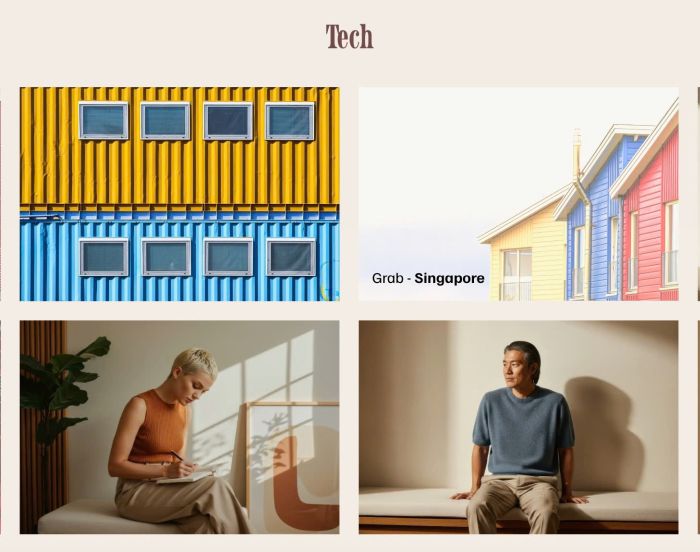
- hover list item will show overlay + title/description (same line)
- enable clickable on whole item
- view demo – password: abc
- buy me a coffee
#1. Install Code
#1.1. First, add a Section > Choose Team > Choose Section with (i) icon

#1.2. Next, hover on top right of section > Click EDIT CONTENT

at Design > Choose List Simple

at Elements > Enable these

#1.3. at Content > add your desired image/text

Something like this

#1.4. Hover on top right of section > Click EDIT SECTION
at Format > Anchor Link > Enter word: list-hoverv3

If you have multiple sections on same page, you can use word: list-hover3-02, list-hover3-03, list-hover3-04…

#1.5. Hover on Page where you added List Section > Click Gear icon

Click Advanced > Paste this code
- If you use Personal/Basic Plan and your plan doesn’t support Injection, see #3.1
- Or
- If you want to use shorter code, you can also use code in #3.1 into Injection
<!-- 05.26c05v1 List Hover v3 -->
<script>
window.LIST_HOVER_V3 = {
  selector: '[id*="list-hoverv3"]',
  enableLink: true,
  removeButton: true,
  hoverImg: true,
  hoverOpacity: 0.65,
  hoverScale: 1.05,
  hoverBrightness: 1.2,
  titleSize: '1.2rem',
  descSize: '0.9rem'
};
</script>
<script>
(function(){
  var KEY = 'tpLhv3';

  function injectStyles(selector, cfg){
    var s = document.createElement('style');
    s.textContent = [
      selector + ' .list-item{position:relative}',
      selector + ' .list-item .list-item-media-inner{position:relative;overflow:hidden}',
      selector + ' .list-item .list-item-media-inner img{display:block;transition:opacity .35s ease,transform .35s ease,filter .35s ease;will-change:transform}',
      selector + ' .list-item:hover .list-item-media-inner img{opacity:' + cfg.hoverOpacity + ';transform:scale(' + cfg.hoverScale + ');filter:brightness(' + cfg.hoverBrightness + ')}',
      selector + ' .list-item .tp-lhv3-cover{position:absolute;inset:0;z-index:2;text-decoration:none;display:block}',
      selector + ' .list-item .tp-lhv3-overlay{position:absolute;bottom:0;left:0;width:100%;box-sizing:border-box;padding:14px;opacity:0;transition:opacity .35s ease;pointer-events:none;z-index:3}',
      selector + ' .list-item:hover .tp-lhv3-overlay{opacity:1}',
      selector + ' .list-item .tp-lhv3-title{font-family:var(--heading-font-font-family);font-style:var(--heading-font-font-style);font-weight:var(--heading-font-font-weight);line-height:var(--heading-font-line-height);letter-spacing:var(--heading-font-letter-spacing);text-transform:var(--heading-font-text-transform);color:var(--list-section-simple-title-color);font-size:' + cfg.titleSize + ';margin:0}',
      selector + ' .list-item .tp-lhv3-sep{color:var(--list-section-simple-title-color);font-size:' + cfg.titleSize + '}',
      selector + ' .list-item .tp-lhv3-desc{font-family:var(--body-font-font-family);font-style:var(--body-font-font-style);font-weight:var(--body-font-font-weight);line-height:var(--body-font-line-height);letter-spacing:var(--body-font-letter-spacing);text-transform:var(--body-font-text-transform);-webkit-font-smoothing:antialiased;color:var(--list-section-simple-description-color);font-size:' + cfg.descSize + ';margin:0}',
      selector + ' .list-item .list-item-content{display:none}'
    ].join(' ');
    document.head.appendChild(s);
  }

  function processSection(section, cfg){
    if(section.dataset[KEY]) return;

    var items = section.querySelectorAll('li.list-item');
    if(!items.length) return;

    section.dataset[KEY] = '1';

    var ul = section.querySelector('ul[data-current-context]');
    var ctxItems = [];
    if(ul){
      try{
        var ctx = JSON.parse(ul.getAttribute('data-current-context'));
        ctxItems = ctx.userItems || [];
      }catch(e){}
    }

    items.forEach(function(li, i){
      var img = li.querySelector('img');
      var mediaInner = li.querySelector('.list-item-media-inner');
      var btn = li.querySelector('a.list-item-content__button');
      var btnWrapper = li.querySelector('.list-item-content__button-wrapper');

      var item = ctxItems[i] || {};
      var titleText = item.title || '';
      var descText = '';
      if(item.description){
        var tmp = document.createElement('div');
        tmp.innerHTML = item.description;
        descText = tmp.textContent.trim();
      }

      if(mediaInner){
        var href = btn ? btn.getAttribute('href') : null;
        var target = btn ? btn.getAttribute('target') : null;

        var cover = (cfg.enableLink && href) ? document.createElement('a') : document.createElement('div');
        cover.className = 'tp-lhv3-cover';
        if(cfg.enableLink && href){
          cover.href = href;
          if(target) cover.target = target;
        }
        mediaInner.appendChild(cover);

        var overlay = document.createElement('div');
        overlay.className = 'tp-lhv3-overlay';

        var t = document.createElement('span');
        t.className = 'tp-lhv3-title';
        t.textContent = titleText;

        var sep = document.createElement('span');
        sep.className = 'tp-lhv3-sep';
        sep.textContent = ' - ';

        var d = document.createElement('span');
        d.className = 'tp-lhv3-desc';
        d.textContent = descText;

        overlay.appendChild(t);
        overlay.appendChild(sep);
        overlay.appendChild(d);
        mediaInner.appendChild(overlay);
      }

      if(cfg.removeButton && btnWrapper) btnWrapper.style.display = 'none';

      if(!img || !cfg.hoverImg) return;

      var origSrc = img.src;
      var altSrc = img.getAttribute('alt');
      var isAltUrl = altSrc && (altSrc.startsWith('http://') || altSrc.startsWith('https://'));
      if(!isAltUrl) return;

      new Image().src = altSrc;

      li.addEventListener('mouseenter', function(){ img.src = altSrc; });
      li.addEventListener('mouseleave', function(){ img.src = origSrc; });
    });
  }

  function init(){
    var cfg = window.LIST_HOVER_V3 || {};
    cfg.selector = cfg.selector || '[id*="list-hoverv3"]';
    cfg.enableLink = cfg.enableLink !== false;
    cfg.removeButton = cfg.removeButton !== false;
    cfg.hoverImg = cfg.hoverImg !== false;
    cfg.hoverOpacity = cfg.hoverOpacity !== undefined ? cfg.hoverOpacity : 0.65;
    cfg.hoverScale = cfg.hoverScale !== undefined ? cfg.hoverScale : 1.05;
    cfg.hoverBrightness = cfg.hoverBrightness !== undefined ? cfg.hoverBrightness : 1.2;
    cfg.titleSize = cfg.titleSize || '1.2rem';
    cfg.descSize = cfg.descSize || '0.9rem';

    injectStyles(cfg.selector, cfg);

    var sections = document.querySelectorAll(cfg.selector);
    if(!sections.length) return;

    sections.forEach(function(section){
      if(section.querySelectorAll('li.list-item').length){
        processSection(section, cfg);
        return;
      }

      var observer = new MutationObserver(function(){
        if(section.querySelectorAll('li.list-item').length){
          observer.disconnect();
          processSection(section, cfg);
        }
      });
      observer.observe(section, { childList: true, subtree: true });
    });
  }

  document.addEventListener('mercury:load', init);
  if(document.readyState === 'loading'){
    document.addEventListener('DOMContentLoaded', init);
  } else {
    init();
  }
})();
</script>

If you want to use shorter code, you can also use this code
<!-- 05.26c05v1 List Hover v3 -->
<script>
window.LIST_HOVER_V3 = {
  selector: '[id*="list-hoverv3"]',
  enableLink: true,
  removeButton: true,
  hoverImg: true,
  hoverOpacity: 0.65,
  hoverScale: 1.05,
  hoverBrightness: 1.2,
  titleSize: '1.2rem',
  descSize: '0.9rem'
};
</script>
<script src="https://code.beaverhero.com/list/0526c05v1listhoverv3.js">
</script>

#2. Customize
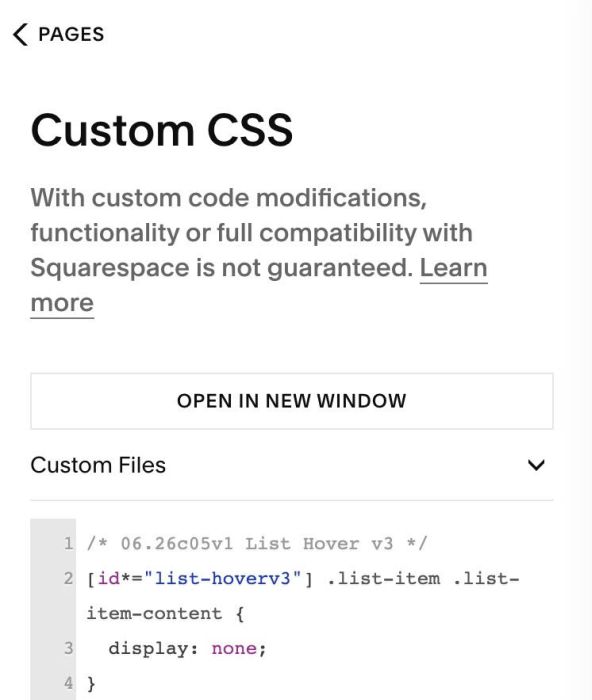
#2.1. If you see section flash with title/des/button then disappear, use this code to Custom CSS
/* 06.26c05v1 List Hover v3 */
[id*="list-hoverv3"] .list-item .list-item-content {
  display: none;
}
#2.2. To change Title – Description Color

You can change in Site Styles

or use this code to Custom CSS
/* list hover v3 color */
 .tp-lhv3-overlay * {
    color: #000 !important;
}
#2.3. To change font weight of title, description, you can use this CSS code
- by default, title inherit heading font weight/style, description inherit parapgrah font weight/style
span.tp-lhv3-title {
    font-weight: 300 !important;
}
span.tp-lhv3-desc {
    font-weight: bold !important;
}
#2.4. To change Title, Description size, change Line 11, Line 12
titleSize: '1.2rem',
descSize: '0.9rem'
#2.5. To make Item clickable, just add URL to item button

#2.6. To change space between items

You can change these options

#2.7. If you changed Row Gap but it doesn’t work, you can change this option to 0

#2.8. And other options, you can test (Line 03 to Line 13)
window.LIST_HOVER_V3 = {
  selector: '[id*="list-hoverv3"]',
  enableLink: true,
  removeButton: true,
  hoverImg: true,
  hoverOpacity: 0.65,
  hoverScale: 1.05,
  hoverBrightness: 1.2,
  titleSize: '1.2rem',
  descSize: '0.9rem'
};
#2.9. To align Section Title to Left or Right, use code like this to Custom CSS
[id*="list-hoverv3"] .list-section-title * {
    text-align: left;
}

#3. Other
#3.1. If you use Personal/Basic Plan, you can edit current page > Add a Block
Choose Markdown

Add this code into Markdown
<script>
window.LIST_HOVER_V3 = {
  selector: '[id*="list-hoverv3"]',
  enableLink: true,
  removeButton: true,
  hoverImg: true,
  hoverOpacity: 0.65,
  hoverScale: 1.05,
  hoverBrightness: 1.2,
  titleSize: '1.2rem',
  descSize: '0.9rem'
};
</script>
<script src="https://code.beaverhero.com/list/0526c05v1listhoverv3.js">
</script>
