Description
- adding Price Range Slider filter to Store Page, you can setup min – max price in price slider
- view demo – password: abc
- buy me a coffee

#1. Install Code
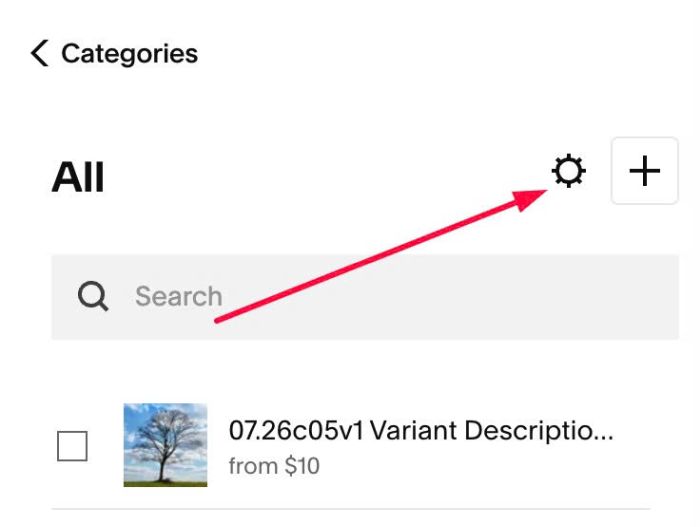
#1.1. Click Gear icon on Store Page
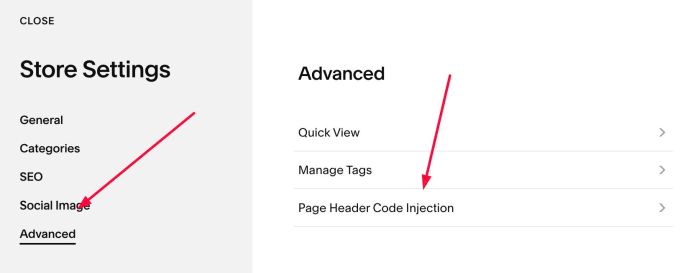
Next, click Advanced > Page Header Code Injection
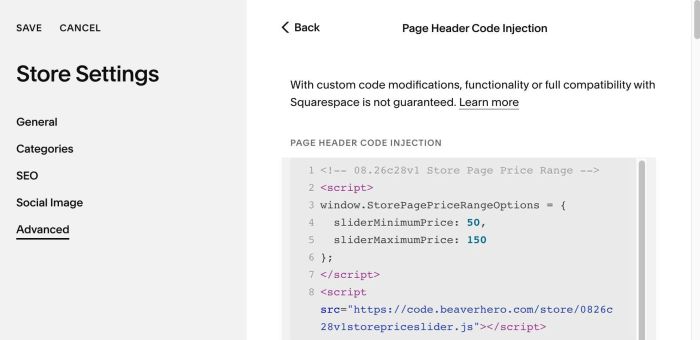
#1.2. Add this code to right box
<!-- 08.26c28v1 Store Page Price Range -->
<script>
window.StorePagePriceRangeOptions = {
  sliderMinimumPrice: 50,
  sliderMaximumPrice: 150
};
</script>
<script src="https://code.beaverhero.com/store/0826c28v1storepriceslider.js"></script>
#2. Customize
#2.1. You can change min-max price here
sliderMinimumPrice: 50,
  sliderMaximumPrice: 150
#2.2. If you need to tweak more you can use this AI Assistant (designed for Squarespace sites)