Description
- list simple with section title (float left – float right), each item has date, title, description – connect with blog page
- view demo (section From the Journal above Footer) – password: abc
- view demo 02 (if you can’t open demo) – password: abc
- buy me a coffee

#1. Install Code
#1.1. First, you use Simple List

#1.2. Next, enable these elements

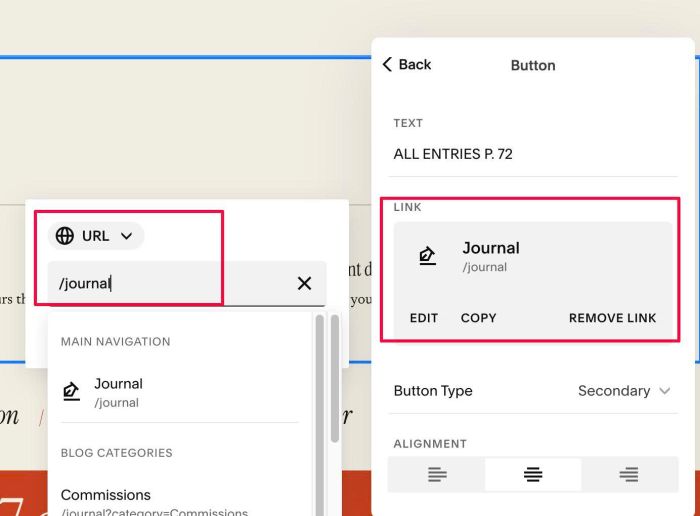
#1.3. Edit Section Button > Enter BLOG PAGE URL (code will get item from Blog Page)
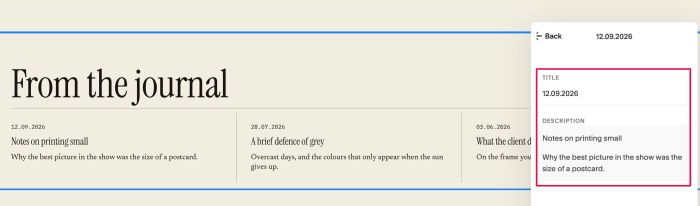
#1.4. Add some sample item. Code will get items from Blog Page then replace Sample text with Blog Date/Blog Title/Blog Excerpt
#1.5. Make sure you enabled this Card option in Style

#1.6. Hover on top right of section > Click EDIT SECTION > at Format > Anchor Link > enter word: cover-journal

#1.7. Hover on Page where you use List Simple > Click Gear icon > Click Advanced > Paste this code
<!-- 10.26c18v7 Team 189 Style 03: Sync Blog -->
<script>
window.Team189JournalStyle03Config = {
  section_selector: 'section[id*="cover-journal"]',
  section_title: {
    size_desktop: '',
    size_mobile: '',
    color: ''
  },
  blog_date: {
    size_desktop: '',
    size_mobile: '',
    color: '',
    format: 'DD.MM.YYYY',
    timezone: ''
  },
  blog_title: {
    size_desktop: '',
    size_mobile: '',
    color: ''
  },
  blog_description: {
    size_desktop: '',
    size_mobile: '',
    color: ''
  },
  lines: {
   below_section_title_color: 'rgba(23, 21, 18, 0.25)',
  between_items_color: 'rgba(23, 21, 18, 0.25)'
  },
  spacing: {
    section_title_padding_bottom: '14px',
    space_below_section_title: '8px',
    item_horizontal_padding: '28px',
    space_above_item_title: '12px',
    space_below_item_title: '12px'
  },
  blog_links: {
    open_in_new_tab: false
  },
  mobile_breakpoint: 760
};
</script>
<script src="https://code.beaverhero.com/listsimple/1026c18v7team189style03syncblog.js"></script>

#2. Customize
#2.1. Section Title
- Left text inherit H2 style
- Right text inherit Secondary Button style
but you can also adjust style of Left text by adjusting these lines.
section_title: {
  size_desktop: '',
  size_mobile: '',
  color: ''
},
#2.2. Date (Blog Date), Item Description (Blog Excerpt) inherit style from Paragraph 3 but use font Miscellaneous. Blog Excerpt size get from Item Description
- Item Title (Blog Title) inherit style from Heading 3, size get from Item Title
but you can also change some styles via these lines
blog_date: {
  size_desktop: '',
  size_mobile: '',
  color: '',
  format: 'DD.MM.YYYY',
  timezone: ''
},
blog_title: {
  size_desktop: '',
  size_mobile: '',
  color: ''
},
blog_description: {
  size_desktop: '',
  size_mobile: '',
  color: ''
},
#2.3. With Lines, spacing, change these
lines: {
  below_section_title_color: 'rgba(23, 21, 18, 0.25)',
 between_items_color: 'rgba(23, 21, 18, 0.25)'
 },
 spacing: {
   section_title_padding_bottom: '14px',
   space_below_section_title: '8px',
   item_horizontal_padding: '28px',
   space_above_item_title: '12px',
   space_below_item_title: '12px'
 },