To achieve Caption appears in Gallery Lightbox, you can do these.
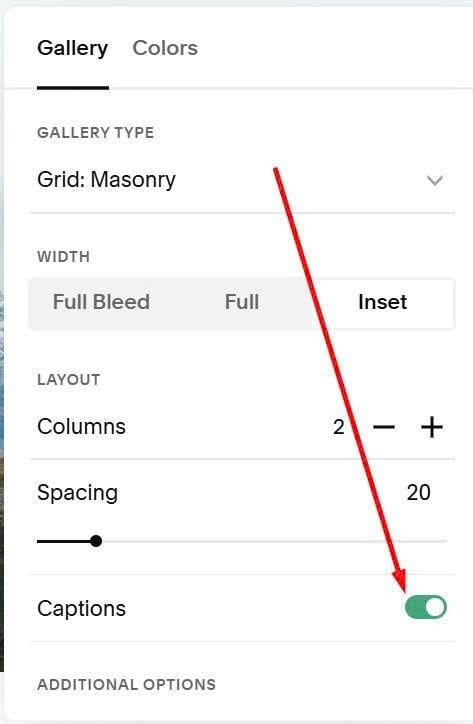
#1. First, enable Gallery Caption
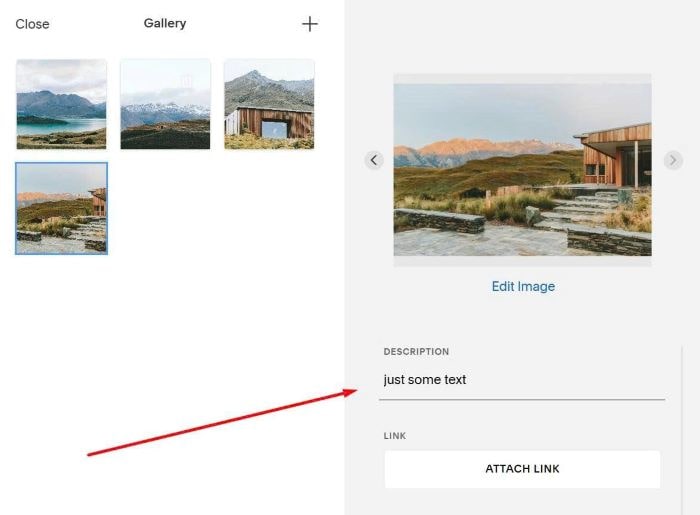
#2. Next, add some caption text to Image
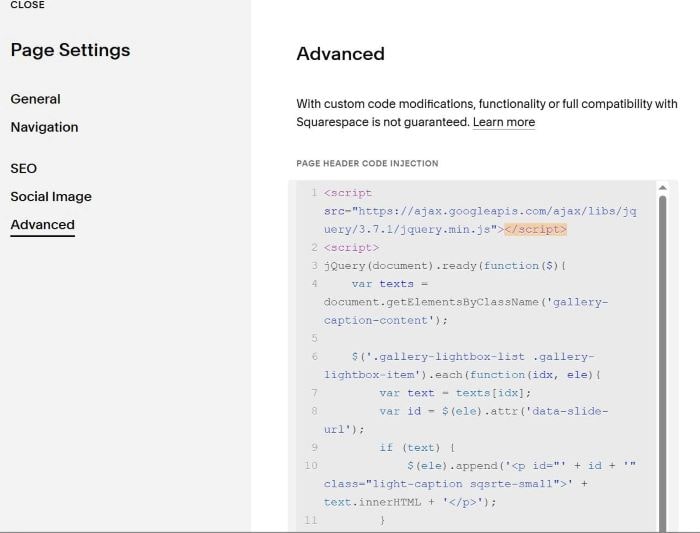
#3. Next, use this code to Page Header Injection
<script src="https://ajax.googleapis.com/ajax/libs/jquery/3.7.1/jquery.min.js"></script>
<script>
jQuery(document).ready(function($){
    var texts = document.getElementsByClassName('gallery-caption-content');

    $('.gallery-lightbox-list .gallery-lightbox-item').each(function(idx, ele){
        var text = texts[idx];
        var id = $(ele).attr('data-slide-url');
        if (text) {
            $(ele).append('<p id="' + id + '" class="light-caption sqsrte-small">' + text.innerHTML + '</p>');
        }
    });

    function updateCaption() {
        $('.light-caption').css('opacity', '0');

        var activeItem = $('.gallery-lightbox-item[data-active="true"]');
        if (activeItem.length > 0) {
            var activeId = activeItem.attr('data-slide-url');
            $(`#${activeId}`).css('opacity', '1');
        }
    }

    var observer = new MutationObserver(function(mutations) {
        mutations.forEach(function(mutation) {
            if (mutation.type === 'attributes' && mutation.attributeName === 'data-active') {
                requestAnimationFrame(updateCaption);
            }
        });
    });

    $('.gallery-lightbox-item').each(function() {
        observer.observe(this, {
            attributes: true,
            attributeFilter: ['data-active']
        });
    });

    updateCaption();

    $('.gallery-lightbox-control, .gallery-grid-lightbox-link').click(function() {
        requestAnimationFrame(updateCaption);
    });

    $(document).on('keydown', function(e) {
        if (e.key === 'ArrowLeft' || e.key === 'ArrowRight') {
            requestAnimationFrame(updateCaption);
        }
    });
});
</script>

<style>
figcaption.gallery-caption {
    display: none;
}

.light-caption {
    opacity: 0;
    position: fixed;
    color: grey;
    font-size: 14px;
    bottom: 20px;
    left: 50%;
    transform: translateX(-50%);
    margin: 0;
    background-color: rgba(255, 255, 255, 1);
    color: #000;
    width: 500px;
    max-width: 90vw;
    text-align: center;
    padding: 10px;
    display: flex;
    align-items: center;
    justify-content: center;
    line-height: 20px;
    z-index: 9999;
    transition: opacity 0.15s ease;
}

.gallery-lightbox-controls {
    display: flex !important;
}

@media (max-width: 768px) {
    .light-caption {
        width: 90%;
        font-size: 12px;
        bottom: 15px;
        padding: 8px;
    }
}
</style>