Description
- section with 2 text blocks (left – right), change right text to left align on mobile
- view demo (last section in footer) – password: abc
- buy me a coffee
(desktop)

(mobile)
#1. Install Code
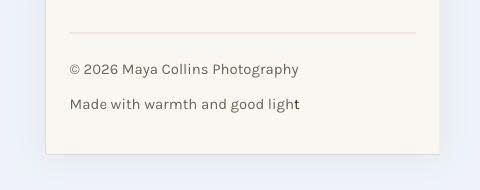
#1.1 First, make sure you added 2 Text Blocks to Footer. Each block will span 50% width, like this.
(
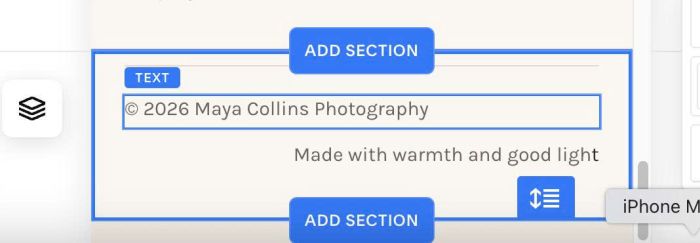
and make sure edit Mobile view to your desired order, something like this
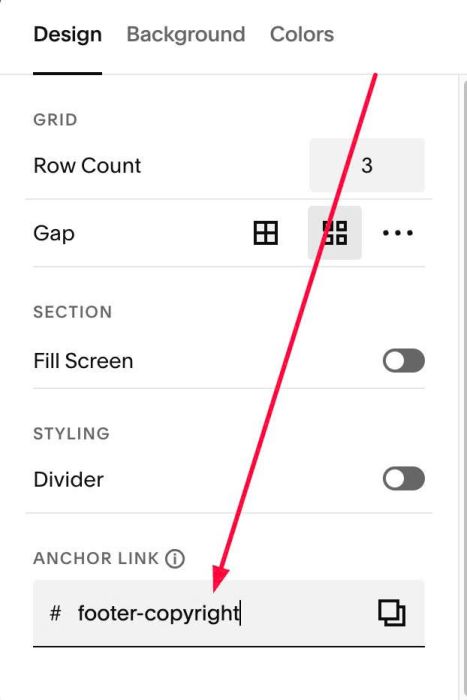
#1.2. Next, hover on top right of section > Click EDIT SECTION > at Design > Anchor Link > enter word: footer-copyright
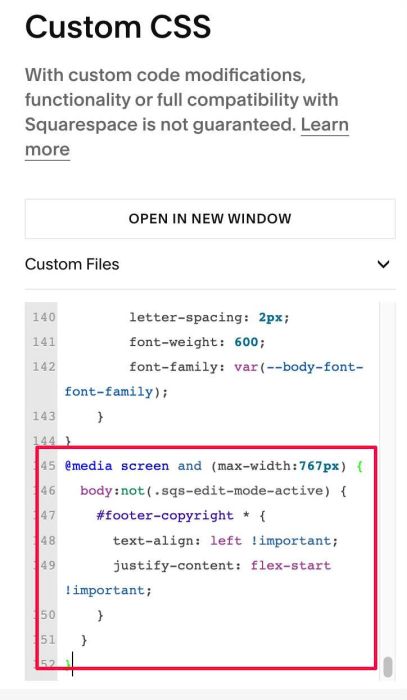
#1.3. Next, use this code to Custom CSS
@media screen and (max-width:767px) {
  body:not(.sqs-edit-mode-active) {
    #footer-copyright * {
      text-align: left !important;
      justify-content: flex-start !important;
    }
  }
}
#1.4. If you want to make both align center on Mobile/or align right, just change this line
text-align: left !important;