Description
- This code turns the Portfolio Grid Simple layout into a full gallery index: category filters with counts, a masonry grid that keeps left-to-right order, a date and short excerpt on each item, and an editorial-style lightbox.
- buy me a coffee
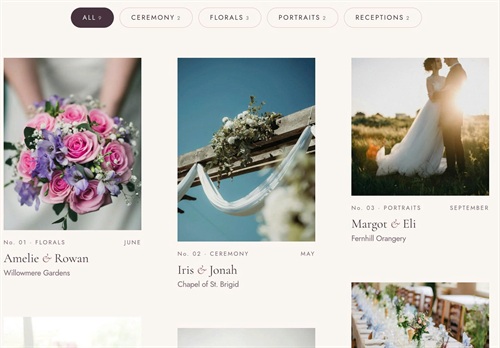
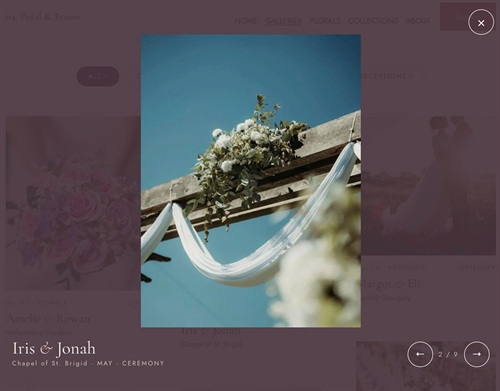
#1. Install Code
#1.1. First, use this code to Portfolio Page Header Injection
<!-- 11.26c11v04 Portfolio Grid v2: True Left-to-Right Masonry, Filter Counts & Editorial Lightbox -->
<script>
window.GalleriesGridConfig = {
  masonry: true,

  filterShowAll: true,
  filterAllText: 'All',
  filterOrder: ['CEREMONY', 'FLORALS', 'PORTRAITS', 'RECEPTIONS'],
  filterAlign: 'center',
  filterSpaceTop: '',
  filterSpaceBottom: '54px',
  filterGap: '10px',
  filterTextSize: '12px',
  filterFontWeight: '400',
  filterLetterSpacing: '.16em',
  filterUppercase: true,
  filterPadding: '10px 20px',
  filterRadius: '999px',
  filterBackground: 'transparent',
  filterColor: '#47333D',
  filterBorder: '1px solid #E6D3CC',
  filterHoverBackground: 'transparent',
  filterHoverColor: '#47333D',
  filterHoverBorder: '1px solid #C98A86',
  filterActiveBackground: '#47333D',
  filterActiveColor: '#FFFDFA',
  filterActiveBorder: '1px solid #47333D',
  filterNumberShow: true,
  filterNumberSize: '9px',
  filterNumberColor: 'currentColor',
  filterNumberOpacity: '.7',
  filterNumberSpace: '4px',

  itemHoverLift: '-6px',
  itemHoverZoom: '1.04',
  itemTitleAmpersandItalic: true,
  itemTitleAmpersandColor: '#9E5A5A',
  itemMetaSeparator: ' · ',
  itemMetaSize: '10.5px',
  itemMetaColor: '#7A6570',
  itemMetaLetterSpacing: '.18em',
  itemMetaSpaceTop: '16px',
  itemMetaSpaceBottom: '6px',
  itemExcerptSize: '14px',
  itemExcerptColor: '#7A6570',
  itemExcerptSpaceTop: '2px',

  lightbox: true,
  lightboxImageSize: '1500w',
  lightboxPreloadNearby: 2,
  lightboxPreloadAll: false,
  lightboxOverlayColor: 'rgba(71, 51, 61, .92)',
  lightboxMaxWidth: '960px',
  lightboxImageRatio: '3/2',
  lightboxImageMaxHeight: '72vh',
  lightboxTitleSize: '32px',
  lightboxTitleSizeMobile: '26px',
  lightboxTitleColor: '#FBF6F1',
  lightboxTitleAmpersandColor: '#E8C4BD',
  lightboxTextSize: '11.5px',
  lightboxTextColor: 'rgba(251, 246, 241, .7)',
  lightboxTextLetterSpacing: '.18em',
  lightboxCounterSize: '12px',
  lightboxCounterLetterSpacing: '.16em',

  arrowSize: '46px',
  arrowIconSize: '18px',
  closeSize: '46px',
  closeIconSize: '24px',

  mobileBreakpoint: 767
};
</script>
<script src="https://code.beaverhero.com/portfolio/1126c11v04portfolio04masonryfilterlightbox.js"></script>
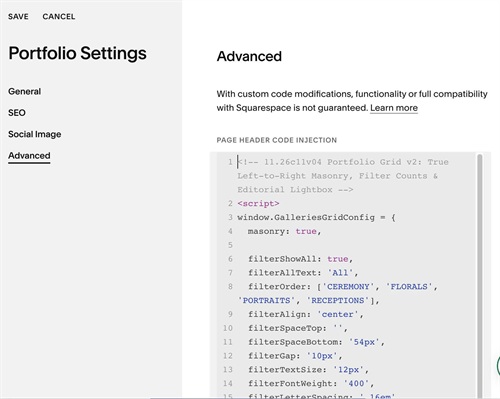
#1.2. Next, edit each item > Add a Code Block
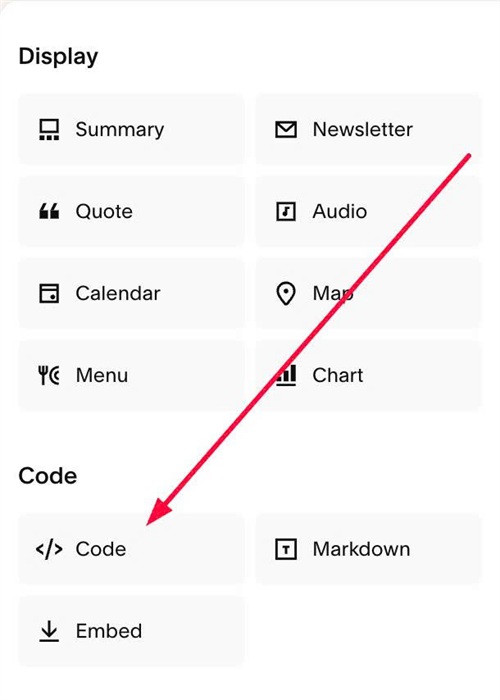
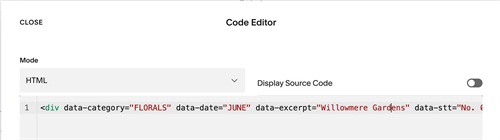
#1.3. Add syntax like this into Code Block
<div data-category="FLORALS" data-date="JUNE" data-excerpt="Willowmere Gardens" data-stt="No. 01"></div>
#2. Customize
#2.1. To change text “All”, you can edit
filterShowAll: true,
 filterAllText: 'All',
#2.2. To change order of filter category button, edit this
filterOrder: ['CEREMONY', 'FLORALS', 'PORTRAITS', 'RECEPTIONS'],
#2.3. To change filter category text style, edit this
filterGap: '10px',
  filterTextSize: '12px',
  filterFontWeight: '400',
  filterLetterSpacing: '.16em',
  filterUppercase: true,
#2.4. To change Filter button size/color/hover/active color, edit this
filterPadding: '10px 20px',
  filterRadius: '999px',
  filterBackground: 'transparent',
  filterColor: '#47333D',
  filterBorder: '1px solid #E6D3CC',
  filterHoverBackground: 'transparent',
  filterHoverColor: '#47333D',
  filterHoverBorder: '1px solid #C98A86',
  filterActiveBackground: '#47333D',
  filterActiveColor: '#FFFDFA',
  filterActiveBorder: '1px solid #47333D',
#2.5. To change Number (next to Filter category text) style, change this
filterNumberShow: true,
  filterNumberSize: '9px',
  filterNumberColor: 'currentColor',
  filterNumberOpacity: '.7',
  filterNumberSpace: '4px',
#2.6. To change lightbox overlay color, edit this
lightboxOverlayColor: 'rgba(71, 51, 61, .92)',
#2.7. To change title color in lightbox, edit this
lightboxTitleSize: '32px',
  lightboxTitleSizeMobile: '26px',
  lightboxTitleColor: '#FBF6F1',
#2.8. To change meta text (under title) + number counter in lightbox, edit this
lightboxTextSize: '11.5px',
  lightboxTextColor: 'rgba(251, 246, 241, .7)',
  lightboxTextLetterSpacing: '.18em',
  lightboxCounterSize: '12px',
  lightboxCounterLetterSpacing: '.16em',