I released a new version (free) (30 – May – 2026). You can check it here
You can install Masonry Layout easier with new version.
- Support: [email protected]
- Free install (1 site/license)
- View Demo – Password: abc
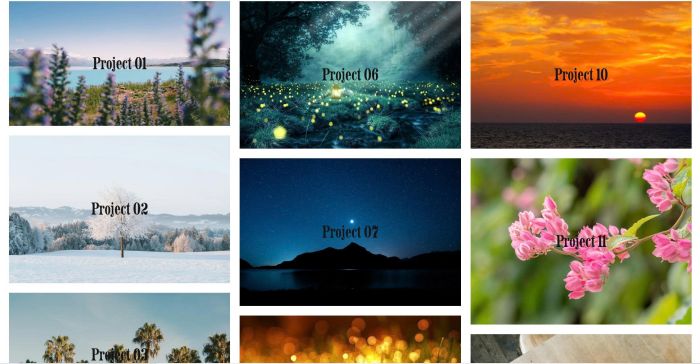
#1. Install Code
Click Gear icon on Portfolio Page

Click Advanced > Paste this code
<!-- @tuanphan - Portfolio Page Masonry v3 -->
<style>
:root {
  --masonry-columns-mobile: 2;
  --masonry-columns-desktop: 3;
  --masonry-gap: 20px;
  --masonry-padding-mobile: 10px;
  --masonry-padding-desktop: 15px;
  --title-margin: 0;
  }
</style>
<link rel="stylesheet" href="https://code.beaverhero.com/portfolio/portfoliopagemasonryv3.css"/>
<script src="https://code.beaverhero.com/portfolio/portfoliopagemasonryv3.js">
</script>

#2. Usage
You need to use Portfolio Grid Simple or Grid Overlay

#3. Customize
#3.1. To change number of columns on Desktop – Mobile, adjust these.
--masonry-columns-mobile: 2;
--masonry-columns-desktop: 3;

#3.2. To change gap between items, change these.
--masonry-gap: 20px;

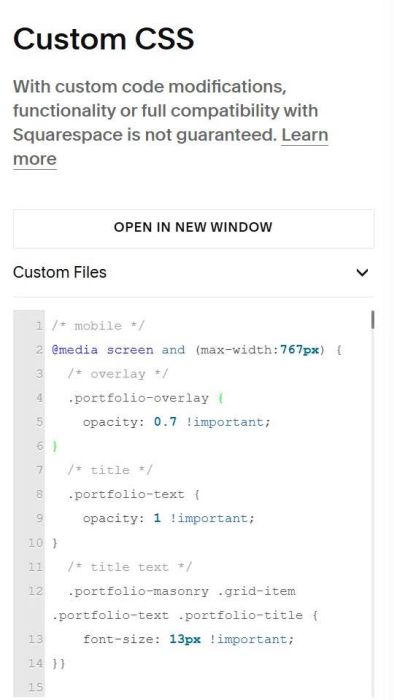
#3.3. To make title always appears on mobile, use this code to Custom CSS
/* mobile */
@media screen and (max-width:767px) {
  /* overlay */
  .portfolio-overlay {
    opacity: 0.7 !important;
}
  /* title */
  .portfolio-text {
    opacity: 1 !important;
}
  /* title text */
  .portfolio-masonry .grid-item .portfolio-text .portfolio-title {
    font-size: 13px !important;
}}