Description: add a button under Add to Cart.

Click it will open Pipedrive Form popup

#1. First, edit Product Additional Info > Add a Code Block > Enter Pipedrive form embed code. Something like this.

#2. Next, use this code to Custom CSS
 /* pipeform */
  .show-pipe.pipedriveWebForms {
  	display: block !important;
  }
.pipedriveWebForms {
    position: fixed;
    top: 50%;
    left: 50%;
    transform: translate(-50%,-50%);
    z-index: 999999;
    background-color: #e6e3dc;
    padding-top: 30px;
  display: none !important;
}
  .show-pipe.pipedriveWebForms iframe {
    margin: 0 auto !important;
    left: 50%;
    transform: translateX(-50%);
}
  .close-pipe {
  display: none;
    cursor: pointer;
  }
  body:has(.show-pipe) .close-pipe {
    background-color: #fff !important;
    border: none !important;
    position: fixed;
    top: 10px;
    right: 10px;
    z-index: 999999999;
    display: none;
    font-size: 30px;
    display: block;
    width: 30px;
    height: 30px;
    line-height: 30px;
    text-align: center;
}

#3. Use this code to Code Injection > Footer
<script>
document.addEventListener('DOMContentLoaded', function() {
    const cartButtonWrapper = document.querySelector('div.product-meta div.sqs-add-to-cart-button-wrapper');
    if (cartButtonWrapper) {
        const downloadButton = document.createElement('a');
        downloadButton.className = 'btn btn--border theme-btn--primary-inverse sqs-button-element--primary pipe-button';
        downloadButton.href = '#';
        downloadButton.textContent = 'Download Files';
        cartButtonWrapper.parentNode.insertBefore(downloadButton, cartButtonWrapper.nextSibling);

        downloadButton.addEventListener('click', function(e) {
            e.preventDefault();
            const pipedriveForm = document.querySelector('.pipedriveWebForms');
            if (pipedriveForm) {
                pipedriveForm.classList.add('show-pipe');
            }
        });
    }

    const pipedriveForm = document.querySelector('.pipedriveWebForms');
    if (pipedriveForm) {
        const closeButton = document.createElement('span');
        closeButton.className = 'close-pipe';
        closeButton.textContent = '×';
        pipedriveForm.parentNode.insertBefore(closeButton, pipedriveForm);

        closeButton.addEventListener('click', function() {
            pipedriveForm.classList.remove('show-pipe');
        });
    }
});
</script>
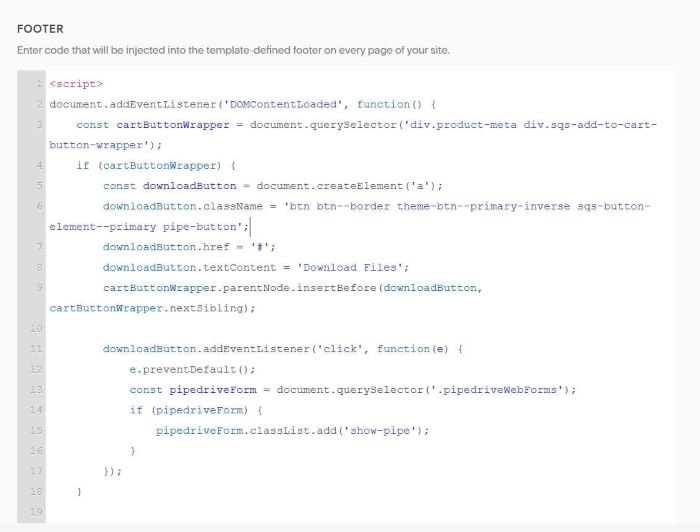
#4. To change button text, change this line
