Description
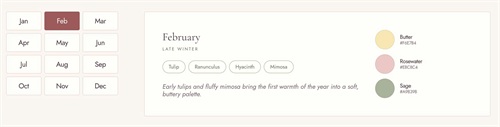
- Want a “What’s in season” guide that’s easy to update? Add one List Section item per month, write flowers as {Peony, Rose}, add colors as a bullet list like “Blush #F3E1DB”, and this code builds month tabs, flower pills and color swatches from it.
- buy me a coffee
#1. Install Code
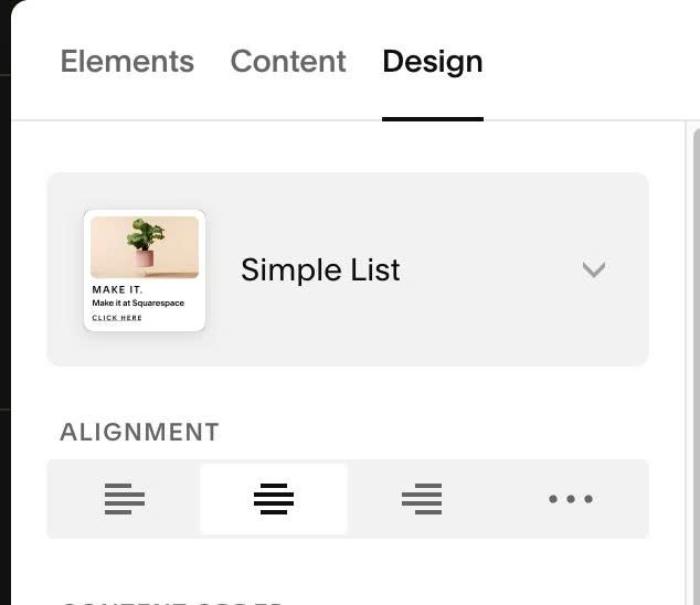
#1.1. First add Section > Choose Team > Choose section with icon in top right > Hover on top right of section > Click EDIT CONTENT > Choose Simple List
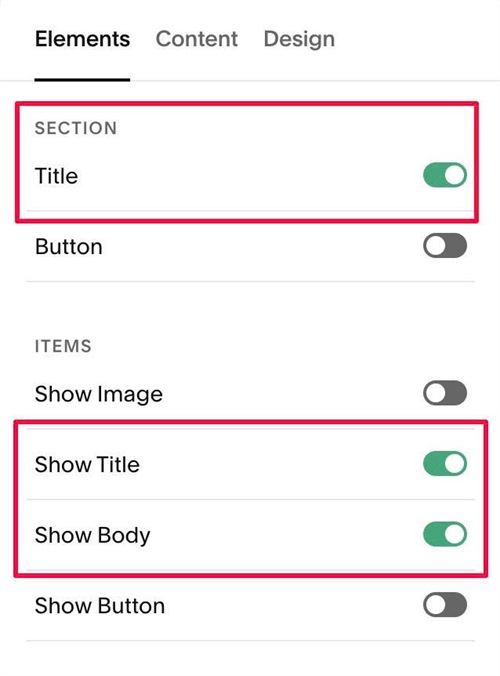
#1.2. Enable these options
#1.3. Edit Section Title > Enter text like this
{Jan, Feb, Mar, Apr, May, Jun, Jul, Aug, Sep, Oct, Nov, Dec}
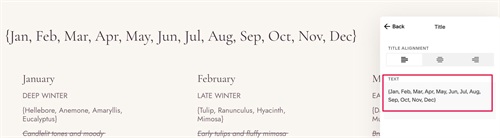
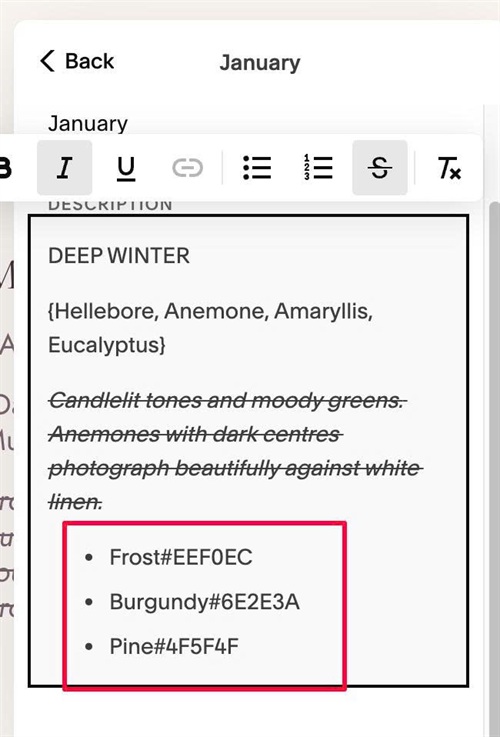
#1.4. Edit each item > enter text like this
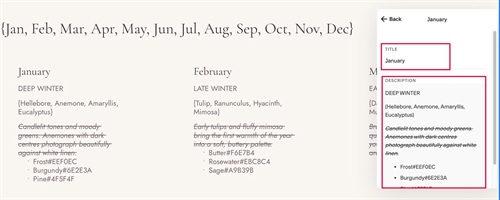
Note: In Item Description, with label text, use text like this
{Hellebore, Anemone, Amaryllis, Eucalyptus}

With text under Label, use strikethrough text
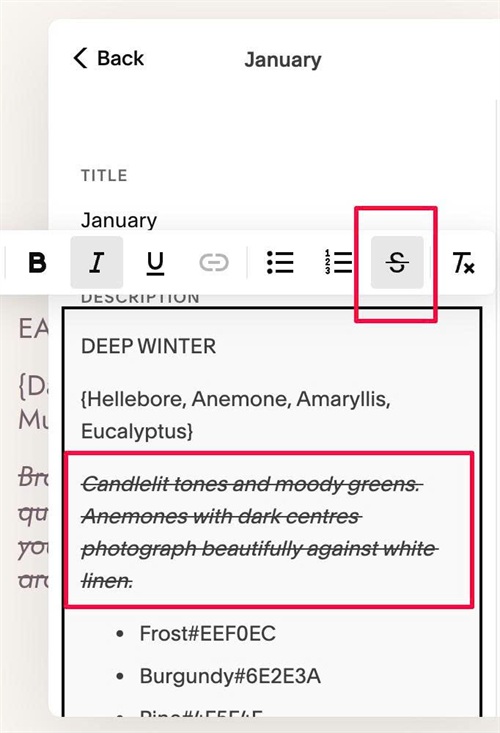
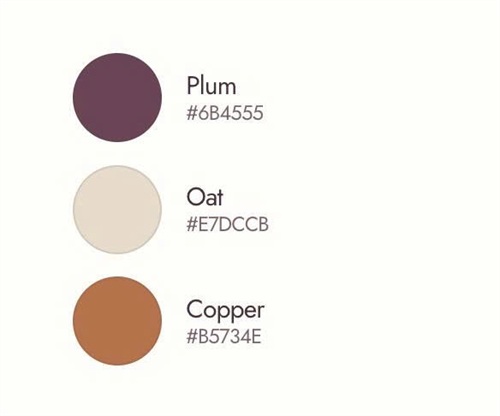
With Circle/Color, use Unordered List
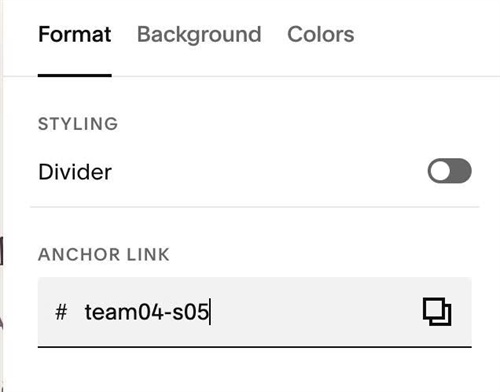
#1.5. Next, hover on top right of section > Click EDIT SECTION > at Format > Anchor Link > enter word: team04-s05
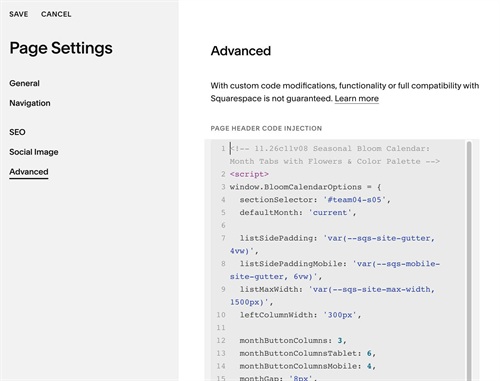
#1.6. Use this code to Page Header Injection
<!-- 11.26c11v08 Seasonal Bloom Calendar: Month Tabs with Flowers & Color Palette -->
<script>
window.BloomCalendarOptions = {
  sectionSelector: '#team04-s05',
  defaultMonth: 'current',

  listSidePadding: 'var(--sqs-site-gutter, 4vw)',
  listSidePaddingMobile: 'var(--sqs-mobile-site-gutter, 6vw)',
  listMaxWidth: 'var(--sqs-site-max-width, 1500px)',
  leftColumnWidth: '300px',

  monthButtonColumns: 3,
  monthButtonColumnsTablet: 6,
  monthButtonColumnsMobile: 4,
  monthGap: '8px',
  monthTextSize: '19px',
  monthTextColor: '#47333D',
  monthBackground: '#FFFDFA',
  monthBorderWidth: '1px',
  monthBorderColor: '#E6D3CC',
  monthRadius: '4px',
  monthWidth: '100%',
  monthHeight: '50px',
  monthHoverTextColor: '#47333D',
  monthHoverBackground: '#FFFDFA',
  monthHoverBorderColor: '#C98A86',
  monthActiveTextColor: '#FFFDFA',
  monthActiveBackground: '#9E5A5A',
  monthActiveBorderColor: '#9E5A5A',

  panelBackground: '#FFFDFA',
  panelBorderWidth: '1px',
  panelBorderColor: '#E6D3CC',
  panelRadius: '4px',
  panelPadding: '48px',
  panelPaddingMobile: '30px 22px',
  textAndColorGap: '44px',
  colorColumnWidth: '260px',

  titleSpaceBelow: '6px',

  seasonTextSize: '11.5px',
  seasonTextColor: '#66735B',
  seasonLetterSpacing: '.22em',
  seasonSpaceBelow: '24px',

  bloomTextSize: '14px',
  bloomTextColor: '#66735B',
  bloomBackground: 'transparent',
  bloomPadding: '6px 16px',
  bloomRadius: '999px',
  bloomBorderWidth: '1px',
  bloomBorderColor: '#A9B39B',
  bloomGap: '8px',
  bloomsSpaceBelow: '26px',

  noteTextSize: '17px',
  noteTextColor: '#7A6570',

  colorSpreadVertical: true,
  colorItemGap: '10px',
  colorCircleSize: '52px',
  colorCircleBorderColor: 'rgba(71, 51, 61, .12)',
  colorCircleTextSpace: '14px',
  colorNameCodeSpace: '0px',
  colorNameSize: '15px',
  colorNameColor: '#47333D',
  colorCodeSize: '12px',
  colorCodeColor: '#7A6570'
};
</script>
<script src="https://code.beaverhero.com/listsimple/1126c11v08team04s05bloomcalendar.js"></script>
#2. Customize
#2.1. To change number of columns on Left side, edit this
monthButtonColumns: 3,
monthButtonColumnsTablet: 6,
monthButtonColumnsMobile: 4,
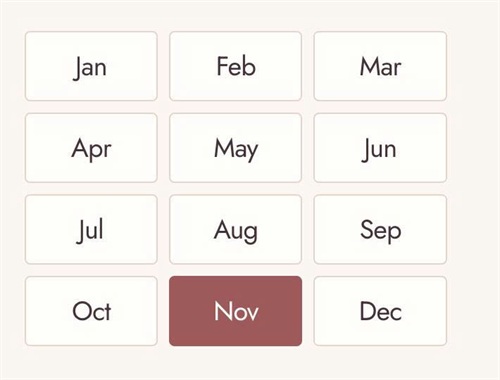
#2.2. To change month style (left side), edit this
monthGap: '8px',
  monthTextSize: '19px',
  monthTextColor: '#47333D',
  monthBackground: '#FFFDFA',
  monthBorderWidth: '1px',
  monthBorderColor: '#E6D3CC',
  monthRadius: '4px',
  monthWidth: '100%',
  monthHeight: '50px',
  monthHoverTextColor: '#47333D',
  monthHoverBackground: '#FFFDFA',
  monthHoverBorderColor: '#C98A86',
  monthActiveTextColor: '#FFFDFA',
  monthActiveBackground: '#9E5A5A',
  monthActiveBorderColor: '#9E5A5A',
#2.3. To change right panel style (background, border, space..) edit this
panelBackground: '#FFFDFA',
  panelBorderWidth: '1px',
  panelBorderColor: '#E6D3CC',
  panelRadius: '4px',
  panelPadding: '48px',
  panelPaddingMobile: '30px 22px',
  textAndColorGap: '44px',
  colorColumnWidth: '260px',
#2.4. To change season text size (text under Month in Right Panel), edit this
seasonTextSize: '11.5px',
  seasonTextColor: '#66735B',
  seasonLetterSpacing: '.22em',
  seasonSpaceBelow: '24px',

#2.5. To change bloom text style (label text), edit this
bloomTextSize: '14px',
  bloomTextColor: '#66735B',
  bloomBackground: 'transparent',
  bloomPadding: '6px 16px',
  bloomRadius: '999px',
  bloomBorderWidth: '1px',
  bloomBorderColor: '#A9B39B',
  bloomGap: '8px',
  bloomsSpaceBelow: '26px',
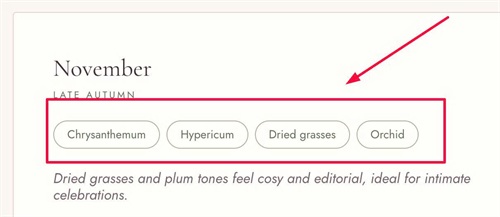
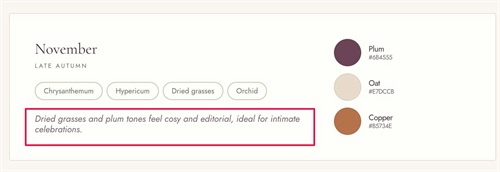
#2.6. To change this text style
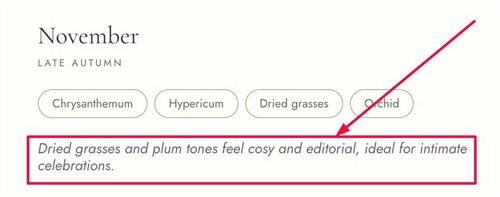
Edit this
noteTextSize: '17px',
noteTextColor: '#7A6570',
#2.7. To change circle/text on right of right panel, edit this
colorSpreadVertical: true,
colorItemGap: '10px',
colorCircleSize: '52px',
colorCircleBorderColor: 'rgba(71, 51, 61, .12)',
colorCircleTextSpace: '14px',
colorNameCodeSpace: '0px',
colorNameSize: '15px',
colorNameColor: '#47333D',
colorCodeSize: '12px',
colorCodeColor: '#7A6570'