To turn Product Detail Title.

To Image, like this.

#1. First, use this code to Custom CSS
h1.product-title {
    background-size: contain;
    background-repeat: no-repeat;
    background-position: center;
    color: transparent !important;
    height: 90px;
}

#2. Next, use this code to Store Page Header Injection
<!-- Product Detail title to image - @tuanphan -->
<script>document.addEventListener('DOMContentLoaded',function(){function isValidUrl(s){try{new URL(s);return!0}catch(_){return!1}}
const currentUrl=window.location.pathname;fetch(currentUrl+'?format=json-pretty').then(r=>r.json()).then(d=>{const seoDescription=d.item?.seoData?.seoDescription;if(seoDescription&&isValidUrl(seoDescription.trim())){const productTitle=document.querySelector('h1.product-title');if(productTitle){productTitle.style.backgroundImage=`url(${seoDescription.trim()})`}}}).catch(e=>console.log('Cannot get data:',currentUrl))});</script>
<!-- END Product Detail title to image - @tuanphan -->

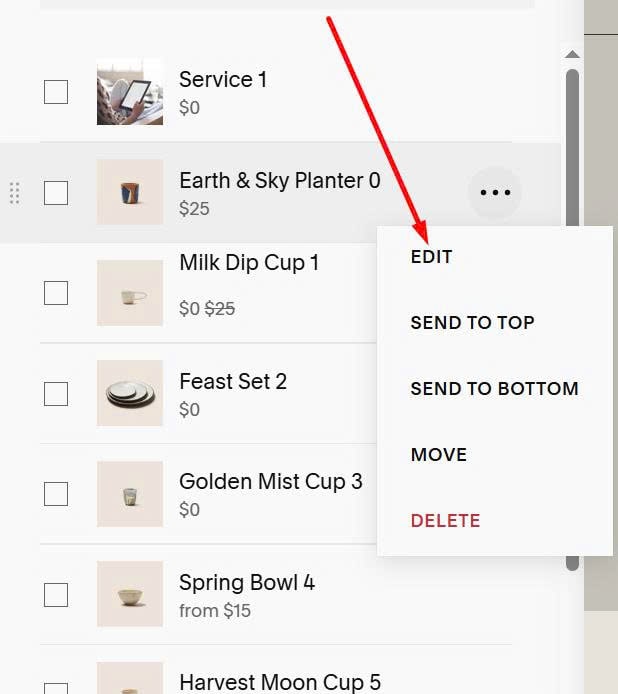
#3. Next, edit product item
#4. Scroll down to SEO and URL > Click Edit

#5. Enter Image URL in SEO Description
